This time we’re going bigger than ever. Fabric, Power BI, SQL, AI and more. We're covering it all. You won't want to miss it.
Learn moreDid you hear? There's a new SQL AI Developer certification (DP-800). Start preparing now and be one of the first to get certified. Register now
Hey, I'm trying to calculate the sum of sales by using the DAX measure function. However, when I try to plot this measure to a visual like a bar chart, it gives an error and says this sum function cannot work for values of type String. What does it mean by type string value? How do I solve this?
You can use MAX function. It will do like this:
Category_Measure = MAX(TableName[Category])
It is not the best solution, but for some situations it is possible to do
As a result you will get measure with categories as a strings. It should be the answer to your question
Hi @Anam,
Have you resolved your problem? If so, would you please mark the helpful reply as an answer or share your solution so that it can benefit more users? If you still have any question, please feel free to ask.
Thanks,
Yuliana Gu
Hey,
this is typically happen, if the data type of the column you are using in your SUM(...) function is not a numeric one.
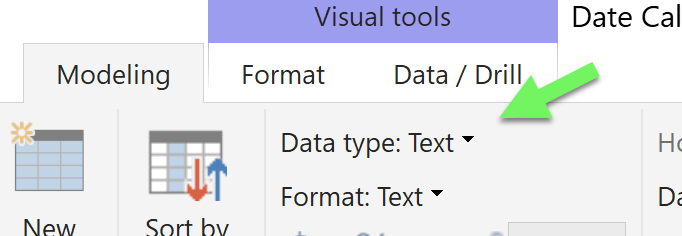
To change this, most of the times it's sufficient to go to the model ribbon
Mark the column in the fields pane and change the data type.
Be aware of the fact, that if you change the data type it sometimes can also affect your visuals, this is due to the default, that numeric columns are treated as continuous variables on axis. This can of course can also be changed very easily.
Sometimes it could be a little harder, due to the fact that a data quality issue sneaked into your data model and this issue implicity determined the initial data type of the column.
Hope this helps
Check out the April 2026 Power BI update to learn about new features.
Sign up to receive a private message when registration opens and key events begin.
If you have recently started exploring Fabric, we'd love to hear how it's going. Your feedback can help with product improvements.
| User | Count |
|---|---|
| 34 | |
| 31 | |
| 30 | |
| 21 | |
| 16 |
| User | Count |
|---|---|
| 63 | |
| 53 | |
| 31 | |
| 23 | |
| 23 |