cancel
Showing results for 
Search instead for 
Did you mean: 

Did you hear? There's a new SQL AI Developer certification (DP-800). Start preparing now and be one of the first to get certified. Register now

Reply
seth127
Regular Visitor

Stream Graph (custom visual) not working with dates

Hello,

I'm not sure if there is support for custom visuals here, but I thought I'd give it a try.


I'm trying to see the hours logged on a project each day, and how many of those were logged by each department. The Stream Graph seems like a perfect solution for this, but I can't get it to work right with the dates.


This bar chart shows the simple version of what I'd like:
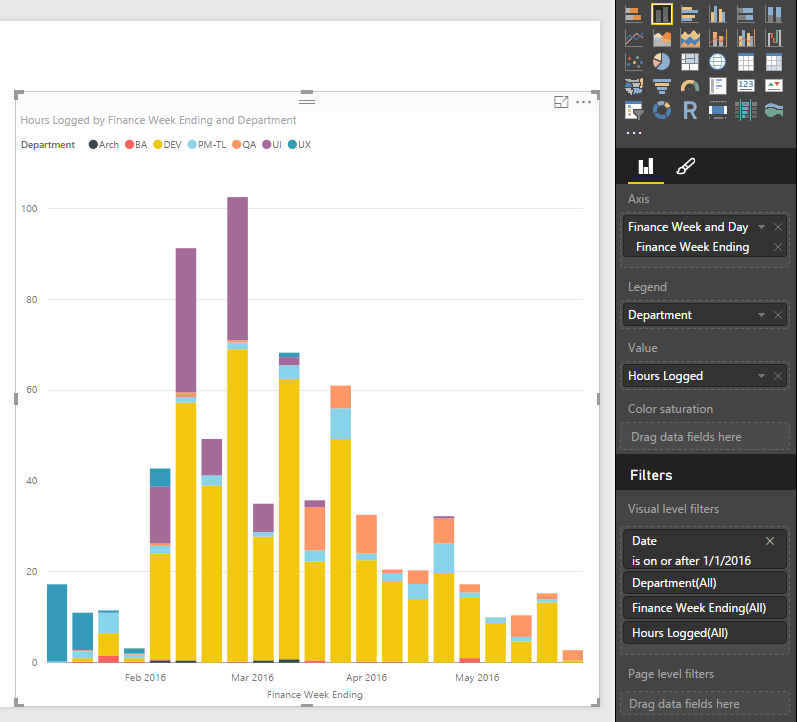
bars screen shoot.PNG


The point is, you see it started with UX, then mid-Feb went to UI and DEV, then by March was mostly DEV. Great, but not that pretty. So then I do the same thing as a Stream Graph:
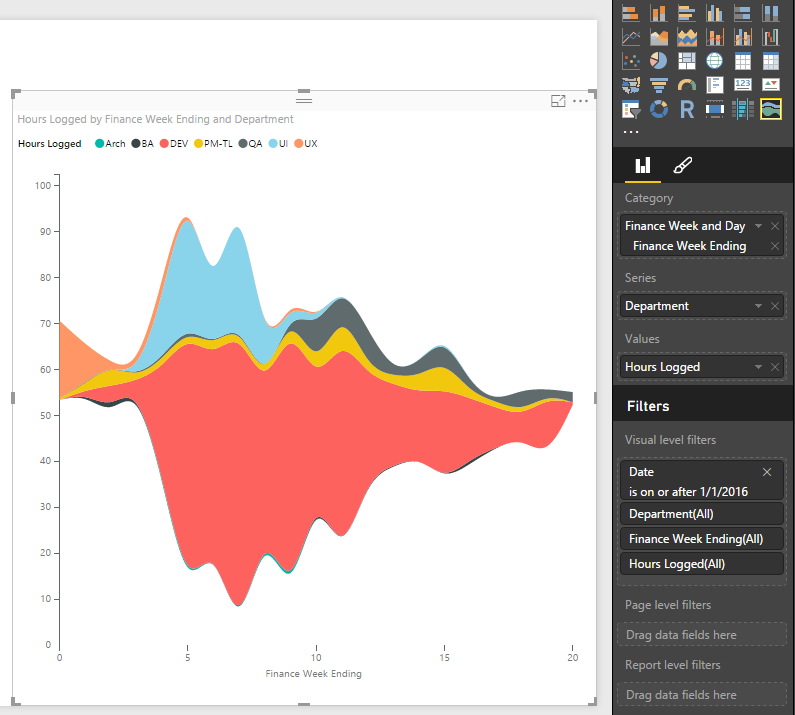
 

stream graph screen shoot.PNG


This shows the same thing, but there are no dates on the bottom. It just shows a number, which I assume is just the count of days. Why? Does anyone get this or know how to change it? Maybe it's just quirky behavoir of custom visual, but I hope there's a solution.


Also, does anyone know if there is any meaning to where the "Wiggle" setting puts your data on the Y-axis? I understand that with Wiggle off it rests at zero. But with Wiggle on, is there any logic to why my first week data starts at 55ish and goes to 70? Is it purely aesthetic and/or random?


Thanks for any help.

Seth

1 ACCEPTED SOLUTION
v-sihou-msft
Microsoft Employee
Microsoft Employee

@seth127


I haven't reproduced your issue. I'm working in Power BI Desktop May Update (2.35.4399.381).


Capture66.PNG


This "wiggle" is resolved automatically. There's no setting for it. For how the "wiggle" generated internally, please contact Power BI Custom Visuals Support: pbicvsupport@microsoft.com


Regards,

View solution in original post

2 REPLIES 2
v-sihou-msft
Microsoft Employee
Microsoft Employee

@seth127


I haven't reproduced your issue. I'm working in Power BI Desktop May Update (2.35.4399.381).


Capture66.PNG


This "wiggle" is resolved automatically. There's no setting for it. For how the "wiggle" generated internally, please contact Power BI Custom Visuals Support: pbicvsupport@microsoft.com


Regards,

Thanks. Maybe it's something weird with how my dates are formatted. I'll look into that. And thanks for the info on the "wiggle."

Helpful resources

Announcements
April Power BI Update Carousel

Power BI Monthly Update - April 2026

Check out the April 2026 Power BI update to learn about new features.

Fabric SQL PBI Data Days

Data Days 2026 coming soon!

Sign up to receive a private message when registration opens and key events begin.

New to Fabric survey Carousel

New to Fabric Survey

If you have recently started exploring Fabric, we'd love to hear how it's going. Your feedback can help with product improvements.

Power BI DataViz World Championships carousel

Power BI DataViz World Championships - June 2026

A new Power BI DataViz World Championship is coming this June! Don't miss out on submitting your entry.