Get certified for free when you join Fabric Data Days 2026 and dive into Fabric, Power BI, SQL, AI, and other essential data skills.
Join nowTry your skills in the Power BI Dataviz World Championship! Round one ends June 26. Join now
Hi there,
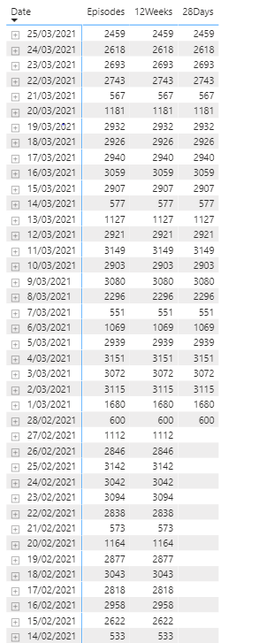
I am trying to show a graph with static values and dynamic values adjusted by a slider int he same graph. The image below has sample data showing the static 28 days and dynamic episodes.
Thanks
N
Solved! Go to Solution.
Hi amitchandak,
I figured it out. I created a second date table using the calendar(min(date[date]), max(date[date])) of the first table. Then created a last date field in the new date table using the TODAY() function. I then used the last date on the two measures above to make them static. Finally i used the second date table as the slide filter, see adjusted caculated fields.
Static fields:
12 weeks =
var _max = maxx(ALLSELECTED('Date2'),'Date2'[LastDate])
var _min = maxx(ALLSELECTED('Date2'),'Date2'[LastDate]) - 12*7
return
calculate([Episodes], filter(Date, Date[Date] >=Min && 'Date'[Date] <=Max ))
28 Days =
var _max = maxx(ALLSELECTED('Date2'),'Date2'[LastDate])
var _min = MAxx(ALLSELECTED('Date2'),'Date2'[LastDate]) - 28
return
calculate([Episodes], filter(Date, Date[Date] >=Min && 'Date'[Date] <=Max ))
Dynamic field:
Episodes =
var _max = maxx(ALLSELECTED('Date2'),'Date2'[Date])
var _min = Minx(ALLSELECTED('Date2'),'Date2'[Date])
return
calculate([Episodes], filter(Date, Date[Date] >=Min && 'Date'[Date] <=Max ))
Thanks for the initial idea of the two measures.
N
Hi amitchandak,
Thanks for this. it partially worked. I was wondering if the two field of 12 weeks and 28 days would remain static if i selected date ranges before 12 weeks. At the moment they seem to disappear if i select date ranges before begining of this year as the last date.
Thanks
N
@ngiom , Try two new measures , Assuming you are using Episodes as measure and Date from Date table on Rows of matrix
12 weeks =
var _max = maxx(ALLSELECTED('Date'),'Date'[Date])
var _min = maxx(ALLSELECTED('Date'),'Date'[Date]) - 12*7
return
calculate([Episodes], filter(Date, Date[Date] >=Min && 'Date'[Date] <=Max ))
28 Days =
var _max = maxx(ALLSELECTED('Date'),'Date'[Date])
var _min = MAxx(ALLSELECTED('Date'),'Date'[Date]) - 28
return
calculate([Episodes], filter(Date, Date[Date] >=Min && 'Date'[Date] <=Max ))
To get the best of the time intelligence function. Make sure you have a date calendar and it has been marked as the date in model view. Also, join it with the date column of your fact/s. Refer :radacad sqlbi My Video Series Appreciate your Kudos.
Hi amitchandak,
I figured it out. I created a second date table using the calendar(min(date[date]), max(date[date])) of the first table. Then created a last date field in the new date table using the TODAY() function. I then used the last date on the two measures above to make them static. Finally i used the second date table as the slide filter, see adjusted caculated fields.
Static fields:
12 weeks =
var _max = maxx(ALLSELECTED('Date2'),'Date2'[LastDate])
var _min = maxx(ALLSELECTED('Date2'),'Date2'[LastDate]) - 12*7
return
calculate([Episodes], filter(Date, Date[Date] >=Min && 'Date'[Date] <=Max ))
28 Days =
var _max = maxx(ALLSELECTED('Date2'),'Date2'[LastDate])
var _min = MAxx(ALLSELECTED('Date2'),'Date2'[LastDate]) - 28
return
calculate([Episodes], filter(Date, Date[Date] >=Min && 'Date'[Date] <=Max ))
Dynamic field:
Episodes =
var _max = maxx(ALLSELECTED('Date2'),'Date2'[Date])
var _min = Minx(ALLSELECTED('Date2'),'Date2'[Date])
return
calculate([Episodes], filter(Date, Date[Date] >=Min && 'Date'[Date] <=Max ))
Thanks for the initial idea of the two measures.
N
Don't miss out on Data Days, June 15 through August 7. Learn Fabric, Power BI, SQL, AI and more.
Check out the May 2026 Power BI update to learn about new features.
| User | Count |
|---|---|
| 22 | |
| 22 | |
| 21 | |
| 20 | |
| 12 |
| User | Count |
|---|---|
| 58 | |
| 55 | |
| 41 | |
| 36 | |
| 35 |