Join us in Barcelona for FabCon and SQLCon, September 28 - October 1, 2026.
This is best Fabric, Power BI, SQL and AI community event. How do we know? The last event sold out! Save €200 with code FABCMTY200.
Register now- Power BI forums
- Get Help with Power BI
- Desktop
- Service
- Report Server
- Power Query
- Mobile Apps
- Developer
- DAX Commands and Tips
- Custom Visuals Development Discussion
- Health and Life Sciences
- Power BI Spanish forums
- Translated Spanish Desktop
- Training and Consulting
- Instructor Led Training
- Dashboard in a Day for Women, by Women
- Galleries
- Data Stories Gallery
- Themes Gallery
- Contests Gallery
- QuickViz Gallery
- Quick Measures Gallery
- Visual Calculations Gallery
- Fabric Apps Gallery
- Notebook Gallery
- Translytical Task Flow Gallery
- TMDL Gallery
- R Script Showcase
- Webinars and Video Gallery
- Ideas
- Custom Visuals Ideas (read-only)
- Issues
- Issues
- Events
- Upcoming Events
The Fabric community is upgrading! Read all of the details including the timeline and what you can expect. Learn more
- Power BI forums
- Forums
- Get Help with Power BI
- Desktop
- Re: Standard Deviation
- Subscribe to RSS Feed
- Mark Topic as New
- Mark Topic as Read
- Float this Topic for Current User
- Bookmark
- Subscribe
- Printer Friendly Page

- Mark as New
- Bookmark
- Subscribe
- Mute
- Subscribe to RSS Feed
- Permalink
- Report Inappropriate Content
Standard Deviation
hello,
am new to power BI, and am trying to plot a levey jenning standard deviation chart on power BI, that shows a minimum of 20% and max of 30% deviation from both ends of the ideal concentrataion(ideal concentration varies from 2-2000 in no particular order) and also having the ideal concentration line constant on the gragh when ever an ideal concentration is selected from the slicer. below is a sample of my data which as the calculated concentration on the y axis and the sample on the x axis.

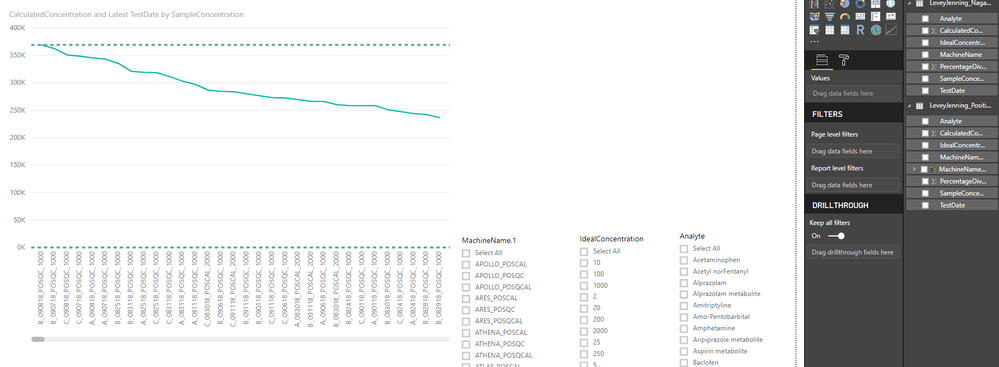
Solved! Go to Solution.


- Mark as New
- Bookmark
- Subscribe
- Mute
- Subscribe to RSS Feed
- Permalink
- Report Inappropriate Content
Well, I was thinking something like:
Ideal = AVERAGE([Ideal Concentration])

Ideal20%Above = [Ideal]*1.2

Ideal20%Below = [Ideal]*.8
Follow on LinkedIn
@ me in replies or I'll lose your thread!!!
Instead of a Kudo, please vote for this idea
Become an expert!: Enterprise DNA
External Tools: MSHGQM
YouTube Channel!: Microsoft Hates Greg
Latest book!: DAX For Humans
DAX is easy, CALCULATE makes DAX hard...
- Mark as New
- Bookmark
- Subscribe
- Mute
- Subscribe to RSS Feed
- Permalink
- Report Inappropriate Content
Well, I can imagine a measure that uses HASONEVALUE and if so, displays the AVERAGE, MAX or MIN of Ideal Concentration. You could then have 2 additional measures for 20% above and 30% below, or whatever, of this measure. Then you just display then in the line chart and they would come out as constant lines.
Follow on LinkedIn
@ me in replies or I'll lose your thread!!!
Instead of a Kudo, please vote for this idea
Become an expert!: Enterprise DNA
External Tools: MSHGQM
YouTube Channel!: Microsoft Hates Greg
Latest book!: DAX For Humans
DAX is easy, CALCULATE makes DAX hard...
- Mark as New
- Bookmark
- Subscribe
- Mute
- Subscribe to RSS Feed
- Permalink
- Report Inappropriate Content
thanks. to create a measure for this what fomular should i use to achieve the % line
- Mark as New
- Bookmark
- Subscribe
- Mute
- Subscribe to RSS Feed
- Permalink
- Report Inappropriate Content
Well, I was thinking something like:
Ideal = AVERAGE([Ideal Concentration])

Ideal20%Above = [Ideal]*1.2

Ideal20%Below = [Ideal]*.8
Follow on LinkedIn
@ me in replies or I'll lose your thread!!!
Instead of a Kudo, please vote for this idea
Become an expert!: Enterprise DNA
External Tools: MSHGQM
YouTube Channel!: Microsoft Hates Greg
Latest book!: DAX For Humans
DAX is easy, CALCULATE makes DAX hard...
- Mark as New
- Bookmark
- Subscribe
- Mute
- Subscribe to RSS Feed
- Permalink
- Report Inappropriate Content
thank you so much for the answer, i also have a situation that i would like to implement a flag if any of the sample concentration exceeds 30% above and 30% below an email should be sent notifying me of the sample that is out of range. thanks you
- Mark as New
- Bookmark
- Subscribe
- Mute
- Subscribe to RSS Feed
- Permalink
- Report Inappropriate Content
Can you paste that sample data as text? Please see this post regarding How to Get Your Question Answered Quickly: https://community.powerbi.com/t5/Community-Blog/How-to-Get-Your-Question-Answered-Quickly/ba-p/38490
Follow on LinkedIn
@ me in replies or I'll lose your thread!!!
Instead of a Kudo, please vote for this idea
Become an expert!: Enterprise DNA
External Tools: MSHGQM
YouTube Channel!: Microsoft Hates Greg
Latest book!: DAX For Humans
DAX is easy, CALCULATE makes DAX hard...
- Mark as New
- Bookmark
- Subscribe
- Mute
- Subscribe to RSS Feed
- Permalink
- Report Inappropriate Content
hello please see sample data as requested thanks
SampleConcentration | Analyte | CalculatedConcentration | PercentageDiviation | MachineName | TestDate | IdealConcentration |
A_090118_POS_QC_50 | Lamotrigine | 37.0688 | -25.8623 | APOLLO_POSQC_090118 | 9/7/2018 | 50 |
A_090118_POS_QC_50 | Fluoxetine metabolite | 119.024 | 138.047 | APOLLO_POSQC_091118 | 9/11/2018 | 50 |
C_090518_POSCAL_1000 | Doxepin | 1015.36 | 1.53557 | GALACTUS_POSCAL_090518 | 9/10/2018 | 1000 |
- Mark as New
- Bookmark
- Subscribe
- Mute
- Subscribe to RSS Feed
- Permalink
- Report Inappropriate Content
please see sample data below, hope that works. thanks
| SampleConcentration | Analyte | CalculatedConcentration | PercentageDiviation | MachineName | TestDate | IdealConcentration |
| A_090118_POS_QC_50 | Lamotrigine | 37.0688 | -25.8623 | APOLLO_POSQC_090118 | 9/7/2018 | 50 |
| A_091118_POS_QC_50 | Fluoxetine metabolite | 119.024 | 138.047 | APOLLO_POSQC_091118 | 9/11/2018 | 50 |
| C_090518_POSCAL_1000 | Doxepin | 1015.36 | 1.53557 | GALACTUS_POSCAL_090518 | 9/10/2018 | 1000 |
| B_091118_POSCAL_50 | Hydrocodone | 51.3164 | 2.63289 | BRYNHILDR_POSCAL_091118 | 9/11/2018 | 50 |

Helpful resources

FabCon & SQLCon – Barcelona 2026
Join us in Barcelona for FabCon and SQLCon, the Fabric, Power BI, SQL, and AI community event. Save €200 with code FABCMTY200.

Power BI DataViz World Championships - June 2026
A new Power BI DataViz World Championship is coming this June! Don't miss out on submitting your entry.

| User | Count |
|---|---|
| 24 | |
| 22 | |
| 20 | |
| 18 | |
| 14 |


| User | Count |
|---|---|
| 45 | |
| 38 | |
| 24 | |
| 21 | |
| 20 |


