cancel
Showing results for 
Search instead for 
Did you mean: 

Learn from the best! Meet the four finalists headed to the FINALS of the Power BI Dataviz World Championships! Register now

Reply
Pfoerster
Helper III
Helper III

Stagged Bar Chart with multiple values

Hello,

again, I am struggling at transforming an EXCEL Report into Power BI:

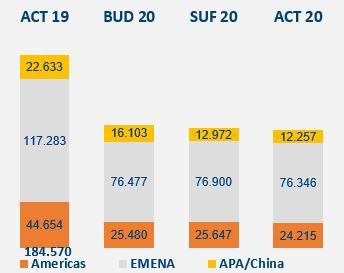
BarChart.JPG

I would like to create this kind of bar charts, and I have following problem:

As Legend of the Bar Chart, I choose my Territory, so I get the "Americas, Emena, APA/China"... everything fine but:

the volumes, based on the different Scenarios (ACT 19, BUD 20, SUF 20, ACT 20) are all calculated measures. Therefore, I can only put one of these 4 into the Value of the Bar Chart Visual. 

And I can not put the Scenario into the Axis of the Bar Chart, because then, I do not have the ACT 19, because in my Dataset, I only have the BUD, SUF and ACT as Element of the Scenario Column.

Is there any workaround, how I can visualize my 4 calculated Measures as a stagged bar chart, based on territory? 

1 ACCEPTED SOLUTION
MFelix
Super User
Super User

Hi @Pfoerster ,


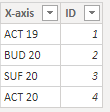
Create a disconnected table with the following data:

MFelix_0-1601031596456.png

Now create the following measure:

VALUE = SWITCH(
                SELECTEDVALUE('AXIS'[ID]); 
                1 ; [ACT 19];
                2; [BUD 20];
                3 ; [SUF 20]; 
                4; [ACT 20]
            )


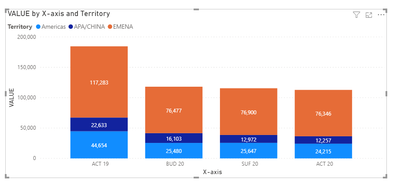
Build you chart with the following setup:

Axis: X-Axis Column

Legend: Territory

Values: Measure Value


Result below and in attach PBIX file.

MFelix_1-1601031720844.png


Regards

Miguel Félix


Did I answer your question? Mark my post as a solution!

Proud to be a Super User!

Check out my blog: Power BI em Português


View solution in original post

2 REPLIES 2
MFelix
Super User
Super User

Hi @Pfoerster ,


Create a disconnected table with the following data:

MFelix_0-1601031596456.png

Now create the following measure:

VALUE = SWITCH(
                SELECTEDVALUE('AXIS'[ID]); 
                1 ; [ACT 19];
                2; [BUD 20];
                3 ; [SUF 20]; 
                4; [ACT 20]
            )


Build you chart with the following setup:

Axis: X-Axis Column

Legend: Territory

Values: Measure Value


Result below and in attach PBIX file.

MFelix_1-1601031720844.png


Regards

Miguel Félix


Did I answer your question? Mark my post as a solution!

Proud to be a Super User!

Check out my blog: Power BI em Português


Perfect! It is working as I like 🙂 Thank you very much. 

Helpful resources

Announcements
Join our Fabric User Panel

Join our Fabric User Panel

Share feedback directly with Fabric product managers, participate in targeted research studies and influence the Fabric roadmap.

February Power BI Update Carousel

Power BI Monthly Update - February 2026

Check out the February 2026 Power BI update to learn about new features.

FabCon Atlanta 2026 carousel

FabCon Atlanta 2026

Join us at FabCon Atlanta, March 16-20, for the ultimate Fabric, Power BI, AI and SQL community-led event. Save $200 with code FABCOMM.