cancel
Showing results for 
Search instead for 
Did you mean: 

Learn from the best! Meet the four finalists headed to the FINALS of the Power BI Dataviz World Championships! Register now

Reply
tk0501
Frequent Visitor

Stacked Column Chart - how to stack incremental values

Hello PBI Community,

I have three measures (called min, expected, max) that are dynamically calculated based on the slicer selections. 

  1. Min
  2. Expected
  3. Max


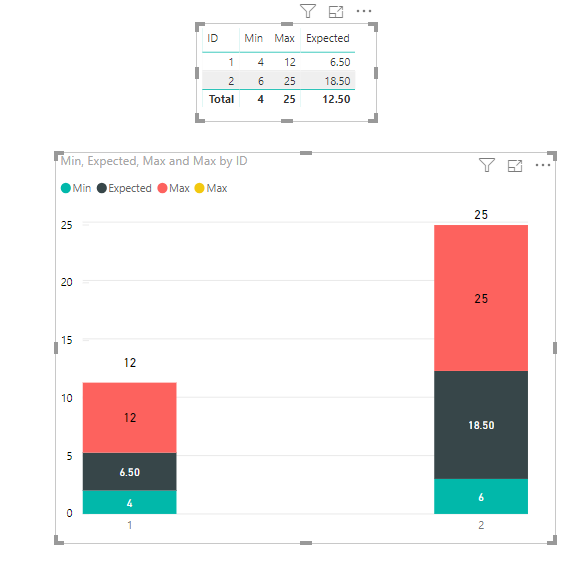
I am trying to display them via a stacked column chart (min at the bottom and max on the top).

The measure computes the absolute values for each, not incremental values.

For example...

Min = 1

Expected = 5

Max = 9


The stacked column needs to be 9, not 15 (1+5+9). 


I could write a longer measure to calculate Expected-Min instead of Expected value itself. 

However, each measure has complex calculations and takes time to perform. 


Is there a way to tell PBI to stack 1,5,9 to add up to 9, instead of 15?

In another word, do I have to write a measure each time to computer incremental value? 


Thank you


1 ACCEPTED SOLUTION
Icey
Community Support
Community Support

Hi @tk0501 ,

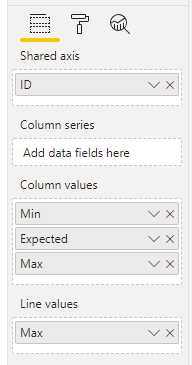
You can use Line and Stacked Column Chart instead. Steps are as follows:

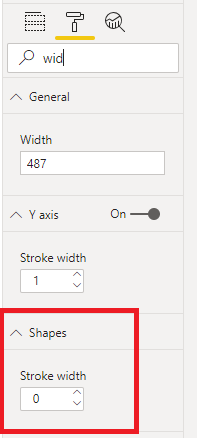
1. Create a Line and Stacked Column Chart and change the 'Stroke width' of 'Shape' to 0.

Stacked Column Chart - how to stack incremental values 2.PNG  Stacked Column Chart - how to stack incremental values1.PNG

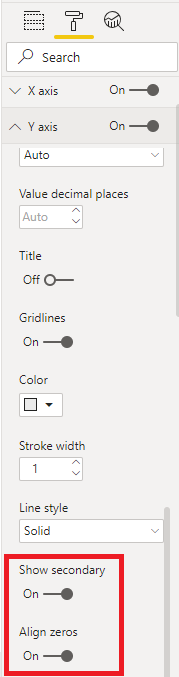
2. Make 'Show secondary' and 'Align zeros' on.

Stacked Column Chart - how to stack incremental values 3.PNG

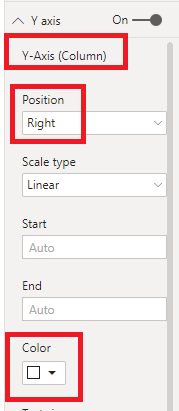
3. Change 'Position' of 'Y-Axis(Column)' to Right and 'Color' to White.

Stacked Column Chart - how to stack incremental values 4.PNG

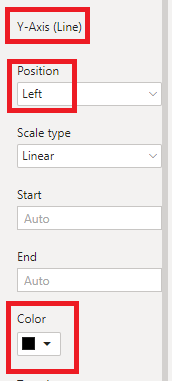
4. Change 'Position' of 'Y-Axis(Line)' to Left and 'Color' to Black.

Stacked Column Chart - how to stack incremental values 5.PNG

Stacked Column Chart - how to stack incremental values.PNG


Best Regards,

Icey


If this post helps, then please consider Accept it as the solution to help the other members find it more quickly.

View solution in original post

2 REPLIES 2
Icey
Community Support
Community Support

Hi @tk0501 ,

 
Is this problem sloved?
 
If it is sloved, could you kindly accept it as a solution to close this case?  
 
If not, please let me know.  
 
Best Regards
Icey
Icey
Community Support
Community Support

Hi @tk0501 ,

You can use Line and Stacked Column Chart instead. Steps are as follows:

1. Create a Line and Stacked Column Chart and change the 'Stroke width' of 'Shape' to 0.

Stacked Column Chart - how to stack incremental values 2.PNG  Stacked Column Chart - how to stack incremental values1.PNG

2. Make 'Show secondary' and 'Align zeros' on.

Stacked Column Chart - how to stack incremental values 3.PNG

3. Change 'Position' of 'Y-Axis(Column)' to Right and 'Color' to White.

Stacked Column Chart - how to stack incremental values 4.PNG

4. Change 'Position' of 'Y-Axis(Line)' to Left and 'Color' to Black.

Stacked Column Chart - how to stack incremental values 5.PNG

Stacked Column Chart - how to stack incremental values.PNG


Best Regards,

Icey


If this post helps, then please consider Accept it as the solution to help the other members find it more quickly.

Helpful resources

Announcements
New to Fabric survey Carousel

New to Fabric Survey

If you have recently started exploring Fabric, we'd love to hear how it's going. Your feedback can help with product improvements.

Power BI DataViz World Championships carousel

Power BI DataViz World Championships - June 2026

A new Power BI DataViz World Championship is coming this June! Don't miss out on submitting your entry.

Join our Fabric User Panel

Join our Fabric User Panel

Share feedback directly with Fabric product managers, participate in targeted research studies and influence the Fabric roadmap.

March Power BI Update Carousel

Power BI Community Update - March 2026

Check out the March 2026 Power BI update to learn about new features.