This time we’re going bigger than ever. Fabric, Power BI, SQL, AI and more. We're covering it all. You won't want to miss it.
Learn moreLevel up your Power BI skills this month - build one visual each week and tell better stories with data! Get started
Hello PBI Community,
I have three measures (called min, expected, max) that are dynamically calculated based on the slicer selections.
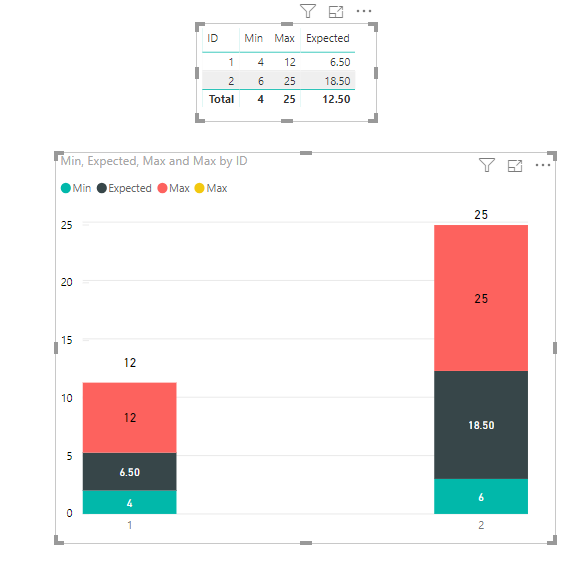
I am trying to display them via a stacked column chart (min at the bottom and max on the top).
The measure computes the absolute values for each, not incremental values.
For example...
Min = 1
Expected = 5
Max = 9
The stacked column needs to be 9, not 15 (1+5+9).
I could write a longer measure to calculate Expected-Min instead of Expected value itself.
However, each measure has complex calculations and takes time to perform.
Is there a way to tell PBI to stack 1,5,9 to add up to 9, instead of 15?
In another word, do I have to write a measure each time to computer incremental value?
Thank you
Solved! Go to Solution.
Hi @tk0501 ,
You can use Line and Stacked Column Chart instead. Steps are as follows:
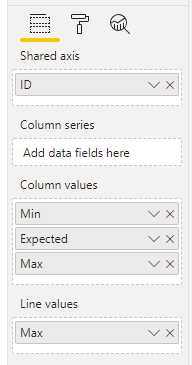
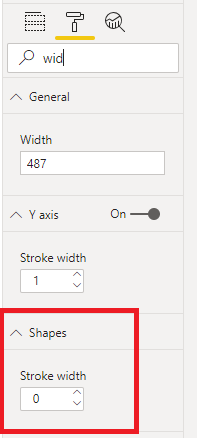
1. Create a Line and Stacked Column Chart and change the 'Stroke width' of 'Shape' to 0.
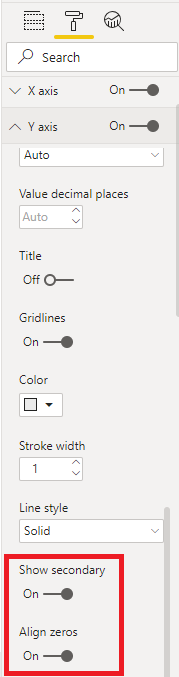
2. Make 'Show secondary' and 'Align zeros' on.
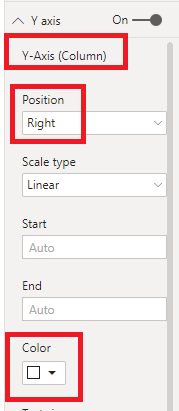
3. Change 'Position' of 'Y-Axis(Column)' to Right and 'Color' to White.
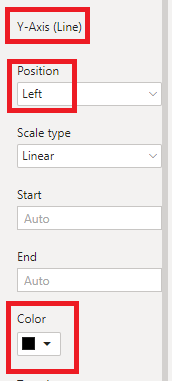
4. Change 'Position' of 'Y-Axis(Line)' to Left and 'Color' to Black.
Best Regards,
Icey
If this post helps, then please consider Accept it as the solution to help the other members find it more quickly.
Hi @tk0501 ,
Hi @tk0501 ,
You can use Line and Stacked Column Chart instead. Steps are as follows:
1. Create a Line and Stacked Column Chart and change the 'Stroke width' of 'Shape' to 0.
2. Make 'Show secondary' and 'Align zeros' on.
3. Change 'Position' of 'Y-Axis(Column)' to Right and 'Color' to White.
4. Change 'Position' of 'Y-Axis(Line)' to Left and 'Color' to Black.
Best Regards,
Icey
If this post helps, then please consider Accept it as the solution to help the other members find it more quickly.
Check out the April 2026 Power BI update to learn about new features.
Sign up to receive a private message when registration opens and key events begin.
If you have recently started exploring Fabric, we'd love to hear how it's going. Your feedback can help with product improvements.
| User | Count |
|---|---|
| 39 | |
| 28 | |
| 27 | |
| 22 | |
| 18 |
| User | Count |
|---|---|
| 67 | |
| 37 | |
| 32 | |
| 26 | |
| 25 |