cancel
Showing results for 
Search instead for 
Did you mean: 

The Power BI Data Visualization World Championships is back! Get ahead of the game and start preparing now! Learn more

Reply
Anonymous
Not applicable

Stacked Chart Sort

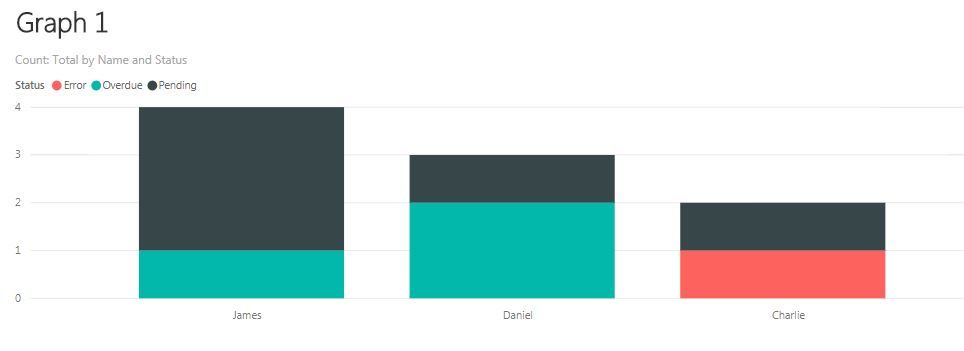
I have read through quite a few of posts on this subject but none seem to solve my issue. I have the below table and have created Graph 1 using COUNT([Status]). However, I would like Overdue to be the first the bar rather than error. Therefore I created individual measures to count each category status i.e. CALCULATE(COUNT([Status]),filter([Status]="Pending")) which is shown in Graph 2. My issue is I want to sort the x-axis by the total count i.e. James, Daniel then Charlie (from Graph 1) but the bars sorted Overdue, Pending then Error (from Graph 2). Is there a work around without adding spaces to the the fields Overdue, Pendign and Error?


NameReport NumberStatus
Daniel1Overdue
Daniel2Overdue
Daniel3Pending
Charlie1Error
Charlie2Pending
James1Overdue
James2Pending
James3Pending
James4

Pending

 Graph 1.JPGGraph 2.JPG


Thanks,


Jack

1 ACCEPTED SOLUTION
kaiserj
Advocate I
Advocate I

Hi, 


it is correct to create single measures with the Status for the order in the legend . 

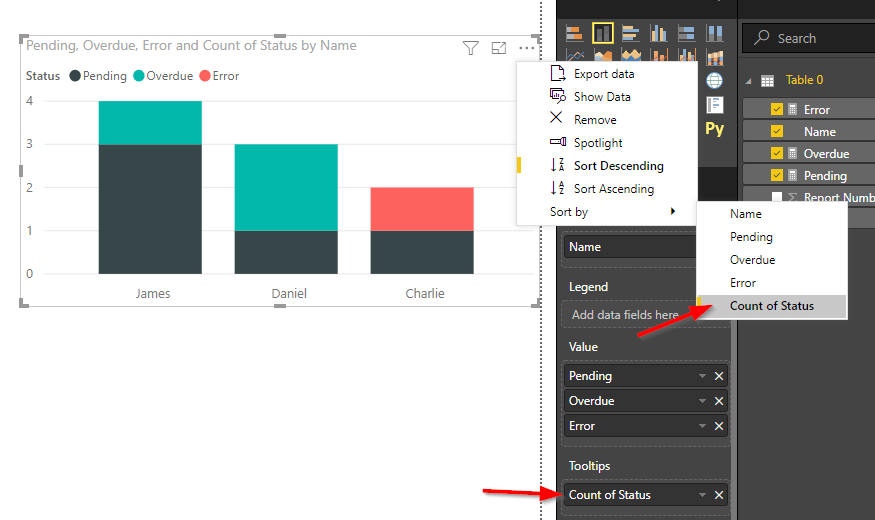
To sort the bars by the total count you can drag the Status to the Tooltips area (use the Count in the drop-down menu of the field) and sort by it.

StackedChartSort.png

Regards,

Julian

View solution in original post

1 REPLY 1
kaiserj
Advocate I
Advocate I

Hi, 


it is correct to create single measures with the Status for the order in the legend . 

To sort the bars by the total count you can drag the Status to the Tooltips area (use the Count in the drop-down menu of the field) and sort by it.

StackedChartSort.png

Regards,

Julian

Helpful resources

Announcements
Power BI DataViz World Championships

Power BI Dataviz World Championships

The Power BI Data Visualization World Championships is back! Get ahead of the game and start preparing now!

December 2025 Power BI Update Carousel

Power BI Monthly Update - December 2025

Check out the December 2025 Power BI Holiday Recap!

FabCon Atlanta 2026 carousel

FabCon Atlanta 2026

Join us at FabCon Atlanta, March 16-20, for the ultimate Fabric, Power BI, AI and SQL community-led event. Save $200 with code FABCOMM.