Share feedback directly with Fabric product managers, participate in targeted research studies and influence the Fabric roadmap.
Sign up nowGet Fabric certified for FREE! Don't miss your chance! Learn more
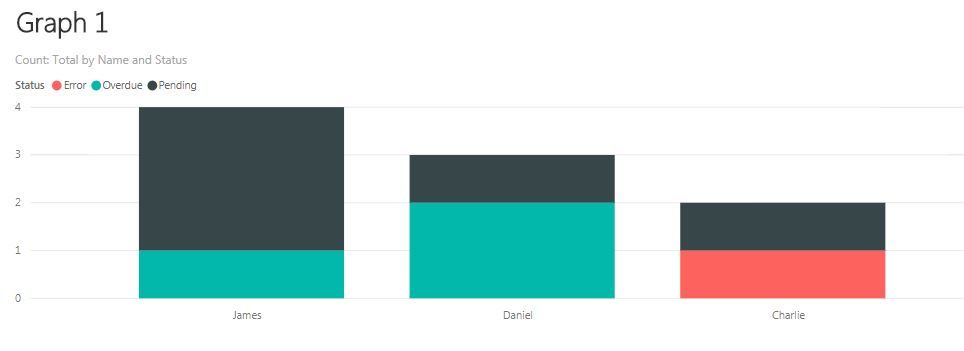
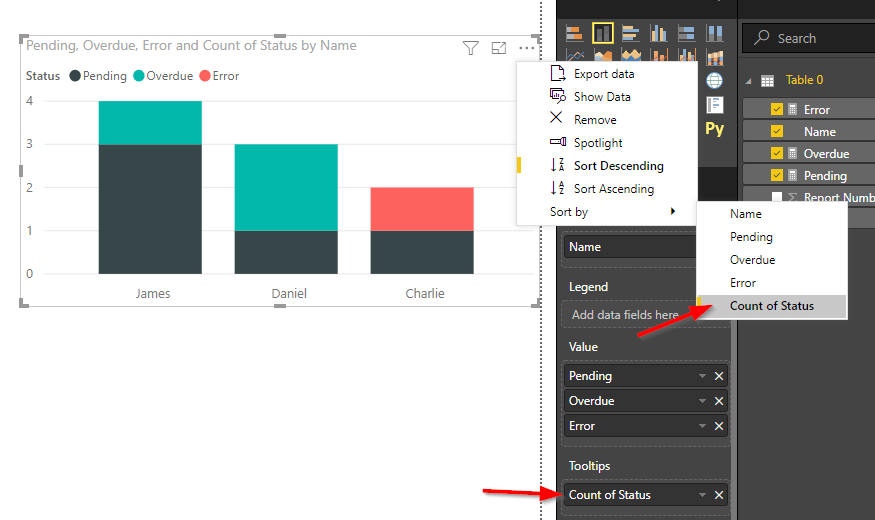
I have read through quite a few of posts on this subject but none seem to solve my issue. I have the below table and have created Graph 1 using COUNT([Status]). However, I would like Overdue to be the first the bar rather than error. Therefore I created individual measures to count each category status i.e. CALCULATE(COUNT([Status]),filter([Status]="Pending")) which is shown in Graph 2. My issue is I want to sort the x-axis by the total count i.e. James, Daniel then Charlie (from Graph 1) but the bars sorted Overdue, Pending then Error (from Graph 2). Is there a work around without adding spaces to the the fields Overdue, Pendign and Error?
| Name | Report Number | Status |
| Daniel | 1 | Overdue |
| Daniel | 2 | Overdue |
| Daniel | 3 | Pending |
| Charlie | 1 | Error |
| Charlie | 2 | Pending |
| James | 1 | Overdue |
| James | 2 | Pending |
| James | 3 | Pending |
| James | 4 | Pending |
Thanks,
Jack
Solved! Go to Solution.
Hi,
it is correct to create single measures with the Status for the order in the legend .
To sort the bars by the total count you can drag the Status to the Tooltips area (use the Count in the drop-down menu of the field) and sort by it.
Regards,
Julian
Hi,
it is correct to create single measures with the Status for the order in the legend .
To sort the bars by the total count you can drag the Status to the Tooltips area (use the Count in the drop-down menu of the field) and sort by it.
Regards,
Julian
Share feedback directly with Fabric product managers, participate in targeted research studies and influence the Fabric roadmap.
If you love stickers, then you will definitely want to check out our Community Sticker Challenge!
Check out the January 2026 Power BI update to learn about new features.
| User | Count |
|---|---|
| 63 | |
| 62 | |
| 42 | |
| 20 | |
| 18 |