cancel
Showing results for 
Search instead for 
Did you mean: 

Level up your Power BI skills this month - build one visual each week and tell better stories with data! Get started

Reply
ashaikh
Helper III
Helper III

Stack Bar Based on Multiple Table Measure

Hello,


I have 3 tables;  viewProdRemedyIncidentServicesSla(TableA), viewProdRemedyWorkorders(TableB) amd Date Table.


TableA has measure to calculate resolved tickets. Calculation is as below - 


INCIDENT COUNT RESOLVED =
CALCULATE (
DISTINCTCOUNT ( viewProdRemedyIncidentServicesSla[INCIDENT NUMBER] ),
FILTER (
ALL ( viewProdRemedyIncidentServicesSla ),
( viewProdRemedyIncidentServicesSla[STATUS] = "Closed"
|| viewProdRemedyIncidentServicesSla[STATUS] = "Resolved" )
&& viewProdRemedyIncidentServicesSla[WeekNumberResolved]
= MAX ( viewProdRemedyIncidentServicesSla[WeekNumberSubmit] )
&& viewProdRemedyIncidentServicesSla[INCIDENT LAST RESOLVED DATE].[Year] = 2018
)
)

Even Table B has a measure to calculate Resolved Ticket


WORKORDER COUNT RESOLVED =
CALCULATE (
COUNT ( viewProdRemedyWorkorders[WORK ORDER ID] ),
FILTER (
ALL ( viewProdRemedyWorkorders ),
( viewProdRemedyWorkorders[STATUS] = "Closed"
|| viewProdRemedyWorkorders[STATUS] = "Completed" )
&& viewProdRemedyWorkorders[WeekNumberResolved]
= MAX ( viewProdRemedyIncidentServicesSla[WeekNumberSubmit] )
&& viewProdRemedyWorkorders[ACTUAL END DATE].[Year] = 2018
)
)


Where as Date table has columns like Date, DateKey, WeeklyDuration. TableA and TableB have relationship with Date table using DateKey column.


So using this how will I be able to create a stack bar visual. For eg. Stack Bar should look like below.
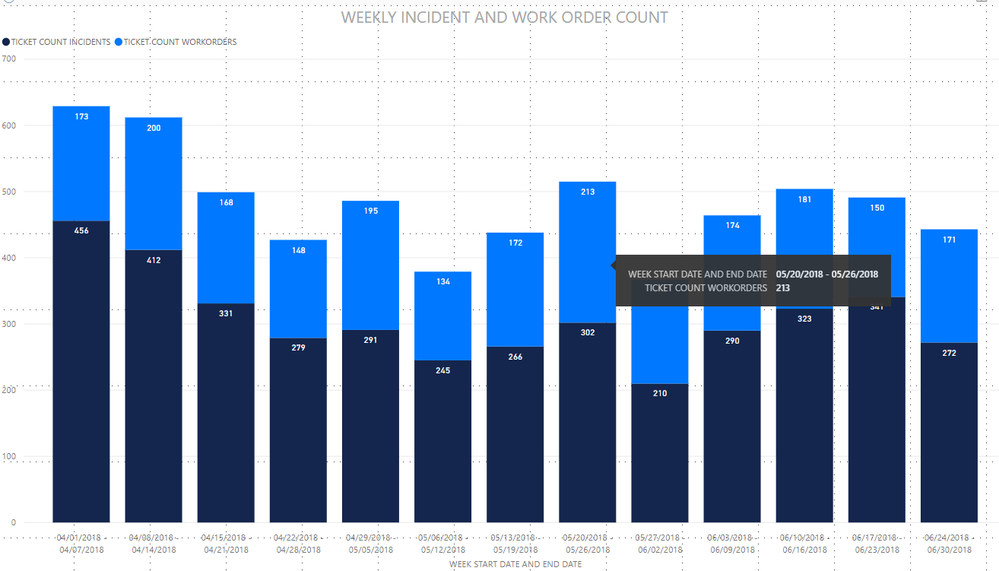
stackbar.png


Any help is appreciated


Thanks in Advance 


3 REPLIES 3
v-yuta-msft
Community Support
Community Support

Hi ashaikh,


Does the table structure in 'viewProdRemedyIncidentServicesSla' and 'viewProdRemedyWorkorders' same with each other? If they are, you could add the datekey column to both tables, add a column to TableA which has value 'TableA' as legend column, add a column to TableB which has value 'TableB' as legend column. Then append the two tables, after applied&closed, you can drag column Date[Datekey] as X-axis column, drag legend column as legend. 


Regards,

Jimmy Tao

@v-yuta-msft the table dont have same structure. But as I have mentioned all three tables are related to each other using DateKey column.

Hi ashaikh,


Could you share some sample data if possible?


Regards,

Jimmy Tao

Helpful resources

Announcements
April Power BI Update Carousel

Power BI Monthly Update - April 2026

Check out the April 2026 Power BI update to learn about new features.

Fabric SQL PBI Data Days

Data Days 2026 coming soon!

Sign up to receive a private message when registration opens and key events begin.

New to Fabric survey Carousel

New to Fabric Survey

If you have recently started exploring Fabric, we'd love to hear how it's going. Your feedback can help with product improvements.

Power BI DataViz World Championships carousel

Power BI DataViz World Championships - June 2026

A new Power BI DataViz World Championship is coming this June! Don't miss out on submitting your entry.