cancel
Showing results for 
Search instead for 
Did you mean: 

We've captured the moments from FabCon & SQLCon that everyone is talking about, and we are bringing them to the community, live and on-demand. Starts on April 14th. Register now

Reply
alromeyn
Regular Visitor

Splitting PostgreSQL hstore fields

I have a column in my PostgeSQL data that is an hstore field. It contains data from our accounting software for user defined fields. I cannot use the split command because all data is not always there. The hstore data includes the field label and the data. See below that the label is contained inside "" and then there is an => and then the data itself inside"" 


I want to create a custom column for each field. For instance I want a column called 'Carrier' that contains the carrier name. 


 UDF DATA

"Passed"=>"TRUE", "Manager"=>"Gerry"
"Date"=>"2016-11-24", "Carrier"=>"Fedex", "TrackNo"=>"465565656", "Complete"=>"TRUE"
"Date"=>"2016-11-23", "Carrier"=>"UPS", "TrackNo"=>"668877"
"Carrier"=>"UPS", "Complete"=>"TRUE"
"By"=>"On time", "Date"=>"2016-05-24", "Carrier"=>"Fedex", "TrackNo"=>"1123", "Complete"=>"TRUE"
1 ACCEPTED SOLUTION
Anonymous
Not applicable

Hi @alromeyn,


You can refer to below steps to get the carrier name:


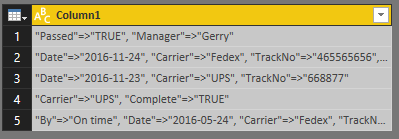
Source:


Capture.PNG


Formula:


let
    Source = Table.FromColumns({Lines.FromBinary(File.Contents("C:\Users\xxxxx\Desktop\New Text Document.txt"), null, null, 1252)}),
    #"Replaced Value" = Table.ReplaceValue(Source," ","",Replacer.ReplaceText,{"Column1"}),//remove the space character
    #"Added Custom1" = Table.AddColumn(#"Replaced Value", "Carrier", each List.Select(Text.Split([Column1],","), each Text.Contains(_, "Carrier"))),//split column and select the record which contain "carrier"
    #"Expanded Temp" = Table.ExpandListColumn(#"Added Custom1", "Carrier"),//expandlist
    #"Replaced Value1" = Table.ReplaceValue(Table.ReplaceValue(#"Expanded Temp","""","",Replacer.ReplaceText,{"Carrier"}),"Carrier=>","",Replacer.ReplaceText,{"Carrier"})//remove " and "carrier=>"
in
    #"Replaced Value1"

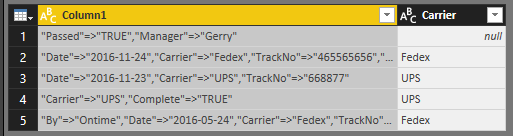
Capture2.PNG

Regards,

Xiaoxin Sheng

View solution in original post

2 REPLIES 2
ashutosh
Helper I
Helper I

Hi @alromeyn,


Does Power BI gives you error while you uploading the hstore values from postgres ?


I am also trying to get the values from my DB into power BI and getting error for hstore value. Even I tried converting it into text field too.

Anonymous
Not applicable

Hi @alromeyn,


You can refer to below steps to get the carrier name:


Source:


Capture.PNG


Formula:


let
    Source = Table.FromColumns({Lines.FromBinary(File.Contents("C:\Users\xxxxx\Desktop\New Text Document.txt"), null, null, 1252)}),
    #"Replaced Value" = Table.ReplaceValue(Source," ","",Replacer.ReplaceText,{"Column1"}),//remove the space character
    #"Added Custom1" = Table.AddColumn(#"Replaced Value", "Carrier", each List.Select(Text.Split([Column1],","), each Text.Contains(_, "Carrier"))),//split column and select the record which contain "carrier"
    #"Expanded Temp" = Table.ExpandListColumn(#"Added Custom1", "Carrier"),//expandlist
    #"Replaced Value1" = Table.ReplaceValue(Table.ReplaceValue(#"Expanded Temp","""","",Replacer.ReplaceText,{"Carrier"}),"Carrier=>","",Replacer.ReplaceText,{"Carrier"})//remove " and "carrier=>"
in
    #"Replaced Value1"

Capture2.PNG

Regards,

Xiaoxin Sheng

Helpful resources

Announcements
New to Fabric survey Carousel

New to Fabric Survey

If you have recently started exploring Fabric, we'd love to hear how it's going. Your feedback can help with product improvements.

Power BI DataViz World Championships carousel

Power BI DataViz World Championships - June 2026

A new Power BI DataViz World Championship is coming this June! Don't miss out on submitting your entry.

Join our Fabric User Panel

Join our Fabric User Panel

Share feedback directly with Fabric product managers, participate in targeted research studies and influence the Fabric roadmap.

March Power BI Update Carousel

Power BI Community Update - March 2026

Check out the March 2026 Power BI update to learn about new features.