FabCon is coming to Atlanta
Join us at FabCon Atlanta from March 16 - 20, 2026, for the ultimate Fabric, Power BI, AI and SQL community-led event. Save $200 with code FABCOMM.
Register now!- Power BI forums
- Get Help with Power BI
- Desktop
- Service
- Report Server
- Power Query
- Mobile Apps
- Developer
- DAX Commands and Tips
- Custom Visuals Development Discussion
- Health and Life Sciences
- Power BI Spanish forums
- Translated Spanish Desktop
- Training and Consulting
- Instructor Led Training
- Dashboard in a Day for Women, by Women
- Galleries
- Data Stories Gallery
- Themes Gallery
- Contests Gallery
- QuickViz Gallery
- Quick Measures Gallery
- Visual Calculations Gallery
- Notebook Gallery
- Translytical Task Flow Gallery
- TMDL Gallery
- R Script Showcase
- Webinars and Video Gallery
- Ideas
- Custom Visuals Ideas (read-only)
- Issues
- Issues
- Events
- Upcoming Events
Get Fabric Certified for FREE during Fabric Data Days. Don't miss your chance! Request now
- Power BI forums
- Forums
- Get Help with Power BI
- Desktop
- Split the timestamp in to categories
- Subscribe to RSS Feed
- Mark Topic as New
- Mark Topic as Read
- Float this Topic for Current User
- Bookmark
- Subscribe
- Printer Friendly Page

- Mark as New
- Bookmark
- Subscribe
- Mute
- Subscribe to RSS Feed
- Permalink
- Report Inappropriate Content
Split the timestamp in to categories
I have few Request types. We can have have their status as Success, Failed, Expired.
I have these timestamps round the clock and I would like to filter the time between morning 10AM to 12PM in to 15 minutes intervals and group them in to categories like 10:00-10:15, 10:15-10:30. How do i do that ?
Is there any default slicer for time ? I am aware that date has but could not find time slicer.
Example:
| REQUEST | STATUS | UPDATED_TS |
| MoveIn | Success | 14-SEP-2018 05:29 |
| MoveIn | Success | 14-SEP-2018 05:20 |
| MoveIn | Success | 14-SEP-2018 05:26 |
| MoveIn | Success | 14-SEP-2018 05:19 |
| MoveIn | Success | 14-SEP-2018 05:23 |
| MoveIn | Success | 14-SEP-2018 05:26 |
| MoveIn | Success | 14-SEP-2018 05:35 |
| MoveIn | Success | 14-SEP-2018 05:32 |
Solved! Go to Solution.


- Mark as New
- Bookmark
- Subscribe
- Mute
- Subscribe to RSS Feed
- Permalink
- Report Inappropriate Content
Unfortunately, there is no specific slicer for time. I can propose you to create a calculated column in the same table where you have datetime column with calculation below:
TimeGroup =
FORMAT(HOUR(Table2[Datetime column]),"00")
& ":"
& FORMAT((ROUNDDOWN(MINUTE(Table2[Datetime column])/15,0)*15),"00")
& "-"
& FORMAT(HOUR(Table2[Datetime column]),"00")
& ":"
& FORMAT((ROUNDDOWN(MINUTE(Table2[Datetime column])/15,0)*15+15),"00")
Where
- Table2[Datetime column] is a table and column of your datetime
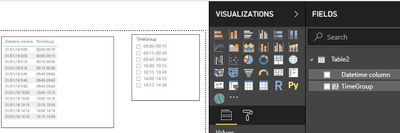
Then you can add a simple slicer with this field.
Then it will look like below:
Regards,
Ruslan
-------------------------------------------------------------------
Did I answer your question? Mark my post as a solution!
- Mark as New
- Bookmark
- Subscribe
- Mute
- Subscribe to RSS Feed
- Permalink
- Report Inappropriate Content
I understand your point. See an updated approach:
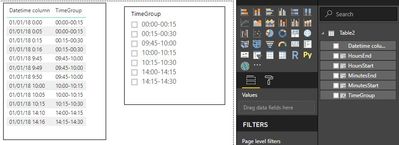
Create 5 calculated columns:
HoursStart = Hour(Table2[Datetime column])

MinutesStart = ROUNDDOWN(MINUTE(Table2[Datetime column])/15,0)*15

HoursEnd = IF(Table2[MinutesStart]=45,Hour(Table2[Datetime column])+1,Hour(Table2[Datetime column]))

MinutesEnd = IF(Table2[MinutesStart]+15=60,0,Table2[MinutesStart]+15)

TimeGroup = FORMAT(Table2[HoursStart],"00")
& ":"
& FORMAT(Table2[MinutesStart],"00")
& "-"
& FORMAT(Table2[HoursEnd],"00")
& ":"
& FORMAT(Table2[MinutesEnd],"00")
Then it will behave as below:
Regards,
Ruslan
-------------------------------------------------------------------
Did I answer your question? Mark my post as a solution!
- Mark as New
- Bookmark
- Subscribe
- Mute
- Subscribe to RSS Feed
- Permalink
- Report Inappropriate Content
Unfortunately, there is no specific slicer for time. I can propose you to create a calculated column in the same table where you have datetime column with calculation below:
TimeGroup =
FORMAT(HOUR(Table2[Datetime column]),"00")
& ":"
& FORMAT((ROUNDDOWN(MINUTE(Table2[Datetime column])/15,0)*15),"00")
& "-"
& FORMAT(HOUR(Table2[Datetime column]),"00")
& ":"
& FORMAT((ROUNDDOWN(MINUTE(Table2[Datetime column])/15,0)*15+15),"00")
Where
- Table2[Datetime column] is a table and column of your datetime
Then you can add a simple slicer with this field.
Then it will look like below:
Regards,
Ruslan
-------------------------------------------------------------------
Did I answer your question? Mark my post as a solution!
- Mark as New
- Bookmark
- Subscribe
- Mute
- Subscribe to RSS Feed
- Permalink
- Report Inappropriate Content
Thanks so much for help, but how do we modify 60's. Eg: 9:60. 10:60 to 10:00, 11:00 respectively
- Mark as New
- Bookmark
- Subscribe
- Mute
- Subscribe to RSS Feed
- Permalink
- Report Inappropriate Content
10:60? What do you mean? For 10 hours maximum is 10:59. Provide more details.
Regards,
Ruslan
- Mark as New
- Bookmark
- Subscribe
- Mute
- Subscribe to RSS Feed
- Permalink
- Report Inappropriate Content
I mean as per your logic, The grouping is done properly, but for times between HH:45 to HH:60 they are getting displayed as 09:45 - 09:60
10:45-10:60
Is there a way that we can categorize them as 09-45-10:00 etc for all the time stamps.
- Mark as New
- Bookmark
- Subscribe
- Mute
- Subscribe to RSS Feed
- Permalink
- Report Inappropriate Content
I understand your point. See an updated approach:
Create 5 calculated columns:
HoursStart = Hour(Table2[Datetime column])

MinutesStart = ROUNDDOWN(MINUTE(Table2[Datetime column])/15,0)*15

HoursEnd = IF(Table2[MinutesStart]=45,Hour(Table2[Datetime column])+1,Hour(Table2[Datetime column]))

MinutesEnd = IF(Table2[MinutesStart]+15=60,0,Table2[MinutesStart]+15)

TimeGroup = FORMAT(Table2[HoursStart],"00")
& ":"
& FORMAT(Table2[MinutesStart],"00")
& "-"
& FORMAT(Table2[HoursEnd],"00")
& ":"
& FORMAT(Table2[MinutesEnd],"00")
Then it will behave as below:
Regards,
Ruslan
-------------------------------------------------------------------
Did I answer your question? Mark my post as a solution!

Helpful resources

Power BI Monthly Update - November 2025
Check out the November 2025 Power BI update to learn about new features.

Fabric Data Days
Advance your Data & AI career with 50 days of live learning, contests, hands-on challenges, study groups & certifications and more!

FabCon Atlanta 2026
Join us at FabCon Atlanta, March 16-20, for the ultimate Fabric, Power BI, AI and SQL community-led event. Save $200 with code FABCOMM.


