Don't miss your chance to take the Fabric Data Engineer (DP-600) exam for FREE! Find out how by attending the DP-600 session on April 23rd (pacific time), live or on-demand.
Learn moreNext up in the FabCon + SQLCon recap series: The roadmap for Microsoft SQL and Maximizing Developer experiences in Fabric. All sessions are available on-demand after the live show. Register now
Hi, I would like to split you know a number of rows, A row must be split so many times that the result in its row is always 0.25. The data jump in a cell is always 0.25 so 0.25 then 0.5 then 0.75 up to 12,
one row has for example 0.5 in its column, I want to split it into two identical rows that have custom values of 0.25
| text | value |
| example1 | 0,5 |
result
| text | value | custom_value |
| example1 | 0,5 | 0,25 |
| example1 | 0,5 | 0,25 |
second example a row has value 4 I want it to be divided into 8 rows
| text | value |
| example2 | 4 |
result
| text | value | custom_value |
| example2 | 4 | 0,25 |
| example2 | 4 | 0,25 |
| example2 | 4 | 0,25 |
| example2 | 4 | 0,25 |
| example2 | 4 | 0,25 |
| example2 | 4 | 0,25 |
| example2 | 4 | 0,25 |
| example2 | 4 | 0,25 |
do you have any idea how to do this
Solved! Go to Solution.
Hi @wiktorius1984 ,
I have a question about how you calculate the number of rows however the first approach since you always want the same value do the following:
Text.Start( Text.Repeat( Number.ToText(0.25) & "," , [Value]/0.25),
Text.Length(Text.Repeat( Number.ToText(0.25) & "," , [Value]/0.25))-1)
Only question here is about the last part of the syntax that should be chjange to give you the correct number of rows (not understanding why 4 gives you a result of 8 rows).
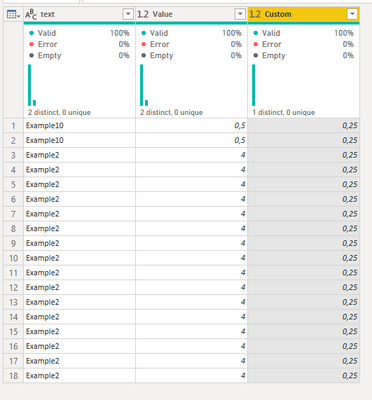
final result and code below:
let
Source = Table.FromRows(Json.Document(Binary.Decompress(Binary.FromText("i45Wcq1IzC3ISTU0UNJRMtAzVYrVgYsZAYVMlGJjAQ==", BinaryEncoding.Base64), Compression.Deflate)), let _t = ((type nullable text) meta [Serialized.Text = true]) in type table [text = _t, Value = _t]),
#"Changed Type" = Table.TransformColumnTypes(Source,{{"text", type text}, {"Value", type number}}),
#"Added Custom" = Table.AddColumn(#"Changed Type", "Custom", each Text.Start( Text.Repeat( Number.ToText(0.25) & "," , [Value]/0.25),
Text.Length(Text.Repeat( Number.ToText(0.25) & "," , [Value]/0.25))-1)),
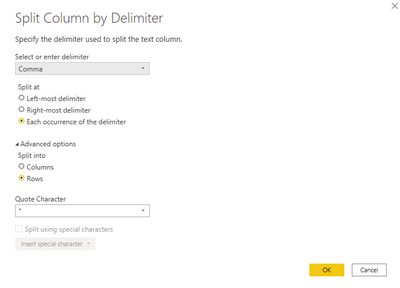
#"Split Column by Delimiter" = Table.ExpandListColumn(Table.TransformColumns(#"Added Custom", {{"Custom", Splitter.SplitTextByDelimiter(",", QuoteStyle.Csv), let itemType = (type nullable text) meta [Serialized.Text = true] in type {itemType}}}), "Custom"),
#"Changed Type1" = Table.TransformColumnTypes(#"Split Column by Delimiter",{{"Custom", type number}})
in
#"Changed Type1"
Regards
Miguel Félix
Proud to be a Super User!
Check out my blog: Power BI em PortuguêsHi @wiktorius1984 ,
I have a question about how you calculate the number of rows however the first approach since you always want the same value do the following:
Text.Start( Text.Repeat( Number.ToText(0.25) & "," , [Value]/0.25),
Text.Length(Text.Repeat( Number.ToText(0.25) & "," , [Value]/0.25))-1)
Only question here is about the last part of the syntax that should be chjange to give you the correct number of rows (not understanding why 4 gives you a result of 8 rows).
final result and code below:
let
Source = Table.FromRows(Json.Document(Binary.Decompress(Binary.FromText("i45Wcq1IzC3ISTU0UNJRMtAzVYrVgYsZAYVMlGJjAQ==", BinaryEncoding.Base64), Compression.Deflate)), let _t = ((type nullable text) meta [Serialized.Text = true]) in type table [text = _t, Value = _t]),
#"Changed Type" = Table.TransformColumnTypes(Source,{{"text", type text}, {"Value", type number}}),
#"Added Custom" = Table.AddColumn(#"Changed Type", "Custom", each Text.Start( Text.Repeat( Number.ToText(0.25) & "," , [Value]/0.25),
Text.Length(Text.Repeat( Number.ToText(0.25) & "," , [Value]/0.25))-1)),
#"Split Column by Delimiter" = Table.ExpandListColumn(Table.TransformColumns(#"Added Custom", {{"Custom", Splitter.SplitTextByDelimiter(",", QuoteStyle.Csv), let itemType = (type nullable text) meta [Serialized.Text = true] in type {itemType}}}), "Custom"),
#"Changed Type1" = Table.TransformColumnTypes(#"Split Column by Delimiter",{{"Custom", type number}})
in
#"Changed Type1"
Regards
Miguel Félix
Proud to be a Super User!
Check out my blog: Power BI em Portuguêsthanks for help, you are right in case of value 4 there must be 16 rows 🙂 thx
If you have recently started exploring Fabric, we'd love to hear how it's going. Your feedback can help with product improvements.
A new Power BI DataViz World Championship is coming this June! Don't miss out on submitting your entry.
Experience the highlights from FabCon & SQLCon, available live and on-demand starting April 14th.
| User | Count |
|---|---|
| 47 | |
| 44 | |
| 40 | |
| 20 | |
| 15 |
| User | Count |
|---|---|
| 70 | |
| 67 | |
| 32 | |
| 27 | |
| 25 |