Share feedback directly with Fabric product managers, participate in targeted research studies and influence the Fabric roadmap.
Sign up nowGet Fabric certified for FREE! Don't miss your chance! Learn more
Hi, I would like to split you know a number of rows, A row must be split so many times that the result in its row is always 0.25. The data jump in a cell is always 0.25 so 0.25 then 0.5 then 0.75 up to 12,
one row has for example 0.5 in its column, I want to split it into two identical rows that have custom values of 0.25
| text | value |
| example1 | 0,5 |
result
| text | value | custom_value |
| example1 | 0,5 | 0,25 |
| example1 | 0,5 | 0,25 |
second example a row has value 4 I want it to be divided into 8 rows
| text | value |
| example2 | 4 |
result
| text | value | custom_value |
| example2 | 4 | 0,25 |
| example2 | 4 | 0,25 |
| example2 | 4 | 0,25 |
| example2 | 4 | 0,25 |
| example2 | 4 | 0,25 |
| example2 | 4 | 0,25 |
| example2 | 4 | 0,25 |
| example2 | 4 | 0,25 |
do you have any idea how to do this
Solved! Go to Solution.
Hi @wiktorius1984 ,
I have a question about how you calculate the number of rows however the first approach since you always want the same value do the following:
Text.Start( Text.Repeat( Number.ToText(0.25) & "," , [Value]/0.25),
Text.Length(Text.Repeat( Number.ToText(0.25) & "," , [Value]/0.25))-1)
Only question here is about the last part of the syntax that should be chjange to give you the correct number of rows (not understanding why 4 gives you a result of 8 rows).
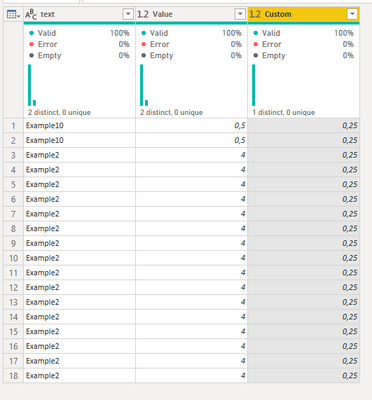
final result and code below:
let
Source = Table.FromRows(Json.Document(Binary.Decompress(Binary.FromText("i45Wcq1IzC3ISTU0UNJRMtAzVYrVgYsZAYVMlGJjAQ==", BinaryEncoding.Base64), Compression.Deflate)), let _t = ((type nullable text) meta [Serialized.Text = true]) in type table [text = _t, Value = _t]),
#"Changed Type" = Table.TransformColumnTypes(Source,{{"text", type text}, {"Value", type number}}),
#"Added Custom" = Table.AddColumn(#"Changed Type", "Custom", each Text.Start( Text.Repeat( Number.ToText(0.25) & "," , [Value]/0.25),
Text.Length(Text.Repeat( Number.ToText(0.25) & "," , [Value]/0.25))-1)),
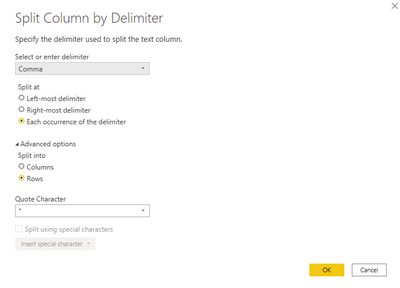
#"Split Column by Delimiter" = Table.ExpandListColumn(Table.TransformColumns(#"Added Custom", {{"Custom", Splitter.SplitTextByDelimiter(",", QuoteStyle.Csv), let itemType = (type nullable text) meta [Serialized.Text = true] in type {itemType}}}), "Custom"),
#"Changed Type1" = Table.TransformColumnTypes(#"Split Column by Delimiter",{{"Custom", type number}})
in
#"Changed Type1"
Regards
Miguel Félix
Proud to be a Super User!
Check out my blog: Power BI em PortuguêsHi @wiktorius1984 ,
I have a question about how you calculate the number of rows however the first approach since you always want the same value do the following:
Text.Start( Text.Repeat( Number.ToText(0.25) & "," , [Value]/0.25),
Text.Length(Text.Repeat( Number.ToText(0.25) & "," , [Value]/0.25))-1)
Only question here is about the last part of the syntax that should be chjange to give you the correct number of rows (not understanding why 4 gives you a result of 8 rows).
final result and code below:
let
Source = Table.FromRows(Json.Document(Binary.Decompress(Binary.FromText("i45Wcq1IzC3ISTU0UNJRMtAzVYrVgYsZAYVMlGJjAQ==", BinaryEncoding.Base64), Compression.Deflate)), let _t = ((type nullable text) meta [Serialized.Text = true]) in type table [text = _t, Value = _t]),
#"Changed Type" = Table.TransformColumnTypes(Source,{{"text", type text}, {"Value", type number}}),
#"Added Custom" = Table.AddColumn(#"Changed Type", "Custom", each Text.Start( Text.Repeat( Number.ToText(0.25) & "," , [Value]/0.25),
Text.Length(Text.Repeat( Number.ToText(0.25) & "," , [Value]/0.25))-1)),
#"Split Column by Delimiter" = Table.ExpandListColumn(Table.TransformColumns(#"Added Custom", {{"Custom", Splitter.SplitTextByDelimiter(",", QuoteStyle.Csv), let itemType = (type nullable text) meta [Serialized.Text = true] in type {itemType}}}), "Custom"),
#"Changed Type1" = Table.TransformColumnTypes(#"Split Column by Delimiter",{{"Custom", type number}})
in
#"Changed Type1"
Regards
Miguel Félix
Proud to be a Super User!
Check out my blog: Power BI em Portuguêsthanks for help, you are right in case of value 4 there must be 16 rows 🙂 thx
If you love stickers, then you will definitely want to check out our Community Sticker Challenge!
Check out the January 2026 Power BI update to learn about new features.
| User | Count |
|---|---|
| 62 | |
| 61 | |
| 42 | |
| 20 | |
| 18 |
| User | Count |
|---|---|
| 122 | |
| 114 | |
| 36 | |
| 29 | |
| 29 |