Don't miss your chance to take the Fabric Data Engineer (DP-600) exam for FREE! Find out how by attending the DP-600 session on April 23rd (pacific time), live or on-demand.
Learn moreNext up in the FabCon + SQLCon recap series: The roadmap for Microsoft SQL and Maximizing Developer experiences in Fabric. All sessions are available on-demand after the live show. Register now
I'm trying to split rows based on a quantity value.
Each row has a quantity from 1-100. If the quantity is more than 1 I would like to split it into multiple rows. For instance if the quantity is 17 I would like 17 rows for that item.
How could I best achieve this?
Hi, @Locco
Is your problem solved? If not, can you provide some data removing sensitive data or show your expected table?
Best Regards,
Caiyun Zheng
I am still having an issue, but I don't think I can actually do this with the current data setup. I'm going to review the data and how it is pulled to the report to see what/if changes can be made and then go from there.
OK. If you have problem, please let us known.
Best Regards,
Caiyun Zheng
If I can validate that each new row actually matches the initial quantity then I could use this and instead of counting the QUANTITY field I could count rows. I'll see if I can validate that and go from there.
You can try this:
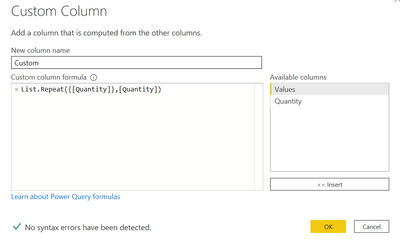
1) Create a new custom column in Power Query Editor using the below formula:
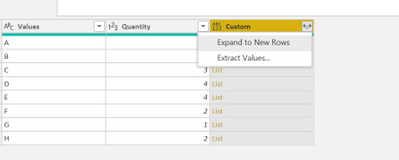
= Table.AddColumn(#"Previous Step", "CustomCoumn", each List.Repeat({[Quantity]},[Quantity]))2) Now Expand to new rows as below:
I hope this will solve your purpose
That didn't work, all it did was copy the column. It did it copy rows though, where I had less than 100,000 rows I now have over 1 million. The Quantity doesn't show 1 though, it shows the value that is in "QUANTITY."
If you have recently started exploring Fabric, we'd love to hear how it's going. Your feedback can help with product improvements.
A new Power BI DataViz World Championship is coming this June! Don't miss out on submitting your entry.
| User | Count |
|---|---|
| 46 | |
| 43 | |
| 39 | |
| 19 | |
| 15 |
| User | Count |
|---|---|
| 68 | |
| 65 | |
| 31 | |
| 28 | |
| 24 |