Join us at FabCon Atlanta from March 16 - 20, 2026, for the ultimate Fabric, Power BI, AI and SQL community-led event. Save $200 with code FABCOMM.
Register now!View all the Fabric Data Days sessions on demand. View schedule
Hello,
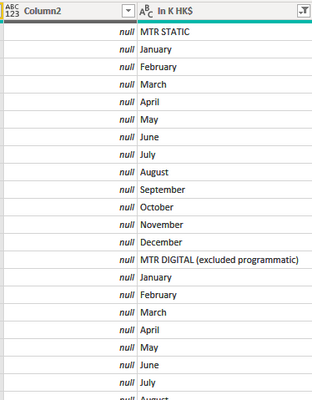
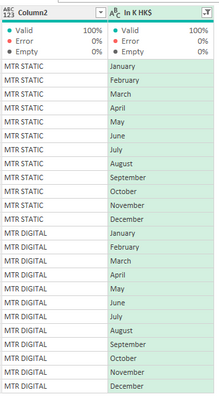
I have a file with a column labels with a interval and months and I want to transform this content into content to the column 2, so in the column 2 I will have MTR STATIC repeated on side from january to december and MTR DIGITAL to another jan to dez interval.
I tried with split column > by positions but won't had success.
Thank you
Solved! Go to Solution.
Hi @lucasmnx ,
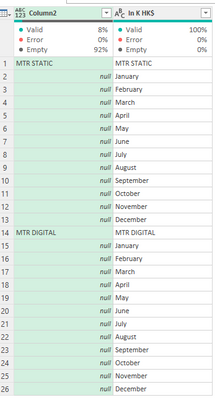
Format column 2 to text then do a replace values, does not matter what you put on that replace you will get a formula similar to this one:
= Table.ReplaceValue(#"Changed Type","a","aa",Replacer.ReplaceText,{"Column2"})
Now replace the value of this step by the following formula:
= Table.ReplaceValue(#"Changed Type", each [Column2] , each if Text.StartsWith ([#"In K HK$"] , "MTR") then [#"In K HK$"] else null,Replacer.ReplaceValue,{"Column2"})
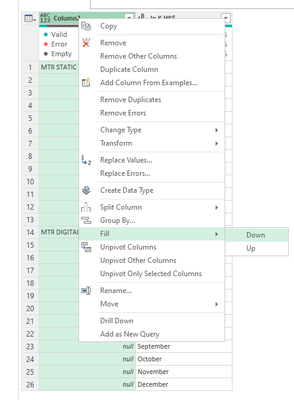
Do a fill down:
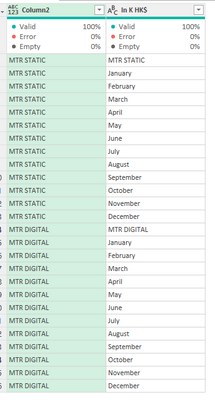
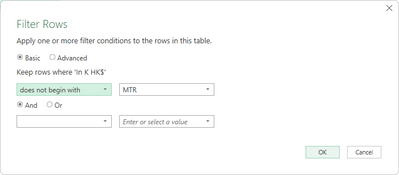
Now you just need to filter out the rows that do not start with MTR:
Regards
Miguel Félix
Proud to be a Super User!
Check out my blog: Power BI em PortuguêsHi @MFelix the solution worked perfectly (I just had to include another variable becaus I had more itens than initialazed with "MTR" but I used or with text.startwith and worked!
Thank you very much for your help!
Hi @lucasmnx ,
Format column 2 to text then do a replace values, does not matter what you put on that replace you will get a formula similar to this one:
= Table.ReplaceValue(#"Changed Type","a","aa",Replacer.ReplaceText,{"Column2"})
Now replace the value of this step by the following formula:
= Table.ReplaceValue(#"Changed Type", each [Column2] , each if Text.StartsWith ([#"In K HK$"] , "MTR") then [#"In K HK$"] else null,Replacer.ReplaceValue,{"Column2"})
Do a fill down:
Now you just need to filter out the rows that do not start with MTR:
Regards
Miguel Félix
Proud to be a Super User!
Check out my blog: Power BI em PortuguêsCheck out the November 2025 Power BI update to learn about new features.
Advance your Data & AI career with 50 days of live learning, contests, hands-on challenges, study groups & certifications and more!