cancel
Showing results for 
Search instead for 
Did you mean: 

The Power BI Data Visualization World Championships is back! Get ahead of the game and start preparing now! Learn more

Reply
lucasmnx
Frequent Visitor

Split row interval into colmun content

Hello,


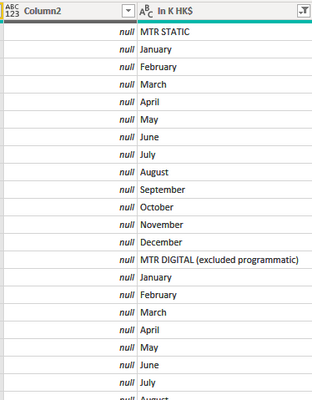
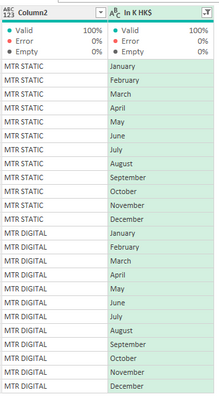
I have a file with a column labels with a interval and months and I want to transform this content into content to the column 2, so in the column 2 I will have MTR STATIC repeated on side from january to december and MTR DIGITAL to another jan to dez interval.


I tried with split column > by positions but won't had success.


lucasmnx_0-1660073802131.png


Thank you


1 ACCEPTED SOLUTION
MFelix
Super User
Super User

Hi @lucasmnx ,


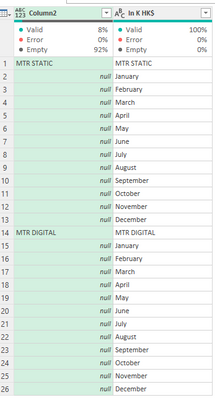
Format column 2 to text then do a replace values, does not matter what you put on that replace you will get a formula similar to this one:

= Table.ReplaceValue(#"Changed Type","a","aa",Replacer.ReplaceText,{"Column2"})


Now replace the value of this step by the following formula:

= Table.ReplaceValue(#"Changed Type", each [Column2] , each if Text.StartsWith ([#"In K HK$"] , "MTR") then [#"In K HK$"] else null,Replacer.ReplaceValue,{"Column2"})

MFelix_0-1660398743137.png

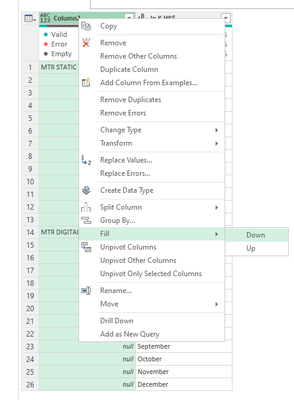
Do a fill down:

MFelix_1-1660398767073.pngMFelix_2-1660398775453.png


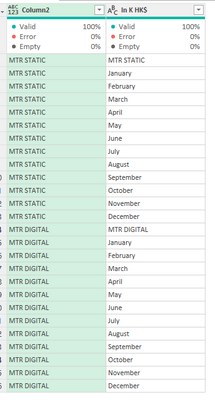
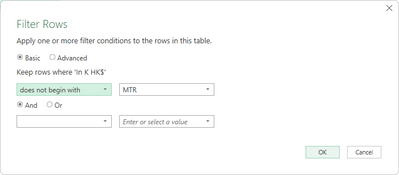
Now you just need to filter out the rows that do not start with MTR:

MFelix_4-1660398831742.pngMFelix_5-1660398845741.png


Regards

Miguel Félix


Did I answer your question? Mark my post as a solution!

Proud to be a Super User!

Check out my blog: Power BI em Português


View solution in original post

2 REPLIES 2
lucasmnx
Frequent Visitor

Hi @MFelix the solution worked perfectly (I just had to include another variable becaus I had more itens than initialazed with "MTR" but I used or with text.startwith and worked!


Thank you very much for your help!

MFelix
Super User
Super User

Hi @lucasmnx ,


Format column 2 to text then do a replace values, does not matter what you put on that replace you will get a formula similar to this one:

= Table.ReplaceValue(#"Changed Type","a","aa",Replacer.ReplaceText,{"Column2"})


Now replace the value of this step by the following formula:

= Table.ReplaceValue(#"Changed Type", each [Column2] , each if Text.StartsWith ([#"In K HK$"] , "MTR") then [#"In K HK$"] else null,Replacer.ReplaceValue,{"Column2"})

MFelix_0-1660398743137.png

Do a fill down:

MFelix_1-1660398767073.pngMFelix_2-1660398775453.png


Now you just need to filter out the rows that do not start with MTR:

MFelix_4-1660398831742.pngMFelix_5-1660398845741.png


Regards

Miguel Félix


Did I answer your question? Mark my post as a solution!

Proud to be a Super User!

Check out my blog: Power BI em Português


Helpful resources

Announcements
November Power BI Update Carousel

Power BI Monthly Update - November 2025

Check out the November 2025 Power BI update to learn about new features.

Fabric Data Days Carousel

Fabric Data Days

Advance your Data & AI career with 50 days of live learning, contests, hands-on challenges, study groups & certifications and more!

FabCon Atlanta 2026 carousel

FabCon Atlanta 2026

Join us at FabCon Atlanta, March 16-20, for the ultimate Fabric, Power BI, AI and SQL community-led event. Save $200 with code FABCOMM.

Top Solution Authors
Top Kudoed Authors