This time we’re going bigger than ever. Fabric, Power BI, SQL, AI and more. We're covering it all. You won't want to miss it.
Learn moreLevel up your Power BI skills this month - build one visual each week and tell better stories with data! Get started
I would be grateful for any assistance with my latest challenge in PowerBI/PowerQuery
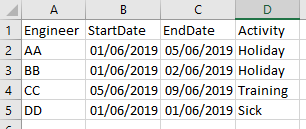
I have a table that records engineer recurring activities on a single row with a start and end date .....
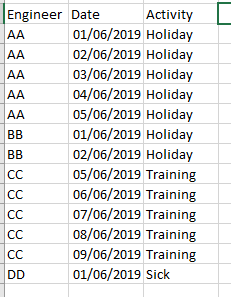
I need to extrapolate these to another table with one row per engineer per day per activity, like so ...
I've been struggling with this for days ...
Thanks
Solved! Go to Solution.
Thank for the reply. In the end I actualy resolved this ... I discovered CROSSJOIN and CALENDER and used these to dynamically create the new table in DAX
Hi Pcav
You could try adding an extra column in the Query Editor using this formulae:
Table.AddColumn(#"Previous Step","Date", each {Number.From([StartDate])..Number.From([EndDate])})
That will create a list of all the dates between your start and end (inclusive). You can then expand the column out using the little icon in it's header and it'll create a row per person per day. Once you've expended the Date column out you'll need to format it as a date otherwise it'll look like a bunch of numbers - those numbers are actually date codes.
Thank for the reply. In the end I actualy resolved this ... I discovered CROSSJOIN and CALENDER and used these to dynamically create the new table in DAX
Check out the April 2026 Power BI update to learn about new features.
Sign up to receive a private message when registration opens and key events begin.
If you have recently started exploring Fabric, we'd love to hear how it's going. Your feedback can help with product improvements.
| User | Count |
|---|---|
| 30 | |
| 24 | |
| 23 | |
| 17 | |
| 17 |
| User | Count |
|---|---|
| 61 | |
| 35 | |
| 30 | |
| 23 | |
| 22 |