Join us at FabCon Atlanta from March 16 - 20, 2026, for the ultimate Fabric, Power BI, AI and SQL community-led event. Save $200 with code FABCOMM.
Register now!The Power BI Data Visualization World Championships is back! Get ahead of the game and start preparing now! Learn more
I would be grateful for any assistance with my latest challenge in PowerBI/PowerQuery
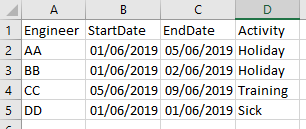
I have a table that records engineer recurring activities on a single row with a start and end date .....
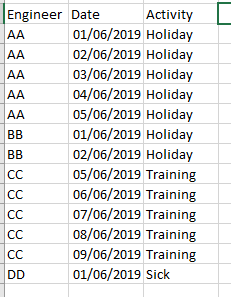
I need to extrapolate these to another table with one row per engineer per day per activity, like so ...
I've been struggling with this for days ...
Thanks
Solved! Go to Solution.
Thank for the reply. In the end I actualy resolved this ... I discovered CROSSJOIN and CALENDER and used these to dynamically create the new table in DAX
Hi Pcav
You could try adding an extra column in the Query Editor using this formulae:
Table.AddColumn(#"Previous Step","Date", each {Number.From([StartDate])..Number.From([EndDate])})
That will create a list of all the dates between your start and end (inclusive). You can then expand the column out using the little icon in it's header and it'll create a row per person per day. Once you've expended the Date column out you'll need to format it as a date otherwise it'll look like a bunch of numbers - those numbers are actually date codes.
Thank for the reply. In the end I actualy resolved this ... I discovered CROSSJOIN and CALENDER and used these to dynamically create the new table in DAX
The Power BI Data Visualization World Championships is back! Get ahead of the game and start preparing now!
| User | Count |
|---|---|
| 37 | |
| 36 | |
| 33 | |
| 31 | |
| 28 |
| User | Count |
|---|---|
| 129 | |
| 88 | |
| 79 | |
| 68 | |
| 63 |