This time we’re going bigger than ever. Fabric, Power BI, SQL, AI and more. We're covering it all. You won't want to miss it.
Learn moreDid you hear? There's a new SQL AI Developer certification (DP-800). Start preparing now and be one of the first to get certified. Register now
Hey,
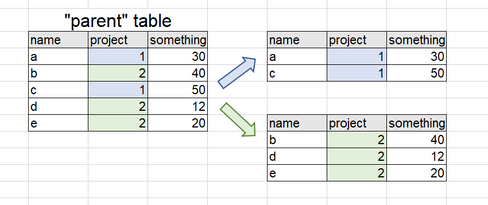
I wanted to ask if there is a query that allows a dynamic distribution of two tables?
Similar to the "append" query.
I am aware of the option of "duplicate a table" and then making a suitable "filter", but the idea is that the tables will automatically update from the "parent" table.
I add a small sample in the picture below.
Thanks,
Inbal
Solved! Go to Solution.
You can try this in DAX as well.
In Modelling -> New Table
Child_TableA= FILTER ( Parent_table, Parent_Table[Project] = 1)
Child_TableB= FILTER ( Parent_table, Parent_Table[Project] = 2)
In this way, you will have 2 dynamic child tables .
Hope this helps.
Thanks
Raj
You can try this in DAX as well.
In Modelling -> New Table
Child_TableA= FILTER ( Parent_table, Parent_Table[Project] = 1)
Child_TableB= FILTER ( Parent_table, Parent_Table[Project] = 2)
In this way, you will have 2 dynamic child tables .
Hope this helps.
Thanks
Raj
I am new to Power BI, although I have been working with Power Query in Excel for some time. I realize that rajendran's post was from several months ago, but I do appreciate the simplicity of his proposed solution. In response to similar questions posted elsewhere, I have typically read suggestions to duplicate the query and apply different criteria for each copy of the query. For small datasets, this might be workable. But for large datasets, duplicating that data pull repeatedly is very inefficient. rajendran's solution requires only a single data pull, which to me seems the most-efficient way to perform this kind of task. And I learned something new, which is also a plus! ![]()
@Anonymous Totally agree - @Anonymous's solution was much better than mine, and I learned something new too. This is why getting involved with the forum is a good thing - sometimes you find the way you do things is good; sometimes someone shows you how to do it better.
You seem to already have the answer you need.
You could either dupliacate parent and filter one for project 1 and the other for project 2 (essentially, exactly what you said you are already aware of!).
Otherwise, you could reference the parent table twice, and do the same filtering on both referencing queries.
I'm struggling to see why these are not suitable options - perhaps more information is needed?
Check out the April 2026 Power BI update to learn about new features.
Sign up to receive a private message when registration opens and key events begin.
If you have recently started exploring Fabric, we'd love to hear how it's going. Your feedback can help with product improvements.
| User | Count |
|---|---|
| 34 | |
| 31 | |
| 30 | |
| 21 | |
| 16 |
| User | Count |
|---|---|
| 65 | |
| 53 | |
| 31 | |
| 23 | |
| 23 |