cancel
Showing results for 
Search instead for 
Did you mean: 

Learn from the best! Meet the four finalists headed to the FINALS of the Power BI Dataviz World Championships! Register now

Reply
Anonymous
Not applicable

Split One column into multiple columns

HI,

I am new to power bi and sql. Im working on power bi audit log report file. The file contains a column 'AuditDate'  n it has multiple columns in it, I need to split that column into multiple columns  using sql. 


the column has values like this


AuditDate

------------

"{""Id"":""44de2468"",""RecordType"":20,""CreationTime"":""2018-08-03T12:30:34"",""Operation"":""ViewReport"",""OrganizationId"":""779558"",""UserType"":0,""UserKey"":""FFFA3DA"",""Workload"":""PowerBI"",""UserId"":""john@abc.com"",""ClientIP"":""9.5.3.26"",""UserAgent"":""Mozilla\/5.0 (Windows NT 10.0;"",""Activity"":""ViewReport"",""ItemName"":""Sales"",""WorkSpaceName"":""TeamITO"",""DatasetName"":""Sales1"",""ReportName"":""Sales1"",""WorkspaceId"":""e8eaa0ca"",""ObjectId"":""Sales1"",""DatasetId"":""4c5d-ad45-eb6546"",""ReportId"":""4cb0-99ad-de41b5160c47"",""IsSuccess"":true,""DatapoolRefreshScheduleType"":""None"",""DatapoolType"":""Undefined""}"


basically i need to split this column into 


id                RecordType       CreationTime                   Operaration     OrganizationID  UserType

---------------------------------------------------------------------------------------------------------

44de2468        20                2018-08-03T12:30:34         ViewReport        779558               0


can anyone help with the sql query for this?

1 ACCEPTED SOLUTION
Anonymous
Not applicable

Hi @Anonymous,


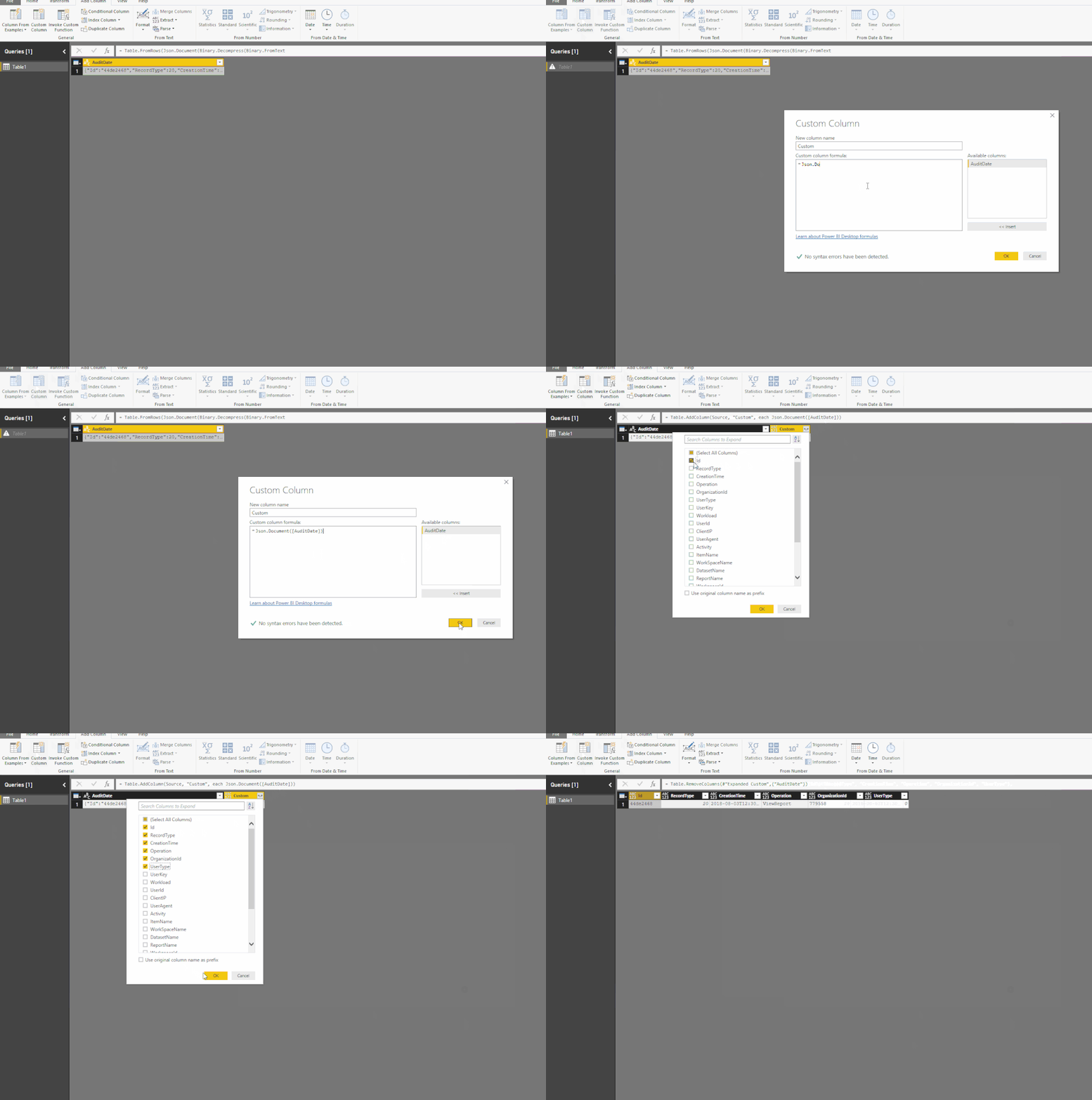
You can direct handle these text value in query edit.

40.gif

Fully query:

let
    Source = Table.FromRows(Json.Document(Binary.Decompress(Binary.FromText("bZFbb4IwFMe/iuFpD4OVq5e9zGlMyDI1gvNBfCjtUeuAklJndNl3H5aOuMSEl/L7X3p61mvjOzFCmhiDxPA8Co4X9BLjMTEWQLig8bmEmjmo/jMSgCXjRcxyUHoH2T0T1Z8b287ARQPXU9ZZCUIpleqDwWkBJReygWKHC3ZRXPd2u33fb1qXFQjdifTxDc5KNZlMhu54qGQrLj4zjhv7nJ9AvIatX6ce+L54wSmxCM8VG2UMChnOFe1bvuVaTtC6hrsaKvTOLyzLcJI8+RbqPKxYQfmp6kzjjo0s9KwcQyLZF5PnexOGEvIp1m8U4Qyq9s5RiQm0LAach/FM0TGWuAL532frTVyj75FrZHWN1CNDDzBGBDcPnR6ASE1uTLrpb+fEpyamnm9CGvhecNPYKlJk9vuYmhQ8O/XtABGv20xaRUdCoKoHHEhxBJ1ecp4tYCug2kdkD/SYgd5pYkx5Ae01rsKWLAsKW1ZA3fpjbDa/", BinaryEncoding.Base64), Compression.Deflate)), let _t = ((type text) meta [Serialized.Text = true]) in type table [AuditDate = _t]),
    #"Added Custom" = Table.AddColumn(Source, "Custom", each Json.Document([AuditDate])),
    #"Expanded Custom" = Table.ExpandRecordColumn(#"Added Custom", "Custom", {"Id", "RecordType", "CreationTime", "Operation", "OrganizationId", "UserType"}, {"Id", "RecordType", "CreationTime", "Operation", "OrganizationId", "UserType"}),
    #"Removed Columns" = Table.RemoveColumns(#"Expanded Custom",{"AuditDate"})
in
    #"Removed Columns"


Regards,

Xiaoxin Sheng

View solution in original post

2 REPLIES 2
Anonymous
Not applicable

Hi @Anonymous,


You can direct handle these text value in query edit.

40.gif

Fully query:

let
    Source = Table.FromRows(Json.Document(Binary.Decompress(Binary.FromText("bZFbb4IwFMe/iuFpD4OVq5e9zGlMyDI1gvNBfCjtUeuAklJndNl3H5aOuMSEl/L7X3p61mvjOzFCmhiDxPA8Co4X9BLjMTEWQLig8bmEmjmo/jMSgCXjRcxyUHoH2T0T1Z8b287ARQPXU9ZZCUIpleqDwWkBJReygWKHC3ZRXPd2u33fb1qXFQjdifTxDc5KNZlMhu54qGQrLj4zjhv7nJ9AvIatX6ce+L54wSmxCM8VG2UMChnOFe1bvuVaTtC6hrsaKvTOLyzLcJI8+RbqPKxYQfmp6kzjjo0s9KwcQyLZF5PnexOGEvIp1m8U4Qyq9s5RiQm0LAach/FM0TGWuAL532frTVyj75FrZHWN1CNDDzBGBDcPnR6ASE1uTLrpb+fEpyamnm9CGvhecNPYKlJk9vuYmhQ8O/XtABGv20xaRUdCoKoHHEhxBJ1ecp4tYCug2kdkD/SYgd5pYkx5Ae01rsKWLAsKW1ZA3fpjbDa/", BinaryEncoding.Base64), Compression.Deflate)), let _t = ((type text) meta [Serialized.Text = true]) in type table [AuditDate = _t]),
    #"Added Custom" = Table.AddColumn(Source, "Custom", each Json.Document([AuditDate])),
    #"Expanded Custom" = Table.ExpandRecordColumn(#"Added Custom", "Custom", {"Id", "RecordType", "CreationTime", "Operation", "OrganizationId", "UserType"}, {"Id", "RecordType", "CreationTime", "Operation", "OrganizationId", "UserType"}),
    #"Removed Columns" = Table.RemoveColumns(#"Expanded Custom",{"AuditDate"})
in
    #"Removed Columns"


Regards,

Xiaoxin Sheng

moonpie100
Frequent Visitor

Hi.


I am not sure if this will work or not. But I thought I would give it a shot.


Click on Edit Queries.

Make sure that you have the table where data is stored selected, and then click on the column you wish to split.


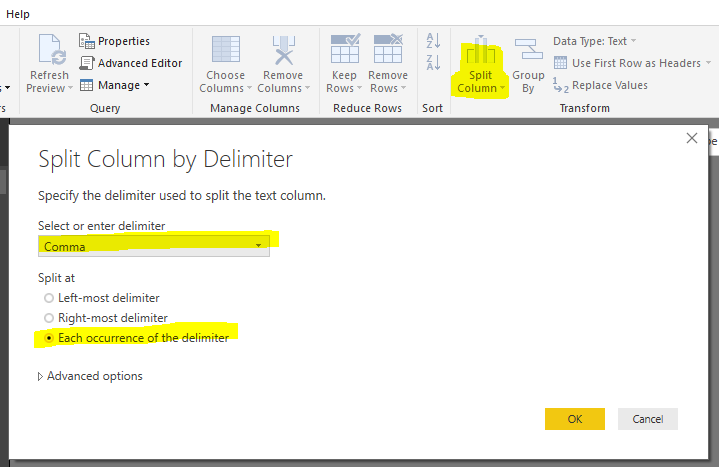
Then Click on the Split Column Icon.


It looks as though your data fields are separated by commas, so choose the comma option under 'Select or enter delimiter'


split column.PNG

and then select the 'Each Occurence of the delimiter' where it says split at. 


And then click on OK.


I hope this helps.


Helpful resources

Announcements
New to Fabric survey Carousel

New to Fabric Survey

If you have recently started exploring Fabric, we'd love to hear how it's going. Your feedback can help with product improvements.

Power BI DataViz World Championships carousel

Power BI DataViz World Championships - June 2026

A new Power BI DataViz World Championship is coming this June! Don't miss out on submitting your entry.

Join our Fabric User Panel

Join our Fabric User Panel

Share feedback directly with Fabric product managers, participate in targeted research studies and influence the Fabric roadmap.

March Power BI Update Carousel

Power BI Community Update - March 2026

Check out the March 2026 Power BI update to learn about new features.