cancel
Showing results for 
Search instead for 
Did you mean: 

Learn from the best! Meet the four finalists headed to the FINALS of the Power BI Dataviz World Championships! Register now

Reply
eamonnj1982
Frequent Visitor

Split Columns

I have a column of merged data which stores a type and a number and sometimes several types and numbers.


I would like to br able to report on the different types and their values but I can't figure out the best way to do this. 


An example of the data in this column is shown below....


Anyone have any thoughts?  Many thanks


COLUMN A

Type C: 8; Type F: 2;Type B: 4;Type L: 4;

Type A: 15; Type C: 15;

Type C: 6; Type B: 6;


3 REPLIES 3
wynhopkins
Most Valuable Professional

@BhaveshPatel shows a good solution.  One thing to consider is to be careful when the number of items to split may increase (I couldn't quite tell from the screen shots if Bhavesh's solution handles this)


see this article for what I'm referring to

https://www.linkedin.com/pulse/take-care-when-splitting-cells-wyn-hopkins


MVP | Author of Power BI for the Excel Analyst | Speaker | Power BI & Excel Developer & Instructor | YouTube- 5 million views | Fan of Power Query & XLOOKUP | Purpose: Making life easier for people through applying and sharing knowledge.

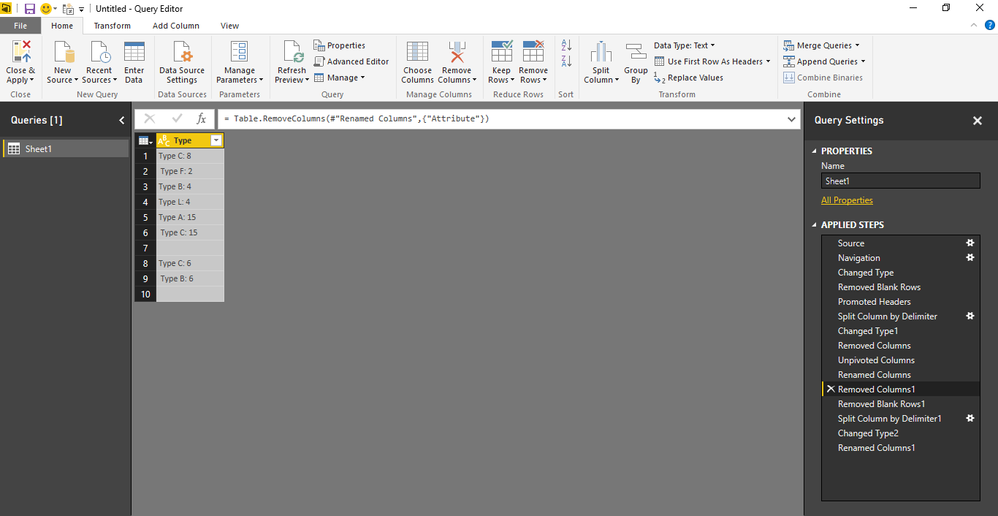
This is your sample column, "Type C: 8; Type F: 2;Type B: 4;Type L: 4;"

Split first by the delimiter ';' and then split the resulting colums by delimiter ':'. Shouldn't cause a probem ideally 

BhaveshPatel
Super User
Super User

Hi There,


You can use the split columns functionality in query mode. Please refer to this attached photos for stepwise procedure.

scr3.PNG


scr4.PNG


scr5.PNG


scr6.PNG


scr7.PNG


Thanks & Regards,

Bhavesh 

Thanks & Regards,
Bhavesh

Love the Self Service BI.
Please use the 'Mark as answer' link to mark a post that answers your question. If you find a reply helpful, please remember to give Kudos.

Helpful resources

Announcements
Join our Fabric User Panel

Join our Fabric User Panel

Share feedback directly with Fabric product managers, participate in targeted research studies and influence the Fabric roadmap.

February Power BI Update Carousel

Power BI Monthly Update - February 2026

Check out the February 2026 Power BI update to learn about new features.

FabCon Atlanta 2026 carousel

FabCon Atlanta 2026

Join us at FabCon Atlanta, March 16-20, for the ultimate Fabric, Power BI, AI and SQL community-led event. Save $200 with code FABCOMM.