Join us at FabCon Atlanta from March 16 - 20, 2026, for the ultimate Fabric, Power BI, AI and SQL community-led event. Save $200 with code FABCOMM.
Register now!The Power BI Data Visualization World Championships is back! Get ahead of the game and start preparing now! Learn more
I have a column of merged data which stores a type and a number and sometimes several types and numbers.
I would like to br able to report on the different types and their values but I can't figure out the best way to do this.
An example of the data in this column is shown below....
Anyone have any thoughts? Many thanks
COLUMN A
Type C: 8; Type F: 2;Type B: 4;Type L: 4;
Type A: 15; Type C: 15;
Type C: 6; Type B: 6;
@BhaveshPatel shows a good solution. One thing to consider is to be careful when the number of items to split may increase (I couldn't quite tell from the screen shots if Bhavesh's solution handles this)
see this article for what I'm referring to
https://www.linkedin.com/pulse/take-care-when-splitting-cells-wyn-hopkins
This is your sample column, "Type C: 8; Type F: 2;Type B: 4;Type L: 4;"
Split first by the delimiter ';' and then split the resulting colums by delimiter ':'. Shouldn't cause a probem ideally
Hi There,
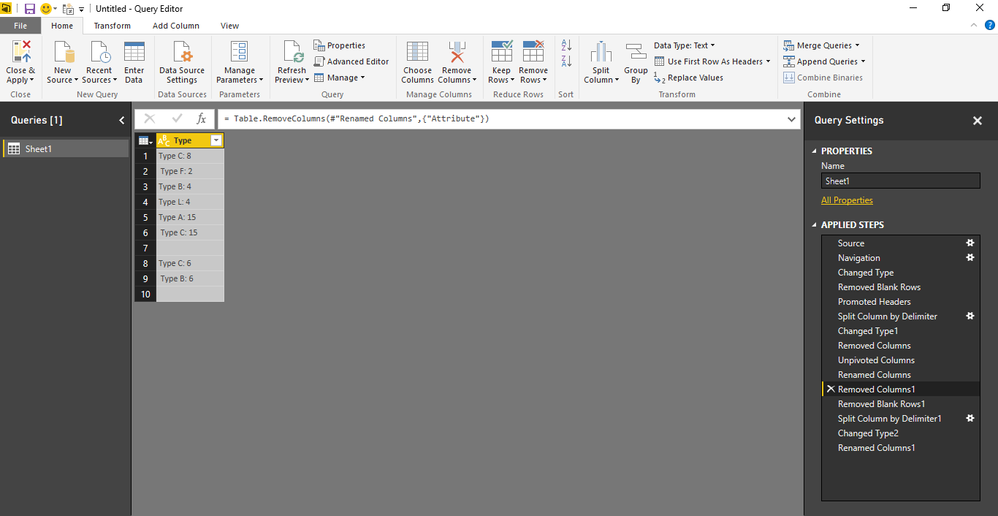
You can use the split columns functionality in query mode. Please refer to this attached photos for stepwise procedure.
Thanks & Regards,
Bhavesh
The Power BI Data Visualization World Championships is back! Get ahead of the game and start preparing now!
| User | Count |
|---|---|
| 150 | |
| 126 | |
| 109 | |
| 79 | |
| 54 |