Join us in Barcelona for FabCon and SQLCon, September 28 - October 1, 2026.
This is best Fabric, Power BI, SQL and AI community event. How do we know? The last event sold out! Save €200 with code FABCMTY200.
Register now- Power BI forums
- Get Help with Power BI
- Desktop
- Service
- Report Server
- Power Query
- Mobile Apps
- Developer
- DAX Commands and Tips
- Custom Visuals Development Discussion
- Health and Life Sciences
- Power BI Spanish forums
- Translated Spanish Desktop
- Training and Consulting
- Instructor Led Training
- Dashboard in a Day for Women, by Women
- Galleries
- Data Stories Gallery
- Themes Gallery
- Contests Gallery
- QuickViz Gallery
- Quick Measures Gallery
- Visual Calculations Gallery
- Fabric Apps Gallery
- Notebook Gallery
- Translytical Task Flow Gallery
- TMDL Gallery
- R Script Showcase
- Webinars and Video Gallery
- Ideas
- Custom Visuals Ideas (read-only)
- Issues
- Issues
- Events
- Upcoming Events
July 28 - August 9 | Final Round of the Power BI Dataviz World Championships. This is your chance. Learn more
- Power BI forums
- Forums
- Get Help with Power BI
- Desktop
- Re: Specifying thousand separator dax function
- Subscribe to RSS Feed
- Mark Topic as New
- Mark Topic as Read
- Float this Topic for Current User
- Bookmark
- Subscribe
- Printer Friendly Page

- Mark as New
- Bookmark
- Subscribe
- Mute
- Subscribe to RSS Feed
- Permalink
- Report Inappropriate Content
Specifying thousand separator dax function
Hello,
I currently have a measure that makes a count. and what I wanted was for the thousands to be separated. but the only option that appears to me is to put the comma.
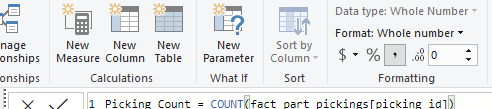
does anyone have any idea how to put a dot instead of the comma?
Best Regards,
JO
Solved! Go to Solution.


- Mark as New
- Bookmark
- Subscribe
- Mute
- Subscribe to RSS Feed
- Permalink
- Report Inappropriate Content
Hi,
I create a sample as below:
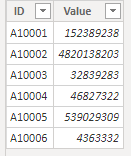
Then i create a measure to test:
Measure 1 = SUM('Table'[Value])Then try this measure:
Measure 2 =
VAR t =
    SUM ( 'Table'[Value] ) & ""
VAR t1 =
    GENERATESERIES ( 1, LEN ( t ) + ROUNDDOWN ( LEN ( t ) / 3, 0 ), 1 )
VAR t2 =
    ADDCOLUMNS (
        t1,
        "Char", IF (
            [Value] / 4
                = ROUND ( [Value] / 4, 0 ),
            ".",
            MID ( t, LEN ( t ) - [Value] + 1 + ROUNDDOWN ( [Value] / 4, 0 ), 1 )
        )
    )
VAR result =
    CONCATENATEX ( t2, [Char], "", [Value], DESC )
RETURN
    result
The result shows:
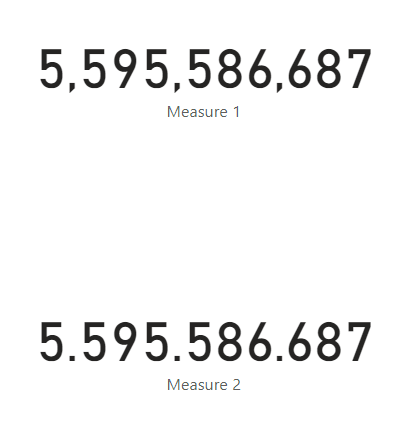
Hope this helps.
Best Regards,
Giotto Zhi
- Mark as New
- Bookmark
- Subscribe
- Mute
- Subscribe to RSS Feed
- Permalink
- Report Inappropriate Content
Hi,
I have found a short version for the measures that works good for me. I prefer using recommended DAX separators but it has its disadvantages such as a comma as a thousand separator. See measure below to solve this issue.
- Mark as New
- Bookmark
- Subscribe
- Mute
- Subscribe to RSS Feed
- Permalink
- Report Inappropriate Content
Hi,
I create a sample as below:
Then i create a measure to test:
Measure 1 = SUM('Table'[Value])Then try this measure:
Measure 2 =
VAR t =
    SUM ( 'Table'[Value] ) & ""
VAR t1 =
    GENERATESERIES ( 1, LEN ( t ) + ROUNDDOWN ( LEN ( t ) / 3, 0 ), 1 )
VAR t2 =
    ADDCOLUMNS (
        t1,
        "Char", IF (
            [Value] / 4
                = ROUND ( [Value] / 4, 0 ),
            ".",
            MID ( t, LEN ( t ) - [Value] + 1 + ROUNDDOWN ( [Value] / 4, 0 ), 1 )
        )
    )
VAR result =
    CONCATENATEX ( t2, [Char], "", [Value], DESC )
RETURN
    result
The result shows:
Hope this helps.
Best Regards,
Giotto Zhi

- Mark as New
- Bookmark
- Subscribe
- Mute
- Subscribe to RSS Feed
- Permalink
- Report Inappropriate Content
Add
Similary 646343 is shown as ,646,343 but should be 646,343
- Mark as New
- Bookmark
- Subscribe
- Mute
- Subscribe to RSS Feed
- Permalink
- Report Inappropriate Content
- Mark as New
- Bookmark
- Subscribe
- Mute
- Subscribe to RSS Feed
- Permalink
- Report Inappropriate Content
Hi @Anonymous ,
I can't use this measure because I'm counting the whole numbers, I don't have decimal places ... it's not a decimal number...
- Mark as New
- Bookmark
- Subscribe
- Mute
- Subscribe to RSS Feed
- Permalink
- Report Inappropriate Content
Hi @Anonymous ,
yes i try all the reginal settings, but not work on my side .... that is why i'm look to find a way to this in DAX
- Mark as New
- Bookmark
- Subscribe
- Mute
- Subscribe to RSS Feed
- Permalink
- Report Inappropriate Content
Hi @Anonymous
change windows regional setting
And set seperator as dot.
Apply chnages and open pbix file again.
Thanks & regards,
Pravin Wattamwar
www.linkedin.com/in/pravin-p-wattamwar
If I resolve your problem Mark it as a solution and give kudos.
- Mark as New
- Bookmark
- Subscribe
- Mute
- Subscribe to RSS Feed
- Permalink
- Report Inappropriate Content
Hi @Anonymous
I think you want decimal as comma seperaor?
Check this,
https://community.powerbi.com/t5/Desktop/Thousand-Separator-and-Decimal-Separator/td-p/194928
one more way is
measure=format([measure1],"##.###")
Thanks & regards,
Pravin Wattamwar
www.linkedin.com/in/pravin-p-wattamwar
If I resolve your problem Mark it as a solution and give kudos.
- Mark as New
- Bookmark
- Subscribe
- Mute
- Subscribe to RSS Feed
- Permalink
- Report Inappropriate Content
Hi @Anonymous , i'm sorry, but no. that is not what i'm looking for....
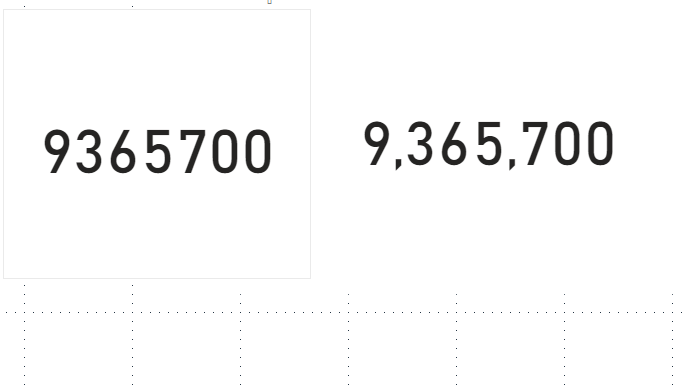
what I want, is that instead of being separated by a comma(,) it's separated by a dot(.) (it's an integer without decimal places)
Best Regards,
JO
- Mark as New
- Bookmark
- Subscribe
- Mute
- Subscribe to RSS Feed
- Permalink
- Report Inappropriate Content
Hi @Anonymous
I have shared one link in last reply have you tried it?
You need to change region setting.
Thanks,
Pravin
- Mark as New
- Bookmark
- Subscribe
- Mute
- Subscribe to RSS Feed
- Permalink
- Report Inappropriate Content
- Mark as New
- Bookmark
- Subscribe
- Mute
- Subscribe to RSS Feed
- Permalink
- Report Inappropriate Content
Hi @Anonymous , i try a lot of times the reginal settings, but is a dead end.... do you know how can i made this happen in dax ?
Helpful resources

FabCon & SQLCon – Barcelona 2026
Join us in Barcelona for FabCon and SQLCon, the Fabric, Power BI, SQL, and AI community event. Save €200 with code FABCMTY200.

Fabric Community Sticker Challenge - Barcelona 2026
If you love stickers, then you will definitely want to check out our community sticker challenge, Barcelona edition!

Power BI Monthly Update - July 2026
Check out the July 2026 Power BI update to learn about new features.

Power BI DataViz World Championships - June 2026
A new Power BI DataViz World Championship is coming this June! Don't miss out on submitting your entry.

| User | Count |
|---|---|
| 25 | |
| 23 | |
| 19 | |
| 17 | |
| 14 |


| User | Count |
|---|---|
| 24 | |
| 23 | |
| 20 | |
| 20 | |
| 19 |


