cancel
Showing results for 
Search instead for 
Did you mean: 

We've captured the moments from FabCon & SQLCon that everyone is talking about, and we are bringing them to the community, live and on-demand. Starts on April 14th. Register now

Reply
erikakushwah
New Member

Source file Error

Hello, 


I have been using an excel file as my data source and the file is on SharePoint, so that multiple users can access the data and make changes. I have stored the PowerBI file on SharePoint as well.


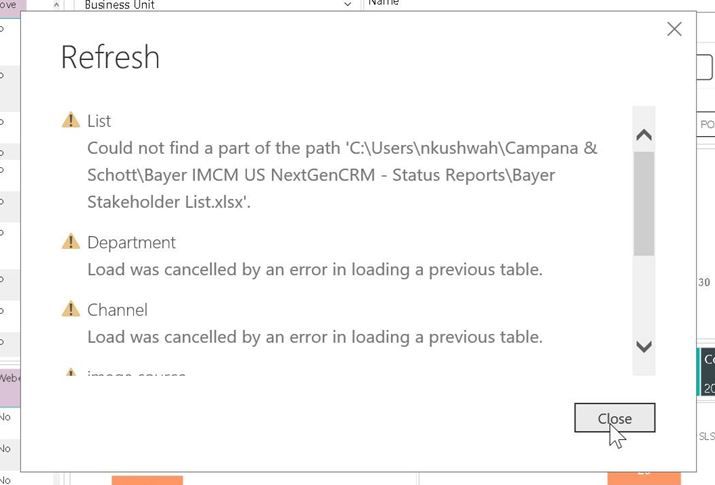
While making the reports, I synced the SharePoint folder to my computer and made the reports on PowerBI. I thought that the files will be still from an online source.  I am able to make changes and see the changes made in PowerBI as well. However, my whenever my teammates make changes in the data source (excel) they cannot see the refreshed Power BI report and they get error like below:
 

 1.jpg


I am the one who has set up the PowerBI report page and published the report to Microsft Teams. I can successfully publish reports on MS Teams, but my teammates cannot even get past refreshing the report. Everyone is using the PowerBI file created by me. 


So my question is how can I get data from a SharePoint excel file and the make the PowerBI on SharePoint so that evryone can access the data source as well as the PowerBI report? 


I would really appreciate if someone can give a solution to this. 


Thank you!


1 REPLY 1
davehus
Memorable Member
Memorable Member

Hi - It would appear that the filepath is mapped to a local machine and not a sharepoint filepath.. You can get the sharepoint filepath by right-clicking on Open File Location and copying the filepath. Replace everything up to \filepath name and update the source in your BI report. This should work for you provided all your colleagues have access to the sharepoint

file.


The link below might help.


https://powerbi.microsoft.com/en-us/blog/combining-excel-files-hosted-on-a-sharepoint-folder/


Hopefully this helps.


D


Helpful resources

Announcements
New to Fabric survey Carousel

New to Fabric Survey

If you have recently started exploring Fabric, we'd love to hear how it's going. Your feedback can help with product improvements.

Power BI DataViz World Championships carousel

Power BI DataViz World Championships - June 2026

A new Power BI DataViz World Championship is coming this June! Don't miss out on submitting your entry.

Join our Fabric User Panel

Join our Fabric User Panel

Share feedback directly with Fabric product managers, participate in targeted research studies and influence the Fabric roadmap.

March Power BI Update Carousel

Power BI Community Update - March 2026

Check out the March 2026 Power BI update to learn about new features.