Don't miss your chance to take the Fabric Data Engineer (DP-700) exam on us!
Learn moreThe FabCon + SQLCon recap series starts April 14th at 8am Pacific. If you’re tracking where AI is going inside Fabric, this first session is a can't miss. Register now
Hi!
Would like to ask how to control which layer of data will be presented on top for azure map visual.
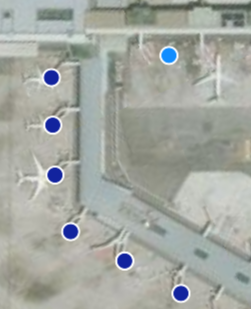
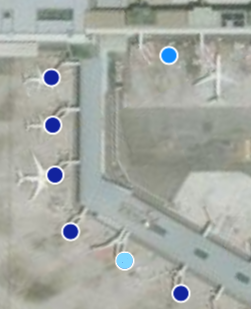
In the below data viz, there's 2 categories (Light blue and dark blue), some of the bubble has multiple categories, and I would like the light blue to override the dark blue.
| |
| Original | Expectation |
Thanks!
Chinwen
Solved! Go to Solution.
@v-angzheng-msft Thanks for the reponse! I've found out that they sort the legend based on descending order alphabetically. So I added a number in front to control which legend will be on top (e.g. "2 Light blue", "1 Dark Blue" ..... and light blue will always appear on top)
P.S. This is for the Azure map visual
Hi, @Anonymous
Here are some references that may be helpful:
https://docs.microsoft.com/en-us/azure/azure-maps/power-bi-visual-understanding-layers
https://docs.microsoft.com/en-us/azure/azure-maps/power-bi-visual-add-bubble-layer
https://www.youtube.com/watch?v=ivgIA5FOmfo
https://www.youtube.com/watch?v=-r5K5kmb8wc
Best Regards,
Community Support Team _ Zeon Zheng
If this post helps, then please consider Accept it as the solution to help the other members find it more quickly.
@v-angzheng-msft Thanks for the reponse! I've found out that they sort the legend based on descending order alphabetically. So I added a number in front to control which legend will be on top (e.g. "2 Light blue", "1 Dark Blue" ..... and light blue will always appear on top)
P.S. This is for the Azure map visual
If you have recently started exploring Fabric, we'd love to hear how it's going. Your feedback can help with product improvements.
A new Power BI DataViz World Championship is coming this June! Don't miss out on submitting your entry.
Share feedback directly with Fabric product managers, participate in targeted research studies and influence the Fabric roadmap.
| User | Count |
|---|---|
| 53 | |
| 40 | |
| 37 | |
| 19 | |
| 18 |
| User | Count |
|---|---|
| 69 | |
| 67 | |
| 34 | |
| 33 | |
| 30 |