cancel
Showing results for 
Search instead for 
Did you mean: 

July 28 - August 9 | Final Round of the Power BI Dataviz World Championships. This is your chance. Learn more

Reply
Breacher
New Member

Sorting Rows in Matrix

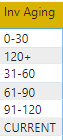
I'm fairly new to PowerBI and I'm currently messing with data.  In excel, you are able to sort PivotTable rows with ease.  In Power Bi, it's a bit more difficult and I've yet to figure it out.  Below is what I'm trying to customer sort.


scrre111.png

6 REPLIES 6
mussaenda
Community Champion
Community Champion

you can add another column to assign a number for each row and then arranged it using that column

Where would I add the column, in the Bi data window? Each row has about 15 lines of data, so would I assign a number to each row title?

Try this:


let
    Source = Table.FromRows(Json.Document(Binary.Decompress(Binary.FromText("i45WMtA1NlCK1YlWMjQy0AYzjA11zSBCZoa6lhCWpaEuUB7MdA4NCnL1C1GKjQUA", BinaryEncoding.Base64), Compression.Deflate)), let _t = ((type text) meta [Serialized.Text = true]) in type table [#"Inv Aging" = _t]),
    #"Changed Type" = Table.TransformColumnTypes(Source,{{"Inv Aging", type text}}),
    #"Added Custom" = Table.AddColumn(#"Changed Type", "Custom", each if [Inv Aging] = "0-30"
then 1
else

if [Inv Aging] = "31-60"
then 2
else

if [Inv Aging] = "61-90"
then 3
else

if [Inv Aging] = "91-120"
then 4
else

if [Inv Aging] = "120+"
then 5
else

if [Inv Aging] = "CURRENT"
then 6
else

null)
in
    #"Added Custom"


2019_11_21_10_09_38_Untitled_Power_BI_Desktop.png

You can go to edit queries then add custom column


if [Inv Aging] = "0-30"
then 1
else

if [Inv Aging] = "31-60"
then 2
else

if [Inv Aging] = "61-90"
then 3
else

if [Inv Aging] = "91-120"
then 4
else

if [Inv Aging] = "120+"
then 5
else

if [Inv Aging] = "CURRENT"
then 6
else

null


then close and apply entries

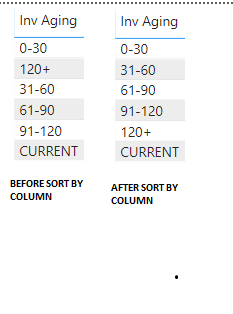
then click the Inv Aging and choose modeling

then Sort by Column

then choose the column you just made


The thing is, Inv Aging is not a column listed in the query editor.  It is a column I added in BI data.

Okay, it is not indicated on your question that it is a calculated column.

Anyway, there is still a solution for that.

Provide a sample pbix file to help you easier.


Thanks

Helpful resources

Announcements
FabCon and SQLCon Barcelona 2026

FabCon & SQLCon – Barcelona 2026

Join us in Barcelona for FabCon and SQLCon, the Fabric, Power BI, SQL, and AI community event. Save €200 with code FABCMTY200.

Fabric Community Sticker Design Challenge Barcelona Carousel

Fabric Community Sticker Challenge - Barcelona 2026

If you love stickers, then you will definitely want to check out our community sticker challenge, Barcelona edition!

July Power BI Update Carousel

Power BI Monthly Update - July 2026

Check out the July 2026 Power BI update to learn about new features.

Power BI DataViz World Championships carousel

Power BI DataViz World Championships - June 2026

A new Power BI DataViz World Championship is coming this June! Don't miss out on submitting your entry.

Top Solution Authors