Join us at FabCon Atlanta from March 16 - 20, 2026, for the ultimate Fabric, Power BI, AI and SQL community-led event. Save $200 with code FABCOMM.
Register now!Learn from the best! Meet the four finalists headed to the FINALS of the Power BI Dataviz World Championships! Register now
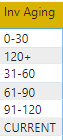
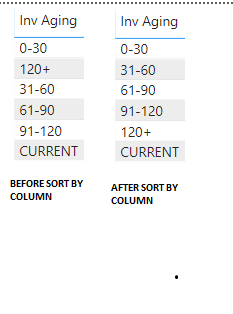
I'm fairly new to PowerBI and I'm currently messing with data. In excel, you are able to sort PivotTable rows with ease. In Power Bi, it's a bit more difficult and I've yet to figure it out. Below is what I'm trying to customer sort.
you can add another column to assign a number for each row and then arranged it using that column
Try this:
let
Source = Table.FromRows(Json.Document(Binary.Decompress(Binary.FromText("i45WMtA1NlCK1YlWMjQy0AYzjA11zSBCZoa6lhCWpaEuUB7MdA4NCnL1C1GKjQUA", BinaryEncoding.Base64), Compression.Deflate)), let _t = ((type text) meta [Serialized.Text = true]) in type table [#"Inv Aging" = _t]),
#"Changed Type" = Table.TransformColumnTypes(Source,{{"Inv Aging", type text}}),
#"Added Custom" = Table.AddColumn(#"Changed Type", "Custom", each if [Inv Aging] = "0-30"
then 1
else
if [Inv Aging] = "31-60"
then 2
else
if [Inv Aging] = "61-90"
then 3
else
if [Inv Aging] = "91-120"
then 4
else
if [Inv Aging] = "120+"
then 5
else
if [Inv Aging] = "CURRENT"
then 6
else
null)
in
#"Added Custom"
You can go to edit queries then add custom column
if [Inv Aging] = "0-30"
then 1
else
if [Inv Aging] = "31-60"
then 2
else
if [Inv Aging] = "61-90"
then 3
else
if [Inv Aging] = "91-120"
then 4
else
if [Inv Aging] = "120+"
then 5
else
if [Inv Aging] = "CURRENT"
then 6
else
null
then close and apply entries
then click the Inv Aging and choose modeling
then Sort by Column
then choose the column you just made
The thing is, Inv Aging is not a column listed in the query editor. It is a column I added in BI data.
Okay, it is not indicated on your question that it is a calculated column.
Anyway, there is still a solution for that.
Provide a sample pbix file to help you easier.
Thanks
Share feedback directly with Fabric product managers, participate in targeted research studies and influence the Fabric roadmap.
Check out the February 2026 Power BI update to learn about new features.
| User | Count |
|---|---|
| 50 | |
| 47 | |
| 29 | |
| 15 | |
| 14 |
| User | Count |
|---|---|
| 89 | |
| 74 | |
| 40 | |
| 26 | |
| 25 |