Don't miss your chance to take the Fabric Data Engineer (DP-600) exam for FREE! Find out how by attending the DP-600 session on April 23rd (pacific time), live or on-demand.
Learn moreNext up in the FabCon + SQLCon recap series: The roadmap for Microsoft SQL and Maximizing Developer experiences in Fabric. All sessions are available on-demand after the live show. Register now
Hi everyone,
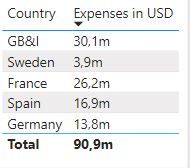
I am new here and have a problem with sorting a table. I created a Measure to format the numbers in million. For example if I have 1.000.000 it should show 1m. I made this with this measure:
Hi @Anonymous,
As what @FrankAT mentioned, FORMAT function returns a string so your millions are not sorted by the number value but alphabetically. You may follow what he suggested.
Hi @Anonymous ,
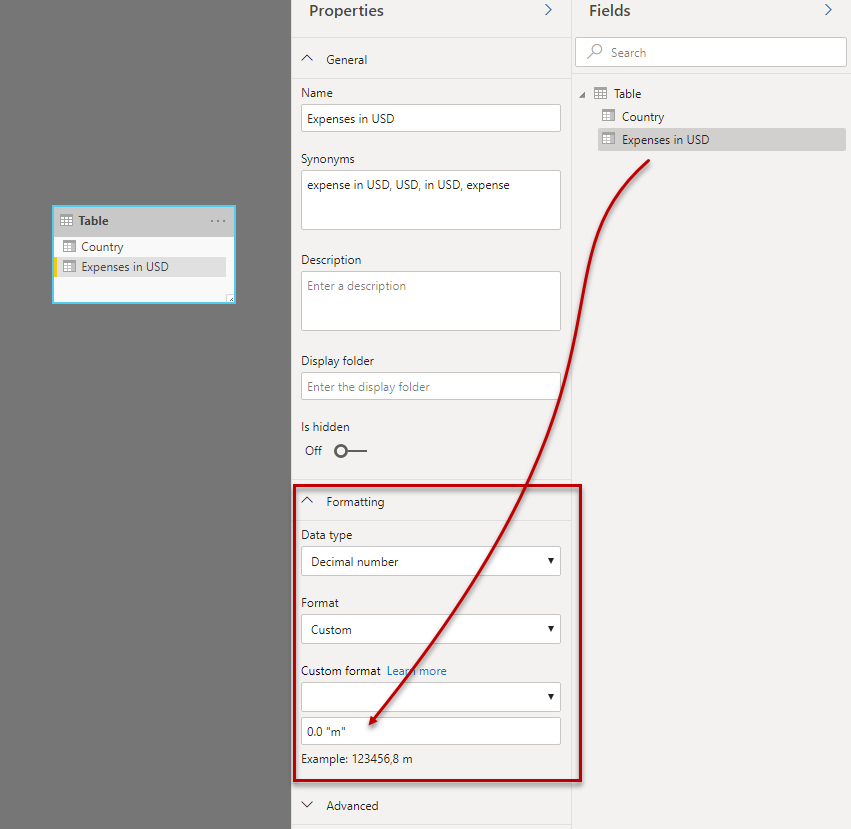
the FORMAT function returns a string. Use the format settings in model view, see figure:
Regards FrankAT
Hi @FrankAT,
thank you for your help. I changed the Format in Model and it works now. I have another problem. Now it does not show me numbers like 0,12. It shows only a 0. I use the following format: #,##0,,."m". I tried to adjust the Format with 0,00 but it doesnt work.
Any suggestions? Excel is much more easier for me ^^.
Thank you in advance
Albert
If you have recently started exploring Fabric, we'd love to hear how it's going. Your feedback can help with product improvements.
A new Power BI DataViz World Championship is coming this June! Don't miss out on submitting your entry.
Experience the highlights from FabCon & SQLCon, available live and on-demand starting April 14th.
| User | Count |
|---|---|
| 47 | |
| 44 | |
| 40 | |
| 20 | |
| 15 |
| User | Count |
|---|---|
| 70 | |
| 68 | |
| 32 | |
| 27 | |
| 25 |