This time we’re going bigger than ever. Fabric, Power BI, SQL, AI and more. We're covering it all. You won't want to miss it.
Learn moreLevel up your Power BI skills this month - build one visual each week and tell better stories with data! Get started
Hi everyone,
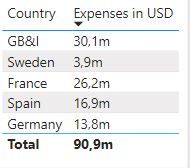
I am new here and have a problem with sorting a table. I created a Measure to format the numbers in million. For example if I have 1.000.000 it should show 1m. I made this with this measure:
Hi @Anonymous,
As what @FrankAT mentioned, FORMAT function returns a string so your millions are not sorted by the number value but alphabetically. You may follow what he suggested.
Hi @Anonymous ,
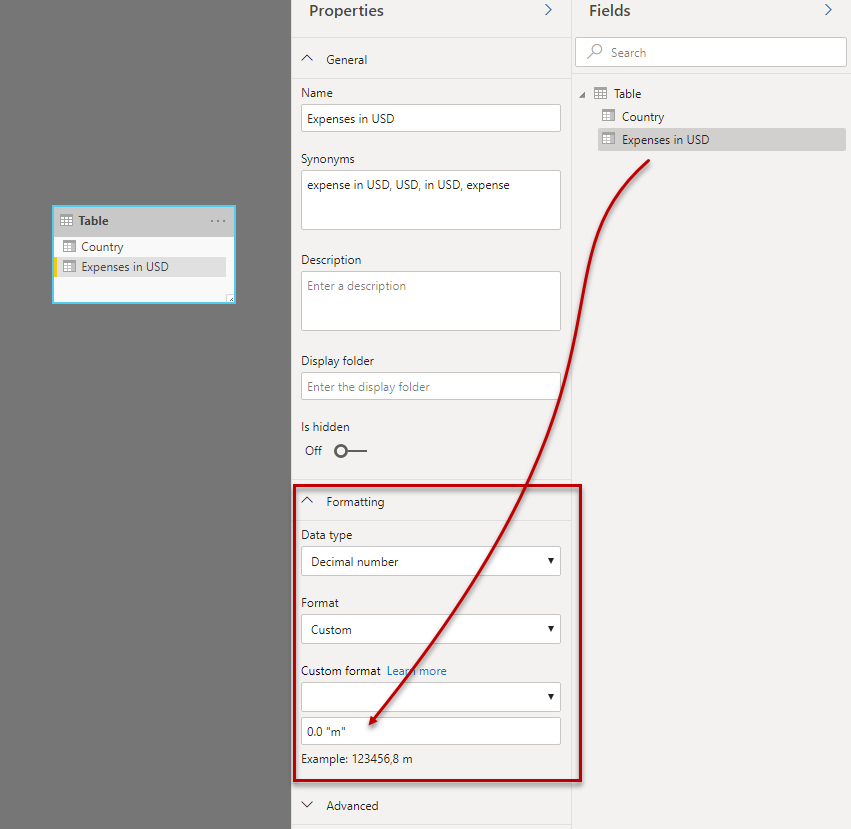
the FORMAT function returns a string. Use the format settings in model view, see figure:
Regards FrankAT
Hi @FrankAT,
thank you for your help. I changed the Format in Model and it works now. I have another problem. Now it does not show me numbers like 0,12. It shows only a 0. I use the following format: #,##0,,."m". I tried to adjust the Format with 0,00 but it doesnt work.
Any suggestions? Excel is much more easier for me ^^.
Thank you in advance
Albert
Check out the April 2026 Power BI update to learn about new features.
Sign up to receive a private message when registration opens and key events begin.
If you have recently started exploring Fabric, we'd love to hear how it's going. Your feedback can help with product improvements.
| User | Count |
|---|---|
| 38 | |
| 28 | |
| 27 | |
| 22 | |
| 18 |
| User | Count |
|---|---|
| 67 | |
| 37 | |
| 32 | |
| 25 | |
| 25 |