cancel
Showing results for 
Search instead for 
Did you mean: 

Learn from the best! Meet the four finalists headed to the FINALS of the Power BI Dataviz World Championships! Register now

Reply
Anonymous
Not applicable

Sorting Calculated Time Column

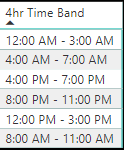
I created a calculated column which will bucket items into 4hr time bands. My goal is to be able to sort the time bands by their true time from AM - PM. Current problem is that this column will sort by their respective number and not in the order of time.  I tried to sort by HourNum but I keep getting the following error message: 

"We Cant' sort the '4hr Time Band' column by 'HourNum'. There can't be more than one value in 'HourNum' for the same value in '4hr Time Band'. 


Any ideas on how I can sort? 


Below is the syntax on how I created the calculated column: 


4hr Time Band =
SWITCH(
TRUE(),
'Time'[HourNum] >= 0 && 'Time'[HourNum] <= 3, "12:00 AM - 3:00 AM",
'Time'[HourNum] >= 4 && 'Time'[HourNum] <= 7, "4:00 AM - 7:00 AM",
'Time'[HourNum] >= 8 && 'Time'[HourNum] <= 11, "8:00 AM - 11:00 AM",
'Time'[HourNum] >= 12 && 'Time'[HourNum] <= 15, "12:00 PM - 3:00 PM",
'Time'[HourNum] >= 16 && 'Time'[HourNum] <= 19, "4:00 PM - 7:00 PM",
'Time'[HourNum] >= 20 && 'Time'[HourNum] <= 23, "8:00 PM - 11:00 PM"
)
 
Below is a screenshot of the current sort. 
 
timebandsort.png
1 ACCEPTED SOLUTION
OwenAuger
Super User
Super User

@Anonymous 

There are a few ways to do this, but one would be to create another column containing the first hour of each Time Band, which will have a 1:1 correspondence with 4hr Time Band.

For example

4hr Time Band Start = 
QUOTIENT( 'Time'[HourNum], 4 ) * 4

Then set 4hr Time Band to sort by 4hr Time Band Start


Regards,

Owen


Owen Auger
Did I answer your question? Mark my post as a solution!
Blog
LinkedIn

View solution in original post

3 REPLIES 3
dax
Community Support
Community Support

Hi win_toeknee,


If you want to sort by time duration, you could try to create another column like below


5hr Time Band = 
SWITCH(
TRUE(),
'Time'[HourNum] >= 0 && 'Time'[HourNum] <= 3, 1,
'Time'[HourNum] >= 4 && 'Time'[HourNum] <= 7, 2,
'Time'[HourNum] >= 8 && 'Time'[HourNum] <= 11, 3,
'Time'[HourNum] >= 12 && 'Time'[HourNum] <= 15, 4,
'Time'[HourNum] >= 16 && 'Time'[HourNum] <= 19, 5,
'Time'[HourNum] >= 20 && 'Time'[HourNum] <= 23, 6
)

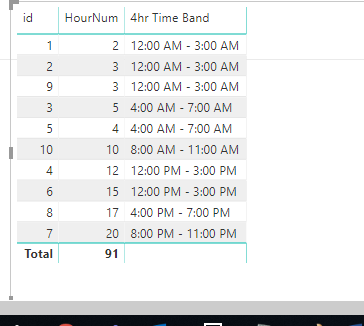
Then you could [id]  and [4hr Time Band] sort by [5hr Time Band] like below

55.png56.png

Best Regards,

Zoe Zhi


If this post helps, then please consider Accept it as the solution to help the other members find it more quickly


mussaenda
Super User
Super User

adding an index maybe to sort the column?

OwenAuger
Super User
Super User

@Anonymous 

There are a few ways to do this, but one would be to create another column containing the first hour of each Time Band, which will have a 1:1 correspondence with 4hr Time Band.

For example

4hr Time Band Start = 
QUOTIENT( 'Time'[HourNum], 4 ) * 4

Then set 4hr Time Band to sort by 4hr Time Band Start


Regards,

Owen


Owen Auger
Did I answer your question? Mark my post as a solution!
Blog
LinkedIn

Helpful resources

Announcements
New to Fabric survey Carousel

New to Fabric Survey

If you have recently started exploring Fabric, we'd love to hear how it's going. Your feedback can help with product improvements.

Power BI DataViz World Championships carousel

Power BI DataViz World Championships - June 2026

A new Power BI DataViz World Championship is coming this June! Don't miss out on submitting your entry.

Join our Fabric User Panel

Join our Fabric User Panel

Share feedback directly with Fabric product managers, participate in targeted research studies and influence the Fabric roadmap.

March Power BI Update Carousel

Power BI Community Update - March 2026

Check out the March 2026 Power BI update to learn about new features.