Join us at FabCon Atlanta from March 16 - 20, 2026, for the ultimate Fabric, Power BI, AI and SQL community-led event. Save $200 with code FABCOMM.
Register now!The Power BI Data Visualization World Championships is back! Get ahead of the game and start preparing now! Learn more
Hi, i have one table with 4 columns like machine, country ,city and status.
pls take a look at the table:
| ABC123 | Spain | Madrid | Bad |
| ABC123 | Yoke | Yoke Left | Critical |
| ABC123 | Ireland | Dublin | Not present |
| ABC123 | Germany | Hamburg | Not present |
| ABC123 | Spain | Barcelona | Not present |
| ABC123 | England | London | Not present |
| ABC123 | Portugal | Braga | Not present |
| ABC123 | Denmark | Copenhagen | Not present |
| ABC123 | Spain | Sevilla | OK |
| ABC123 | Italy | Rome | OK |
| ABC123 | Italy | Milan | OK |
| ABC123 | Italy | Turin | OK |
| ABC123 | Portugal | Lisbon | OK |
| ABC123 | Germany | Dortmund | OK |
| ABC123 | Portugal | Porto | OK |
| ABC123 | Estonia | Tallinn | OK |
| ABC123 | Yoke | Yoke Right | OK |
| ABC123 | Italy | Bologna | OK |
| ABC123 | Germany | Berlin | Really Bad |
and i want to create a alert matrix , I have hierarchy columns country/city, the country level:
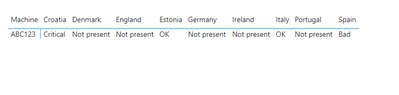
and as you can on germany, the status is Not present.
City level:
and i have a alert in Berlin.
I wonder if is possible to change then value in the country level in Germany from Not present to Really Bad, I can only select first or last status in matrix values.
Thanks all help.
Solved! Go to Solution.
Hi @Anonymous,
Is this what you want?
Try measure as:
Measure =
IF(
MAX('Table'[country])="Germany",
"Really Bad",
MAX('Table'[status])
)
The pbix is attached.
Best Regards,
Link
If this post helps then please consider Accept it as the solution to help the other members find it more quickly.
Hi @Anonymous,
Is this what you want?
Try measure as:
Measure =
IF(
MAX('Table'[country])="Germany",
"Really Bad",
MAX('Table'[status])
)
The pbix is attached.
Best Regards,
Link
If this post helps then please consider Accept it as the solution to help the other members find it more quickly.
@Anonymous , we can control column sorting(using sort column). But here you are using status as a measure. And in matrix measure sorting can only happen on grand total
refer to my video on column sorting
Hi , I have edit my post, I dont want to sort the column instead I want to change the values in the highest level of hierchy.
The Power BI Data Visualization World Championships is back! Get ahead of the game and start preparing now!
| User | Count |
|---|---|
| 38 | |
| 35 | |
| 33 | |
| 32 | |
| 29 |
| User | Count |
|---|---|
| 134 | |
| 96 | |
| 78 | |
| 67 | |
| 65 |
