Join us at FabCon Atlanta from March 16 - 20, 2026, for the ultimate Fabric, Power BI, AI and SQL community-led event. Save $200 with code FABCOMM.
Register now!The Power BI Data Visualization World Championships is back! It's time to submit your entry. Live now!
Hi, i have one table with 4 columns like machine, country ,city and status.
pls take a look at the table:
| ABC123 | Spain | Madrid | Bad |
| ABC123 | Yoke | Yoke Left | Critical |
| ABC123 | Ireland | Dublin | Not present |
| ABC123 | Germany | Hamburg | Not present |
| ABC123 | Spain | Barcelona | Not present |
| ABC123 | England | London | Not present |
| ABC123 | Portugal | Braga | Not present |
| ABC123 | Denmark | Copenhagen | Not present |
| ABC123 | Spain | Sevilla | OK |
| ABC123 | Italy | Rome | OK |
| ABC123 | Italy | Milan | OK |
| ABC123 | Italy | Turin | OK |
| ABC123 | Portugal | Lisbon | OK |
| ABC123 | Germany | Dortmund | OK |
| ABC123 | Portugal | Porto | OK |
| ABC123 | Estonia | Tallinn | OK |
| ABC123 | Yoke | Yoke Right | OK |
| ABC123 | Italy | Bologna | OK |
| ABC123 | Germany | Berlin | Really Bad |
and i want to create a alert matrix , I have hierarchy columns country/city, the country level:
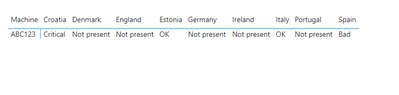
and as you can on germany, the status is Not present.
City level:
and i have a alert in Berlin.
I wonder if is possible to change then value in the country level in Germany from Not present to Really Bad, I can only select first or last status in matrix values.
Thanks all help.
Solved! Go to Solution.
Hi @Anonymous,
Is this what you want?
Try measure as:
Measure =
IF(
MAX('Table'[country])="Germany",
"Really Bad",
MAX('Table'[status])
)
The pbix is attached.
Best Regards,
Link
If this post helps then please consider Accept it as the solution to help the other members find it more quickly.
Hi @Anonymous,
Is this what you want?
Try measure as:
Measure =
IF(
MAX('Table'[country])="Germany",
"Really Bad",
MAX('Table'[status])
)
The pbix is attached.
Best Regards,
Link
If this post helps then please consider Accept it as the solution to help the other members find it more quickly.
@Anonymous , we can control column sorting(using sort column). But here you are using status as a measure. And in matrix measure sorting can only happen on grand total
refer to my video on column sorting
Hi , I have edit my post, I dont want to sort the column instead I want to change the values in the highest level of hierchy.
The Power BI Data Visualization World Championships is back! It's time to submit your entry.
Check out the January 2026 Power BI update to learn about new features.
| User | Count |
|---|---|
| 61 | |
| 48 | |
| 35 | |
| 25 | |
| 23 |
| User | Count |
|---|---|
| 134 | |
| 110 | |
| 59 | |
| 39 | |
| 32 |
