Get certified for free when you join Fabric Data Days 2026 and dive into Fabric, Power BI, SQL, AI, and other essential data skills.
Join nowTry your skills in the Power BI Dataviz World Championship! Round one ends June 26. Join now
Is it possible to sort by selection in slicer? If I select february 2016 to januari 2017 I want to see february in the chart as the first bar on the left followed by march... until january is the last bar in the chart.
Hi @Anonymous,
can you give us a screenshot of your data?
What data type/columns do you have in your data?
Do you have a date table?
without having seen any of your data: you need an additional column, e.g. saying "2016-12", "2017-01" etc - this would be the easiest way to make it sort like you want
HTH,
Frank
I have this:
Table Names
Name Created ABC 2016-02-01 13:12:28 DEF 2016-02-07 11:07:00 GHI 2016-02-07 11:10:52
Then in the chart I have a date-hierarchy on the axis and I have deleted Year, Quarter and Day so Month is the only one left.
quick solution would be to add a calc column:
YYYY-MM = FORMAT( Table[Created], "YYYY-MMM")
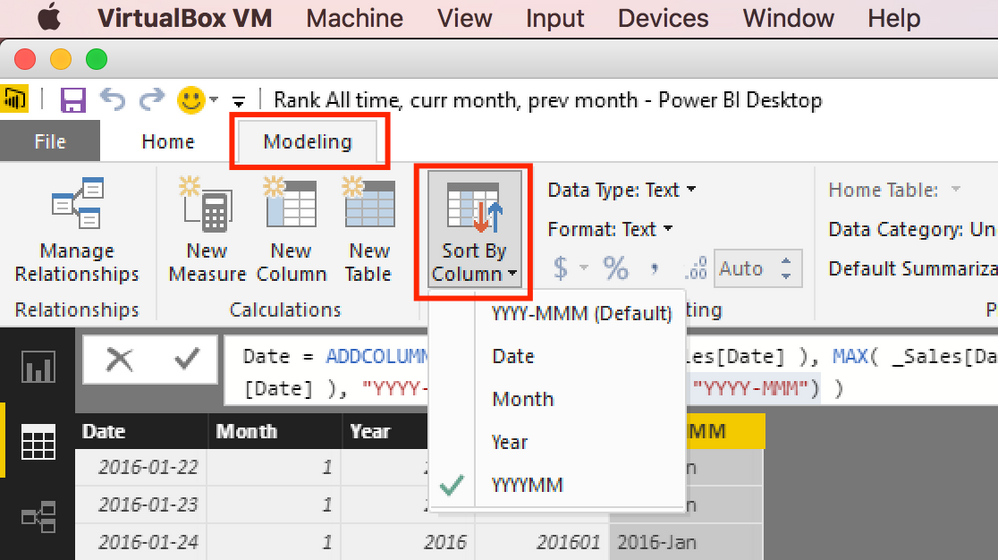
Then make the new column be sorted by Created column:
put the new column on your axis in the visual.
HTH,
Frank
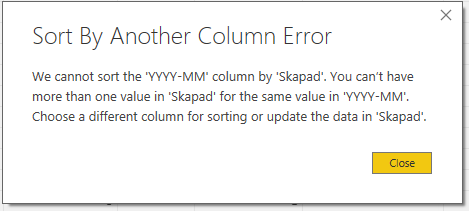
When I do that I get this: ("Skapad = Created")
Hi @Anonymous
ok, please add a second calc column like this
YYYY-MM-Sort = FORMAT( Table[Created], "YYYY-MM")
(note: only two "M" here in the format) - sort the first calc column by this second column - will work 🙂
HTH,
Frank
Don't miss out on Data Days, June 15 through August 7. Learn Fabric, Power BI, SQL, AI and more.
Check out the May 2026 Power BI update to learn about new features.
| User | Count |
|---|---|
| 22 | |
| 22 | |
| 21 | |
| 20 | |
| 12 |
| User | Count |
|---|---|
| 58 | |
| 53 | |
| 41 | |
| 34 | |
| 32 |