
cancel
Showing results for 
Search instead for 
Did you mean: 

We've captured the moments from FabCon & SQLCon that everyone is talking about, and we are bringing them to the community, live and on-demand. Starts on April 14th. Register now

Reply
fanhui3
Helper I
Helper I

Sort by column not working

Hi, 

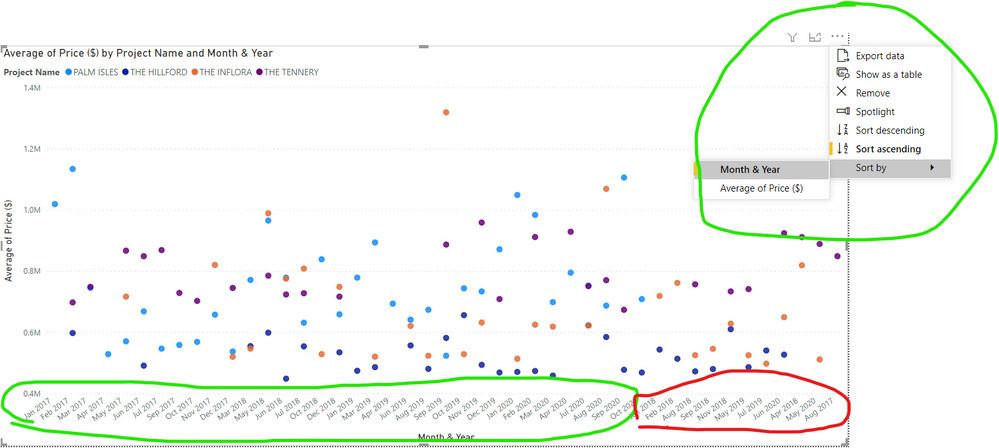
I created a sort column for my dataset and sort the data with that column. However, my date axis in my visual is still not sorted. Some help please? Thank you. 


I will also enclose my PBIX file here:  https://www.dropbox.com/s/mcvemjaq1166wsc/Price%20Analyser%20Date%20request%20help%20%28sort%20Colum...


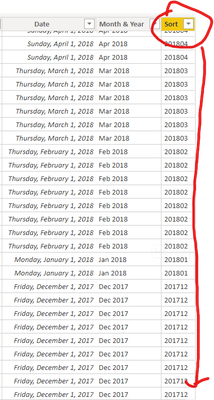
Sort Column.png

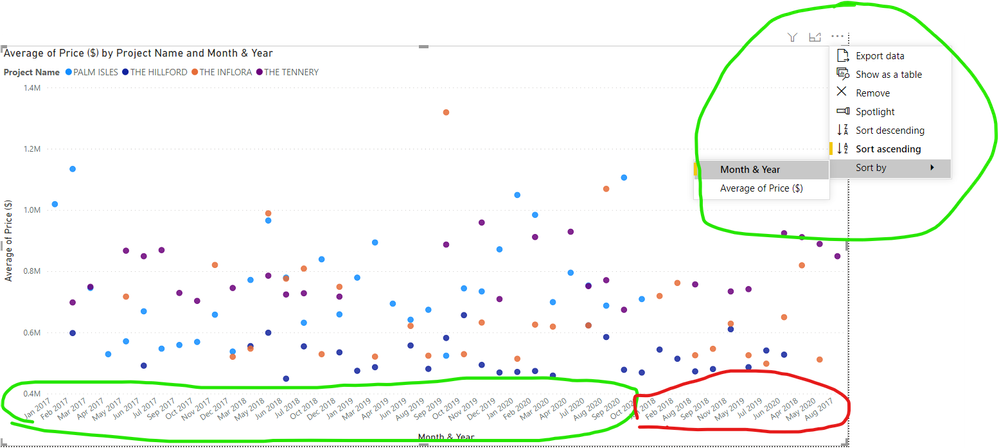
erroreous x axis.png

7 REPLIES 7

OMG found it!!!! Thanks to pragmatic works! 
1 - Click your visual

2 - Open you Calendar Table and Click the column you want the visual to sort by

3 - Under Column Tools, Sort by that column

4 - Cry in happiness.... 

https://www.youtube.com/watch?v=gUPLhh1Esm0 

Syndicate_Admin
Administrator
Administrator

Good

exactly the same thing happens to me, I have tried everything they indicate but it still does not change the order in the graph.

In 'data' it is sorted by the column idmes:

VictoriaMar_0-1634745320537.png

But then the graph is sorted from lowest to highest (and the most recent is left at the end:

VictoriaMar_1-1634745548729.pngVictoriaMar_2-1634745661507.png

Also when I hit the 3 points of the visual object, sorting does not allow me to select the idmes (I have it in columns).

VictoriaMar_3-1634745852277.png

It just lets me sort by the fields that are in rows and Values (which start with p and C):

VictoriaMar_4-1634745924703.png

Would anyone know how to help me? why doesn't you allow me to order by month?

Thank you very much!

mahoneypat
Microsoft Employee
Microsoft Employee

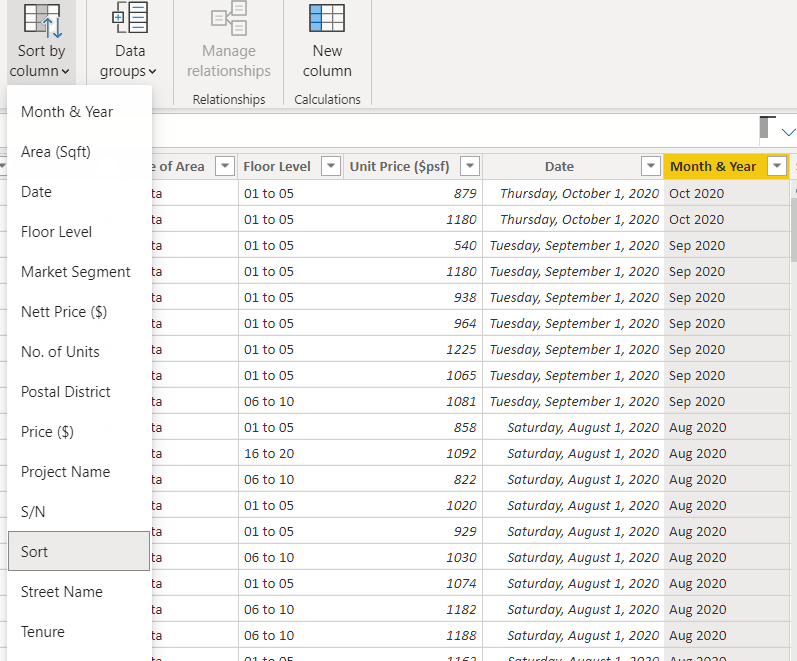
I downloaded your file and got it working from your existing Sort column.  In Data View, highlight/select the Month & Year column, then on the ribbon choose Sort By Column and choose the Sort column.  Then, if needed, hit the ellipsis on the visual and choose to sort it by Month & Year and Ascending.


Regards,

Pat


Did I answer your question? Mark my post as a solution! Kudos are also appreciated!

To learn more about Power BI, follow me on Twitter or subscribe on YouTube.


@mahoneypa HoosierBI on YouTube


Hi Pat! 


I did what you instructed and I still see the following. Any idea where else went wrong? 


Sort Attempt.png

Still cannot .png

FrankAT
Community Champion
Community Champion

Hi @fanhui3 

I downloaded your sample pbix file and got the following solution:


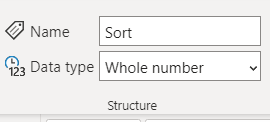
  1.  Select your column Sort and change the data type to whole number.
  2. In data view select your column Month & Year > tab Column tools > Sort by column > choose Sort.

The sort order of the chart axis changes immediatly.


With kind regards from the town where the legend of the 'Pied Piper of Hamelin' is at home
FrankAT (Proud to be a Datanaut)

HI @FrankAT 


At this point, I am starting to think there are problem with my software instead of the solutions. 

Sorted by sort.png

Sort Attempt.png

Still cannot .png

Oh yea, I would like to add. The problem only persist in scattered graph. Weird. 

Helpful resources

Announcements
New to Fabric survey Carousel

New to Fabric Survey

If you have recently started exploring Fabric, we'd love to hear how it's going. Your feedback can help with product improvements.

Power BI DataViz World Championships carousel

Power BI DataViz World Championships - June 2026

A new Power BI DataViz World Championship is coming this June! Don't miss out on submitting your entry.

Join our Fabric User Panel

Join our Fabric User Panel

Share feedback directly with Fabric product managers, participate in targeted research studies and influence the Fabric roadmap.

March Power BI Update Carousel

Power BI Community Update - March 2026

Check out the March 2026 Power BI update to learn about new features.