cancel
Showing results for 
Search instead for 
Did you mean: 

July 7 - July 17 | Round 2 of the Power BI Dataviz World Championships. Don't miss your chance! Learn more

Reply
jbrown_99
Regular Visitor

'Sort by Column' setting gets lost when using Power BI Data Set

I've created a Data Set and published to Power BI Service.  I have a 'Sort by Column' set on one of the query columns and this works successfully in the original .pbix.   However, when I use the published data set as a new 'Power BI Data Set' source in for another Power BI desktop .pbix, the 'Sort By Column' functionality is not working and I don't see a way to update this in the .pbix - since the data set is from the Service.   Any thoughts super appreciated.   

1 ACCEPTED SOLUTION
parry2k
Super User
Super User

@jbrown_99 if you connect to Power BI Dataset, you must add this sort by column to the original Power BI dataset file, and then it will work on the file that is connecting to the Power BI dataset.


Subscribe to the @PowerBIHowTo YT channel for an upcoming video on List and Record functions in Power Query!!

Learn Power BI and Fabric - subscribe to our YT channel - Click here: @PowerBIHowTo

If my solution proved useful, I'd be delighted to receive Kudos. When you put effort into asking a question, it's equally thoughtful to acknowledge and give Kudos to the individual who helped you solve the problem. It's a small gesture that shows appreciation and encouragement! ❤


Did I answer your question? Mark my post as a solution. Proud to be a Super User! Appreciate your Kudos 🙂
Feel free to email me with any of your BI needs.

View solution in original post

4 REPLIES 4
parry2k
Super User
Super User

@jbrown_99 if you connect to Power BI Dataset, you must add this sort by column to the original Power BI dataset file, and then it will work on the file that is connecting to the Power BI dataset.


Subscribe to the @PowerBIHowTo YT channel for an upcoming video on List and Record functions in Power Query!!

Learn Power BI and Fabric - subscribe to our YT channel - Click here: @PowerBIHowTo

If my solution proved useful, I'd be delighted to receive Kudos. When you put effort into asking a question, it's equally thoughtful to acknowledge and give Kudos to the individual who helped you solve the problem. It's a small gesture that shows appreciation and encouragement! ❤


Did I answer your question? Mark my post as a solution. Proud to be a Super User! Appreciate your Kudos 🙂
Feel free to email me with any of your BI needs.

Thanks everyone!   Yes, this was user error.  I double checked my original .pbix data and I'd lost the Sort By in it.  After reassigning the Sory By and republishing the data set,  it only took a simple refresh the second .pbix to see the Sory By working.      

Anonymous
Not applicable

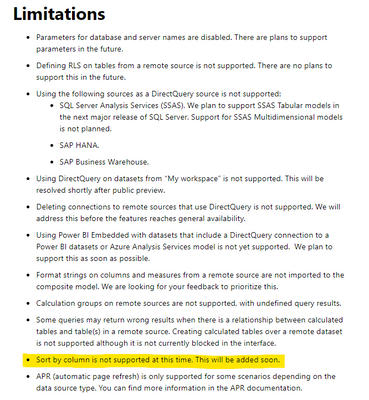
Hi @jbrown_99 , are you simply using a "live" connection, or are you attempting to make additional model changes using the new "DirectQuery for Live Connections" preview feature?

If the latter, "Sort by Column" is one of the initial limitations listed with the release of that feature.

https://powerbi.microsoft.com/en-us/blog/directquery-for-power-bi-datasets-and-azure-analysis-servic...


ebeery_1-1609903296537.png


amitchandak
Super User
Super User

@jbrown_99 , May be republish and try again.


Also, check when clicking on the base column,  do you see the sort column option under column tools.  This should be accessible from visualization view, if available

Share with Power BI Enthusiasts: Full Power BI Video (20 Hours) YouTube
Microsoft Fabric Series 60+ Videos YouTube
Microsoft Fabric Hindi End to End YouTube

Helpful resources

Announcements
FabCon and SQLCon Barcelona 2026

FabCon & SQLCon – Barcelona 2026

Join us in Barcelona for FabCon and SQLCon, the Fabric, Power BI, SQL, and AI community event. Save €200 with code FABCMTY200.

60 days of Data Days Carousel

Data Days 2026

Join Data Days 2026: 60 days of free live/on-demand sessions, challenges, study groups, and certification opportunities.

Power BI DataViz World Championships carousel

Power BI DataViz World Championships - June 2026

A new Power BI DataViz World Championship is coming this June! Don't miss out on submitting your entry.

Top Solution Authors