Join us at FabCon Atlanta from March 16 - 20, 2026, for the ultimate Fabric, Power BI, AI and SQL community-led event. Save $200 with code FABCOMM.
Register now!The Power BI Data Visualization World Championships is back! Get ahead of the game and start preparing now! Learn more
Hello,
Please see below requirements,
How can i sorting out rows ,so that matching positive and negative numbers are found and sorted next to each other?
BEFORE | |||
Date | Type | Amount | Result |
9/1/2015 | R | 45 | Y |
13/01/2016 | B | 50 | Y |
13/01/2016 | X | -62 | N |
9/1/2015 | R | -45 | N |
9/1/2015 | BA | 80 | Y |
9/1/2015 | B | -50 | N |
8/2/2005 | X | 62 | Y |
9/1/2015 | BA | -80 | N |
AFTER | |||
Date | Type | Amount | Result |
9/1/2015 | R | 45 | Y |
9/1/2015 | R | -45 | N |
13/01/2016 | B | 50 | Y |
9/1/2015 | B | -50 | N |
13/01/2016 | X | -62 | N |
8/2/2005 | X | 62 | Y |
9/1/2015 | BA | 80 | Y |
9/1/2015 | BA | -80 | N |
Solved! Go to Solution.
Hi @Anonymous
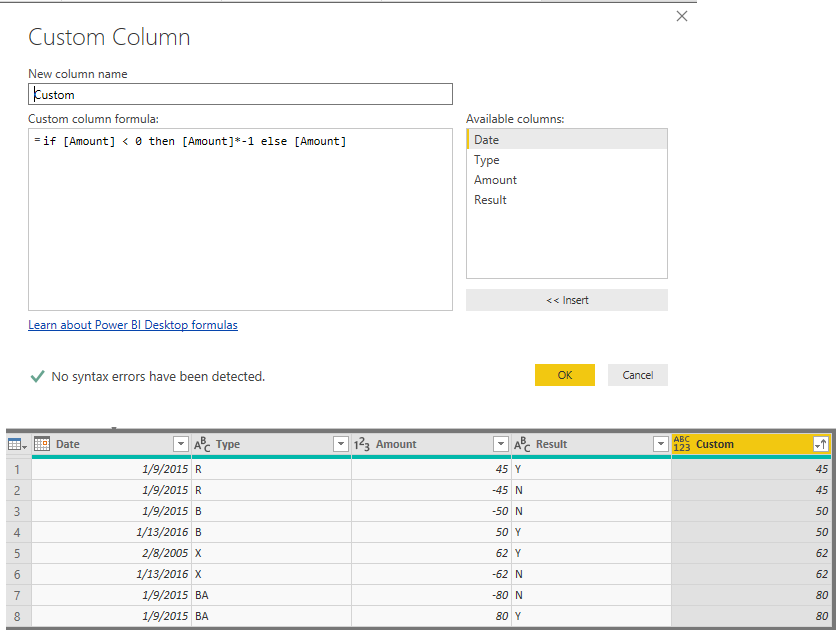
You may add a custom column in query editor and then sort by the custom column.
if [Amount] < 0 then [Amount]*-1 else [Amount]
Regards,
Cherie
You could try creating a new measure which gives Abs(SUM(Table[Amount])), and sort Ascending based on this measure.
Hi Akhil,
thank you so much for your suggestion.Is it possbile i can use the same formula in Power Query (Language M).?
Thanks
Hi @Anonymous
You may add a custom column in query editor and then sort by the custom column.
if [Amount] < 0 then [Amount]*-1 else [Amount]
Regards,
Cherie
Thank you so much Cherie.
The Power BI Data Visualization World Championships is back! Get ahead of the game and start preparing now!
Check out the November 2025 Power BI update to learn about new features.
| User | Count |
|---|---|
| 59 | |
| 46 | |
| 42 | |
| 23 | |
| 18 |
| User | Count |
|---|---|
| 193 | |
| 123 | |
| 99 | |
| 67 | |
| 49 |