Join us at FabCon Atlanta from March 16 - 20, 2026, for the ultimate Fabric, Power BI, AI and SQL community-led event. Save $200 with code FABCOMM.
Register now!The Power BI Data Visualization World Championships is back! It's time to submit your entry. Live now!
Hello,
Please see below requirements,
How can i sorting out rows ,so that matching positive and negative numbers are found and sorted next to each other?
BEFORE | |||
Date | Type | Amount | Result |
9/1/2015 | R | 45 | Y |
13/01/2016 | B | 50 | Y |
13/01/2016 | X | -62 | N |
9/1/2015 | R | -45 | N |
9/1/2015 | BA | 80 | Y |
9/1/2015 | B | -50 | N |
8/2/2005 | X | 62 | Y |
9/1/2015 | BA | -80 | N |
AFTER | |||
Date | Type | Amount | Result |
9/1/2015 | R | 45 | Y |
9/1/2015 | R | -45 | N |
13/01/2016 | B | 50 | Y |
9/1/2015 | B | -50 | N |
13/01/2016 | X | -62 | N |
8/2/2005 | X | 62 | Y |
9/1/2015 | BA | 80 | Y |
9/1/2015 | BA | -80 | N |
Solved! Go to Solution.
Hi @Anonymous
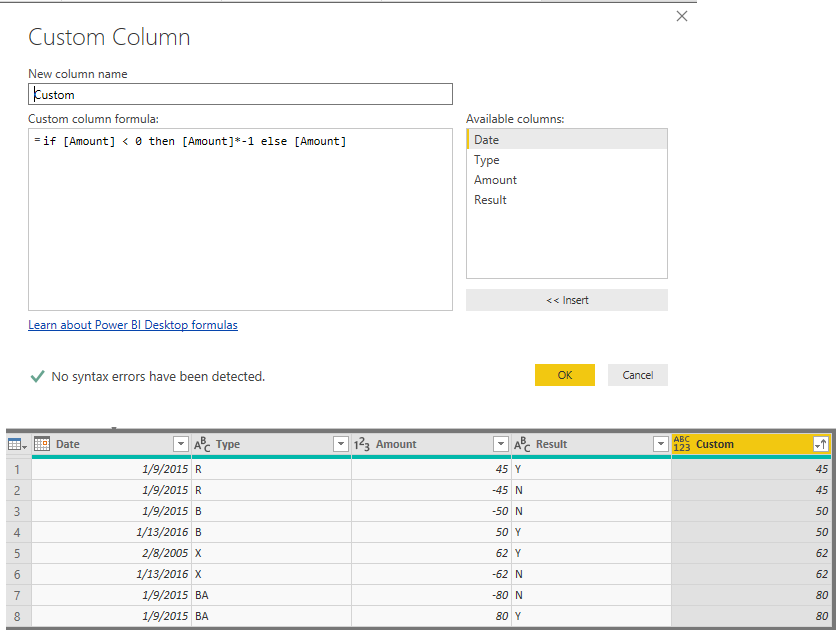
You may add a custom column in query editor and then sort by the custom column.
if [Amount] < 0 then [Amount]*-1 else [Amount]
Regards,
Cherie
You could try creating a new measure which gives Abs(SUM(Table[Amount])), and sort Ascending based on this measure.
Hi Akhil,
thank you so much for your suggestion.Is it possbile i can use the same formula in Power Query (Language M).?
Thanks
Hi @Anonymous
You may add a custom column in query editor and then sort by the custom column.
if [Amount] < 0 then [Amount]*-1 else [Amount]
Regards,
Cherie
Thank you so much Cherie.
The Power BI Data Visualization World Championships is back! It's time to submit your entry.
| User | Count |
|---|---|
| 47 | |
| 45 | |
| 33 | |
| 33 | |
| 30 |
| User | Count |
|---|---|
| 138 | |
| 118 | |
| 59 | |
| 58 | |
| 56 |