

cancel
Showing results for 
Search instead for 
Did you mean: 

July 7 - July 17 | Round 2 of the Power BI Dataviz World Championships. Don't miss your chance! Learn more

Reply
Anonymous
Not applicable

Sort Matrix Column using measure

Hello,


I have a matrix with a date column called "Valuation Date" we want to sort the visiual in descending order(newest date first) instead of the default ascending order. The common solution I know or have found is to use the sort by column under modeling, however this isn't an option for us. We have 1 dataset being shared across multiple reports as a PowerBI Dataset. This eliminates the ability to sort by column on the reports.


Is there a way to create a measure which would sort the matrix by the valuation date descending rather than ascending or is the only option to use new dataset?

3 REPLIES 3
Dubs
New Member

I was having the same problem. The workaround seemed to be moving the date from column to rows. Then sort ascending by clicking directly on the date field. Then once it's sorted by row, drag and drop the date dimension back into the columns. It somehow overrides any pre-existing sorting.


Hope that works!

v-juanli-msft
Community Support
Community Support

Hi @Anonymous 

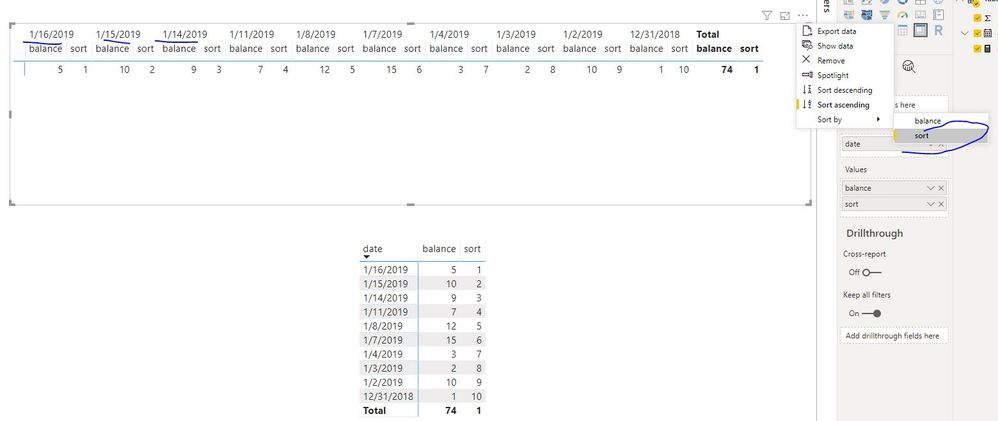
I make a test as below:

Connect to a Power BI Dataset with Power BI Desktop,

add "date" to "column" field, it is possible to sort "date" column by descending as below:

sort = RANKX(ALL('Table'),CALCULATE(MAX('Table'[date])),,DESC,Dense)
Capture5.JPG
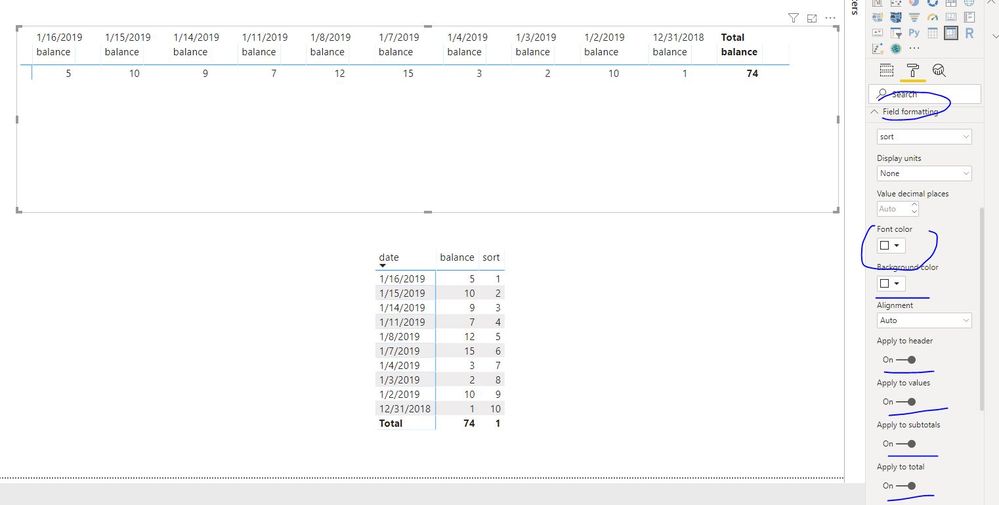
Then format the measure as below, so that it doesn't show in a matrix
Capture6.JPG
 
Best Regards
Maggie
Community Support Team _ Maggie Li
If this post helps, then please consider Accept it as the solution to help the other members find it more quickly.
Anonymous
Not applicable

Hello @v-juanli-msft ,


I tried adding this but it only works if there are no rows in the matrix. If you have any row it will no longer sort by the sort measure.

In the two below screen shots I applied the measure the one without a row works, but when you add any row it will no longer sort.


SortnotWorking.PNG

SortWorking.PNG


Helpful resources

Announcements
FabCon and SQLCon Barcelona 2026

FabCon & SQLCon – Barcelona 2026

Join us in Barcelona for FabCon and SQLCon, the Fabric, Power BI, SQL, and AI community event. Save €200 with code FABCMTY200.

60 days of Data Days Carousel

Data Days 2026

Join Fabric Data Days 2026: 60 days of free live/on-demand sessions, challenges, study groups, and certification opportunities.

Power BI DataViz World Championships carousel

Power BI DataViz World Championships - June 2026

A new Power BI DataViz World Championship is coming this June! Don't miss out on submitting your entry.

Top Kudoed Authors