

Join us at FabCon Atlanta from March 16 - 20, 2026, for the ultimate Fabric, Power BI, AI and SQL community-led event. Save $200 with code FABCOMM.
Register now!The Power BI Data Visualization World Championships is back! Get ahead of the game and start preparing now! Learn more
Hello,
I have a matrix with a date column called "Valuation Date" we want to sort the visiual in descending order(newest date first) instead of the default ascending order. The common solution I know or have found is to use the sort by column under modeling, however this isn't an option for us. We have 1 dataset being shared across multiple reports as a PowerBI Dataset. This eliminates the ability to sort by column on the reports.
Is there a way to create a measure which would sort the matrix by the valuation date descending rather than ascending or is the only option to use new dataset?
I was having the same problem. The workaround seemed to be moving the date from column to rows. Then sort ascending by clicking directly on the date field. Then once it's sorted by row, drag and drop the date dimension back into the columns. It somehow overrides any pre-existing sorting.
Hope that works!
Hi @Anonymous
I make a test as below:
Connect to a Power BI Dataset with Power BI Desktop,
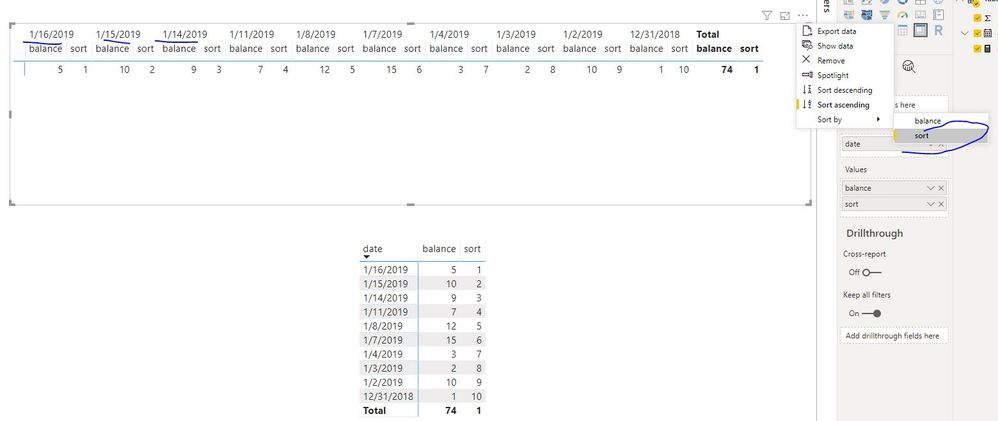
add "date" to "column" field, it is possible to sort "date" column by descending as below:
sort = RANKX(ALL('Table'),CALCULATE(MAX('Table'[date])),,DESC,Dense)
Hello @v-juanli-msft ,
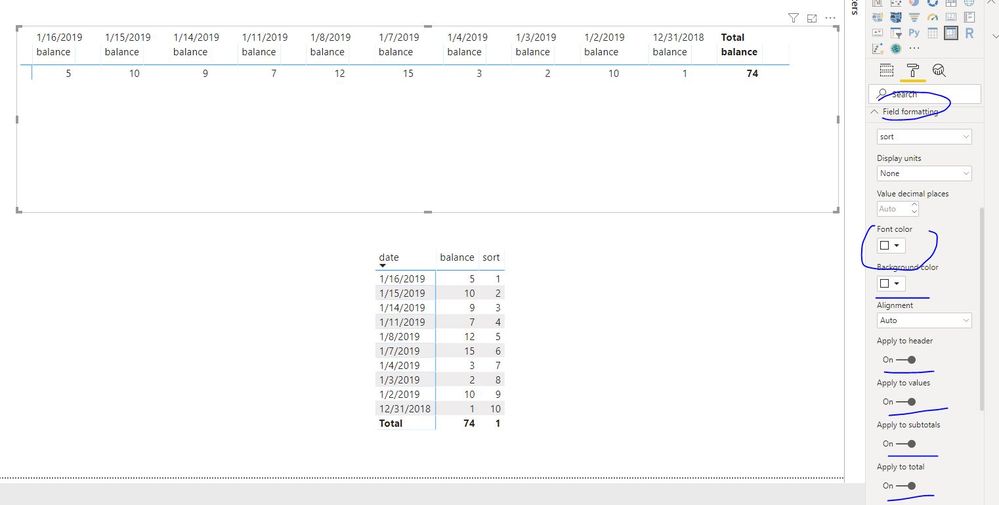
I tried adding this but it only works if there are no rows in the matrix. If you have any row it will no longer sort by the sort measure.
In the two below screen shots I applied the measure the one without a row works, but when you add any row it will no longer sort.
The Power BI Data Visualization World Championships is back! Get ahead of the game and start preparing now!
| User | Count |
|---|---|
| 61 | |
| 54 | |
| 41 | |
| 41 | |
| 22 |
| User | Count |
|---|---|
| 171 | |
| 136 | |
| 119 | |
| 80 | |
| 54 |