
Learn from the best! Meet the four finalists headed to the FINALS of the Power BI Dataviz World Championships! Register now
Hi Experts,
below is my date slicer, is there any way I can change the formate to July 3 2021 something like that?
Solved! Go to Solution.
Hi, @vjnvinod
Yes, the date format display in the slicer visual decided by the local client Regional settings and not all short date formats will work in date slicers.
Best Regards,
Community Support Team _ Eason
it only works in the column, but when I bring that column into the slicer, it automatically comes like below format
Hi, @vjnvinod
Please refer to this same thread.
https://community.powerbi.com/t5/Desktop/date-format-in-slicer/td-p/215627
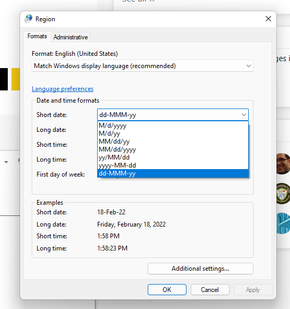
You can consider changing the format of the short date('Region' in 'Control Panel'):
Best Regards,
Community Support Team _ Eason
does it means that, when i share the report with other users, they also have to set the date format like in your thread?
Hi, @vjnvinod
Yes, the date format display in the slicer visual decided by the local client Regional settings and not all short date formats will work in date slicers.
Best Regards,
Community Support Team _ Eason
A new Power BI DataViz World Championship is coming this June! Don't miss out on submitting your entry.
Share feedback directly with Fabric product managers, participate in targeted research studies and influence the Fabric roadmap.
| User | Count |
|---|---|
| 45 | |
| 34 | |
| 27 | |
| 15 | |
| 15 |
| User | Count |
|---|---|
| 58 | |
| 55 | |
| 38 | |
| 21 | |
| 20 |