cancel
Showing results for 
Search instead for 
Did you mean: 

July 7 - July 17 | Round 2 of the Power BI Dataviz World Championships. Don't miss your chance! Learn more

Reply
mphippen
New Member

Slicer & Map functionality not working?

I have a page set up that includes a table, several slicers, and a map. Even within the same dataset, I am able to use the slicers to filter down the table, but this will not filter the map. However, the map is not disconnected from the visuals - if I click a bubble on the map, the table is filtered down to that bubble. 


Does anyone have any ideas why the slicers would be working for the table but not the map?


Any help is appreciated. 

2 REPLIES 2
v-yulgu-msft
Microsoft Employee
Microsoft Employee

Hi @mphippen,


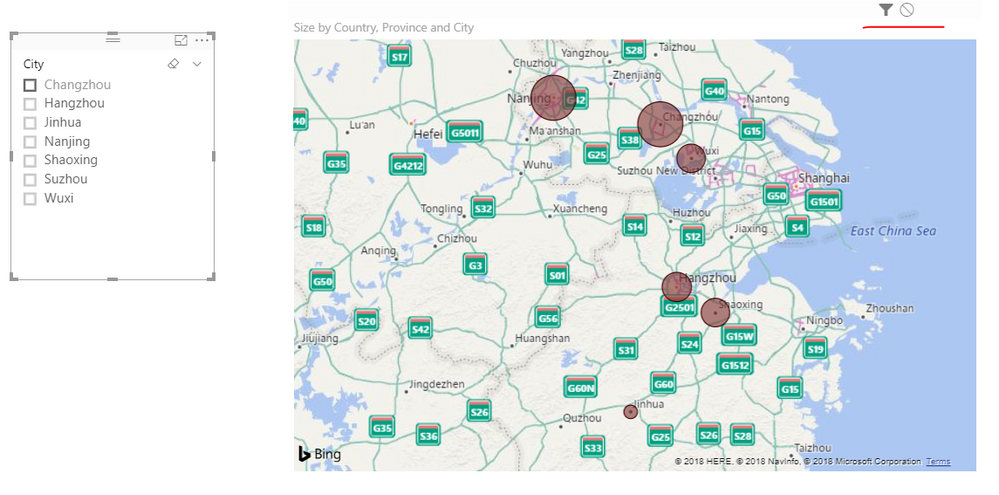
In my test, the slicer could filter map visual as expected.


Which map visual did you use? Please make sure the interaction between slicer and map visual is not disabled. Also, you can delete and re-add the map visual for a test.

1.PNG


Best regards,

Yuliana Gu

Community Support Team _ Yuliana Gu
If this post helps, then please consider Accept it as the solution to help the other members find it more quickly.

Hi there -


I used the built in map powered by bing. As far as I can tell, the interaction is not disabled. I have also tried deleting and re-creating to no avail. 

Helpful resources

Announcements
FabCon and SQLCon Barcelona 2026

FabCon & SQLCon – Barcelona 2026

Join us in Barcelona for FabCon and SQLCon, the Fabric, Power BI, SQL, and AI community event. Save €200 with code FABCMTY200.

60 days of Data Days Carousel

Data Days 2026

Join Data Days 2026: 60 days of free live/on-demand sessions, challenges, study groups, and certification opportunities.

Power BI DataViz World Championships carousel

Power BI DataViz World Championships - June 2026

A new Power BI DataViz World Championship is coming this June! Don't miss out on submitting your entry.

Top Solution Authors