cancel
Showing results for 
Search instead for 
Did you mean: 

Next up in the FabCon + SQLCon recap series: The roadmap for Microsoft SQL and Maximizing Developer experiences in Fabric. All sessions are available on-demand after the live show. Register now

Reply
atat0105
New Member

Slicer Set Value

Hello everyone,

I have a column which defines each row like below.


Column =IF(V_OKM_0[Periyod]<601;""Active"";""Passive"")


then, I show percentage of ""Passive"" on a card.


Measure = CALCULATE(SUM(V_OKM_0[Pasif])/(SUM(V_OKM_0[Aktif])+SUM(V_OKM_0[Pasif])))


But I would like to have a slicer includes values of 301, 601, 901 instead of a set value like 601 in example above. Is it possible to do?


If slicer is 601,

Periyod - Column

400 - Active

700 - Passive

1000 - Passive

So, result is %66


If slicer is 901,

Periyod - Column

400 - Active

700 - Passive

1000 - Passive

So, result is %33


Thanks a lot.

1 ACCEPTED SOLUTION
cosborn1231
Resolver I
Resolver I

Hi Atat0105,


You will need to use a disconnected table here.

Instead of "hardcoding" the IF in your column to <601 you can pass a slicer value through.


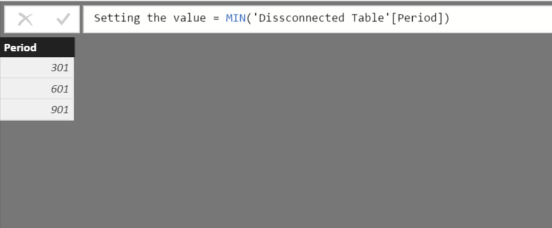
Click "Enter data" and build a table like below/ the measure shown in the formula bar.

 Disconnected Table.png


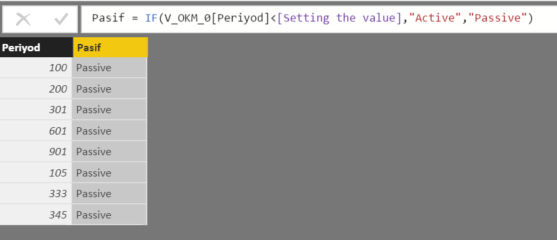
Once you do this pass that measure into the calculated column like so:Slicer selector.png


When you are using disconnected tables you allow yourself to pick what you want to slice on. Connect the tables within Power BI to filter correctly. Once you select a value from that disconnect table it will pass that value into the rest of your functions.


Hope this helps,

Christian


View solution in original post

2 REPLIES 2
cosborn1231
Resolver I
Resolver I

Hi Atat0105,


You will need to use a disconnected table here.

Instead of "hardcoding" the IF in your column to <601 you can pass a slicer value through.


Click "Enter data" and build a table like below/ the measure shown in the formula bar.

 Disconnected Table.png


Once you do this pass that measure into the calculated column like so:Slicer selector.png


When you are using disconnected tables you allow yourself to pick what you want to slice on. Connect the tables within Power BI to filter correctly. Once you select a value from that disconnect table it will pass that value into the rest of your functions.


Hope this helps,

Christian


Greg_Deckler
Community Champion
Community Champion

Can you provide some sample data so that we can mock this up?


Follow on LinkedIn
@ me in replies or I'll lose your thread!!!
Instead of a Kudo, please vote for this idea
Become an expert!: Enterprise DNA
External Tools: MSHGQM
YouTube Channel!: Microsoft Hates Greg
Latest book!:
DAX For Humans

DAX is easy, CALCULATE makes DAX hard...

Helpful resources

Announcements
New to Fabric survey Carousel

New to Fabric Survey

If you have recently started exploring Fabric, we'd love to hear how it's going. Your feedback can help with product improvements.

Power BI DataViz World Championships carousel

Power BI DataViz World Championships - June 2026

A new Power BI DataViz World Championship is coming this June! Don't miss out on submitting your entry.

Join our Fabric User Panel

Join our Fabric User Panel

Share feedback directly with Fabric product managers, participate in targeted research studies and influence the Fabric roadmap.

March Power BI Update Carousel

Power BI Community Update - March 2026

Check out the March 2026 Power BI update to learn about new features.