cancel
Showing results for 
Search instead for 
Did you mean: 

We've captured the moments from FabCon & SQLCon that everyone is talking about, and we are bringing them to the community, live and on-demand. Starts on April 14th. Register now

Reply
Ad550
Frequent Visitor

Simulate Text Parameter In PowerBI

While I am aware that PowerBI doesn't have the capability to use text parameters, is there anyway I can accomplish the following?:


I have a bar graph of companies ranked by revenue for a given date range.   There is also a text input that allows the user to input the name of one of the companies.   When the user does this and enters a name of a company, that company's entry in the bar graph should change colors in order to "highlight" where that company stands in comparison to the other companies in terms of revenue.


Is there any way to do this in PowerBI? 


Thanks  

1 ACCEPTED SOLUTION
MFelix
Super User
Super User

Hi @Ad550 ,


Believe that the company name you are refering is based on values that you have has part of your axis correct?


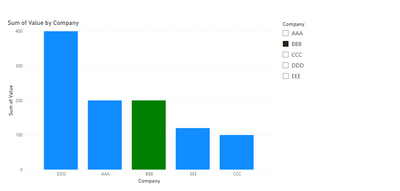
What you can do is to create a disconnected table with the name of the tables, then you can use a normal slicer~, or the find text custom visual . Then you can add a measure similar to this:


Selected company = IF(ISFILTERED(Companies[Company]) && SELECTEDVALUE('Table'[Company]) in DISTINCT(Companies[Company]), "Green")


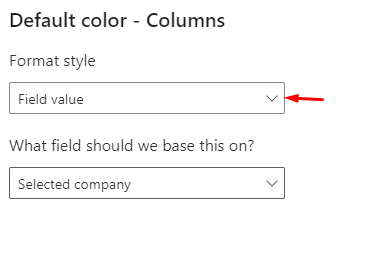
You can then change the Green by other colour or hex code ("#FFFFFF") then use this on the condittional formatting.

MFelix_3-1672945824891.png


MFelix_0-1672945597479.png


MFelix_1-1672945643830.png

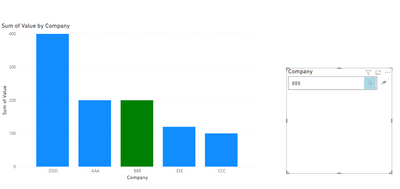
If you use the text finder you are abble to get more flexibility since it search part of text:


MFelix_2-1672945790367.png


Regards

Miguel Félix


Did I answer your question? Mark my post as a solution!

Proud to be a Super User!

Check out my blog: Power BI em Português


View solution in original post

1 REPLY 1
MFelix
Super User
Super User

Hi @Ad550 ,


Believe that the company name you are refering is based on values that you have has part of your axis correct?


What you can do is to create a disconnected table with the name of the tables, then you can use a normal slicer~, or the find text custom visual . Then you can add a measure similar to this:


Selected company = IF(ISFILTERED(Companies[Company]) && SELECTEDVALUE('Table'[Company]) in DISTINCT(Companies[Company]), "Green")


You can then change the Green by other colour or hex code ("#FFFFFF") then use this on the condittional formatting.

MFelix_3-1672945824891.png


MFelix_0-1672945597479.png


MFelix_1-1672945643830.png

If you use the text finder you are abble to get more flexibility since it search part of text:


MFelix_2-1672945790367.png


Regards

Miguel Félix


Did I answer your question? Mark my post as a solution!

Proud to be a Super User!

Check out my blog: Power BI em Português


Helpful resources

Announcements
New to Fabric survey Carousel

New to Fabric Survey

If you have recently started exploring Fabric, we'd love to hear how it's going. Your feedback can help with product improvements.

Power BI DataViz World Championships carousel

Power BI DataViz World Championships - June 2026

A new Power BI DataViz World Championship is coming this June! Don't miss out on submitting your entry.

Join our Fabric User Panel

Join our Fabric User Panel

Share feedback directly with Fabric product managers, participate in targeted research studies and influence the Fabric roadmap.