Join us at FabCon Atlanta from March 16 - 20, 2026, for the ultimate Fabric, Power BI, AI and SQL community-led event. Save $200 with code FABCOMM.
Register now!The Power BI Data Visualization World Championships is back! It's time to submit your entry. Live now!
Hi guys,
I have mail adresses from a specific table (dimension table)
i have sales total from fact table
and i'd like to rank the sales by mail address.
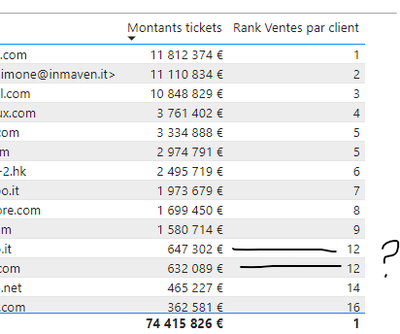
here is what i get with
Rank Ventes par client = rankx(ALLSELECTED('TIERS'),[Montants tickets])
Why is there Two 12 rank even if data is totaly different?
Kind regards
Hi @SebSchoon1,
Try:
Rank = RANKX(ALL('Tiers'),'Tiers'[Montants Tickets],,SKIP)
Works for you? Mark this post as a solution if it does!
Consider taking a look at my blog: Forecast Period - Previous Forecasts
Hi @Shaurya
The 'TIERS'[Montants Tickets] is in fact a measure which is not part of the Table 'TIERS'
RANKX(ALL('Tiers'),'Tiers'[Montants Tickets],,SKIP)
🙂
The Power BI Data Visualization World Championships is back! It's time to submit your entry.
Check out the January 2026 Power BI update to learn about new features.
| User | Count |
|---|---|
| 69 | |
| 45 | |
| 36 | |
| 28 | |
| 23 |
| User | Count |
|---|---|
| 135 | |
| 121 | |
| 58 | |
| 40 | |
| 32 |