Join us at FabCon Atlanta from March 16 - 20, 2026, for the ultimate Fabric, Power BI, AI and SQL community-led event. Save $200 with code FABCOMM.
Register now!The Power BI Data Visualization World Championships is back! Get ahead of the game and start preparing now! Learn more
Hello All,
I got a table called "OverallData" which contains entries for past 5 years. Table structure is as follows
| Name | Date | Status | Program Name |
| ABC | 1/10/2015 | Started | 2-7 Months |
| XYZ | 5/14/2016 | Closed | 4-12 Months programs |
| AAA | 2/22/2018 | In Progress | Employee Engagement |
| AN | 8/16/2019 | In Progress | Executive program |
| MYX | 9/20/2022 | Retirement program |
I want to create a table with Program Name as Row headers and Status as column headers. But I want to showcase rolling sum when I select the quarter year slicer i.e. On selecting Q4 2022 from slicer it should showcase me the values till start of Q4 2021 and so on. I do have a separate date table "dimDate" which contain dates from 2015 till date. Can someone help me with appropriate DAX for this scenario as the below one doesn't seem to giving me the correct output.
rollSum = CALCULATE(COUNT(OverallData[Status]),DATEADD(dimDate[Date],-4,QUARTER))
Solved! Go to Solution.
Hi @Anonymous ,
I do have a separate date table "dimDate" which contain dates from 2015 till date.
For your case, we just need a Quarter- Year Column and an additional column for sorting like:
Quarter Slicer =
var _q={"Q1","Q2","Q3","Q4"}
var _y=VALUES(OverallData[Date].[Year])
return SELECTCOLUMNS(CROSSJOIN(_q,_y) ,"Qua - Year", [Value] & " "&[Date].[Year], "Index", [Date].[Year]*100+RIGHT([Value],1))
Then please create a measure :
rollSum =
CALCULATE (
COUNT ( OverallData[Status] ),
FILTER (
'OverallData',
YEAR ( [Date] ) * 100
+ QUARTER ( [Date] )
>= SELECTEDVALUE ( 'Quarter Slicer'[Index] ) - 100
&& YEAR ( [Date] ) * 100
+ QUARTER ( [Date] )
<= SELECTEDVALUE ( 'Quarter Slicer'[Index] )
)
)
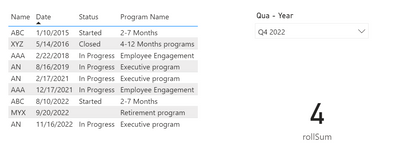
Output:
Best Regards,
Community Support Team _Yinliw
If this post helps, then please consider Accept it as the solution to help the other members find it more quickly.
Hi @Anonymous ,
I do have a separate date table "dimDate" which contain dates from 2015 till date.
For your case, we just need a Quarter- Year Column and an additional column for sorting like:
Quarter Slicer =
var _q={"Q1","Q2","Q3","Q4"}
var _y=VALUES(OverallData[Date].[Year])
return SELECTCOLUMNS(CROSSJOIN(_q,_y) ,"Qua - Year", [Value] & " "&[Date].[Year], "Index", [Date].[Year]*100+RIGHT([Value],1))
Then please create a measure :
rollSum =
CALCULATE (
COUNT ( OverallData[Status] ),
FILTER (
'OverallData',
YEAR ( [Date] ) * 100
+ QUARTER ( [Date] )
>= SELECTEDVALUE ( 'Quarter Slicer'[Index] ) - 100
&& YEAR ( [Date] ) * 100
+ QUARTER ( [Date] )
<= SELECTEDVALUE ( 'Quarter Slicer'[Index] )
)
)
Output:
Best Regards,
Community Support Team _Yinliw
If this post helps, then please consider Accept it as the solution to help the other members find it more quickly.
Check out the November 2025 Power BI update to learn about new features.
Advance your Data & AI career with 50 days of live learning, contests, hands-on challenges, study groups & certifications and more!