Join the FabCon + SQLCon recap series. Up next: Power BI, Real-Time Intelligence, IQ and AI, and Data Factory take center stage. All sessions are available on-demand after the live show. Register now
Hi
If I have a dataset like the following:
Status Qty
P 10
P 20
M 50
M 30
C 25
C 20
D 15
What would be the formula for a measure that calculates the total Qty excluding those with the status of C or D.
I'd like to be able to apply the same sort of concept but with many various status' and only have a few be excluded.
Thanks
Solved! Go to Solution.
Assuming your table is called "Table":
Measure = CALCULATE(SUM('Table'[QTY]);'Table'[Status]<>"C";'Table'[Status]<>"D")
CALCULATE() allows multiple filters
Hi Spencer,
SanderBeukers’s reply seems well, you could also use below measures:
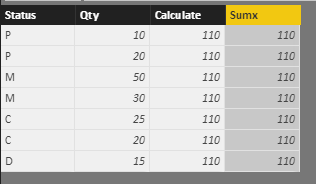
Total Qty without CD = SUMX(FILTER(ALL(Test),AND([Status]<>"C",[Status]<>"D")),[Qty])
Sum Except CD = CALCULATE(SUM([Qty]),FILTER(ALL(Test),AND([Status]<>"C",[Status]<>"D")) )
Result: (It have added two columns to display the measures)
Notice: my test table is ‘test’, you can modify it to your table name.
Regards,
Xiaoxin Sheng
I might try that method in the future @Anonymous. Thankyou very much for the reply.
Something like this should work:
Sum = CALCULATE(SUM(Qty);FILTER(Status=C))
Thanks for the reply @Douwe but I don't think that will filter out the D's as well.
Extend it like this: Sum = CALCULATE(SUM(Qty);FILTER(Status<>"C" || Status<>"D"))
Assuming your table is called "Table":
Measure = CALCULATE(SUM('Table'[QTY]);'Table'[Status]<>"C";'Table'[Status]<>"D")
CALCULATE() allows multiple filters
Check out the April 2026 Power BI update to learn about new features.
If you have recently started exploring Fabric, we'd love to hear how it's going. Your feedback can help with product improvements.
A new Power BI DataViz World Championship is coming this June! Don't miss out on submitting your entry.
| User | Count |
|---|---|
| 42 | |
| 37 | |
| 35 | |
| 22 | |
| 15 |
| User | Count |
|---|---|
| 67 | |
| 58 | |
| 29 | |
| 27 | |
| 25 |