cancel
Showing results for 
Search instead for 
Did you mean: 

Get Fabric certified for FREE! Don't miss your chance! Learn more

Reply
Cacaff
Microsoft Employee
Microsoft Employee

Showing percentage values in visuals

Hello,


I have a simple excel spreadsheet that I've imported in BI.  I have a column of percentages in my excel sheet (no calculations) that are showing up in BI as either negative numbers or in decimals.  I cannot seem to it get it to show the percentage sign.  For example 40% is showing up as .40.


Any help would be appreciated.


thanks!

2 ACCEPTED SOLUTIONS
dramus
Continued Contributor

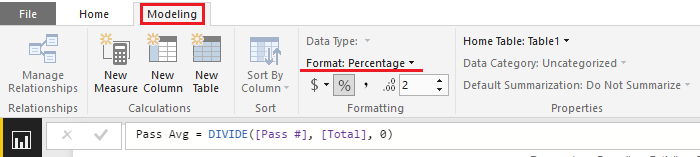
Click on the field name in the Fields list on the right of the PBI Desktop screen, then select the Modelling ribbon at the top.


You should now see under the Formatting section a percent sign. Select that to get PBI to show a percent sign after your data value. If it's disabled, make sure that the data type is set to a number.

View solution in original post

Sean
Community Champion
Community Champion

Select the Field and then... 

Format.png

View solution in original post

4 REPLIES 4
dramus
Continued Contributor

Click on the field name in the Fields list on the right of the PBI Desktop screen, then select the Modelling ribbon at the top.


You should now see under the Formatting section a percent sign. Select that to get PBI to show a percent sign after your data value. If it's disabled, make sure that the data type is set to a number.

Cacaff
Microsoft Employee
Microsoft Employee

Thanks very much for both responses!!!

Sean
Community Champion
Community Champion

Select the Field and then... 

Format.png

ndna74
Frequent Visitor

Hi


Do you know why this functionality in the "modelling" tab and not in edit queries ?


Thanks

Nick

Helpful resources

Announcements
Sticker Challenge 2026 Carousel

Join our Community Sticker Challenge 2026

If you love stickers, then you will definitely want to check out our Community Sticker Challenge!

January Power BI Update Carousel

Power BI Monthly Update - January 2026

Check out the January 2026 Power BI update to learn about new features.

FabCon Atlanta 2026 carousel

FabCon Atlanta 2026

Join us at FabCon Atlanta, March 16-20, for the ultimate Fabric, Power BI, AI and SQL community-led event. Save $200 with code FABCOMM.