Join us at FabCon Atlanta from March 16 - 20, 2026, for the ultimate Fabric, Power BI, AI and SQL community-led event. Save $200 with code FABCOMM.
Register now!The Power BI Data Visualization World Championships is back! Get ahead of the game and start preparing now! Learn more
Hi,
I have a data set where I have numerator and denominators in different columns (and rows) for different projects.
I use a measure to calculate the resulting percentage of these figures. ((SUM(Table[Numerator])/SUM(Table[Denominator])))
Currently when I view these results they are just the sum of all projects numerator divided by the sum of all projects denominator. What I want to get are the max, min and average of these - for each project as a KPI/single figure. How can I do this? See example data set in excel.
Thanks!
Results I want in the measure is highligted in yellow:
Solved! Go to Solution.
HI @troyel,
You can try to use below formulas if it suitable for your requirement.
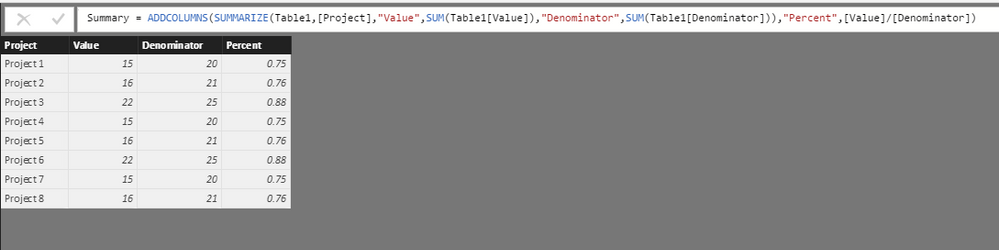
Summary table and calculate the percent:
Summary =
ADDCOLUMNS (
SUMMARIZE (
Table1,
[Project],
"Value", SUM ( Table1[Value] ),
"Denominator", SUM ( Table1[Denominator] )
),
"Percent", [Value] / [Denominator]
)
Measures:
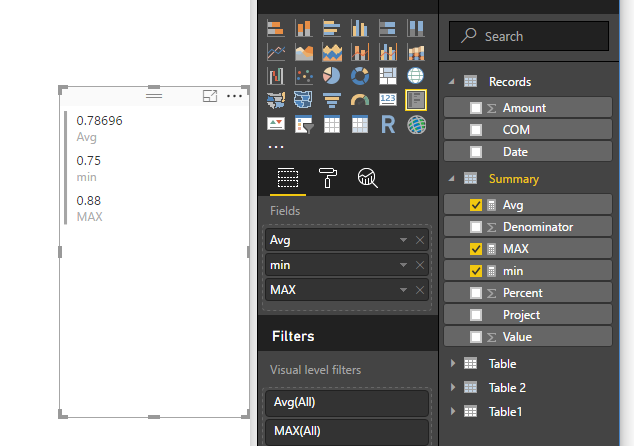
AVG=AVERAGE(Summary[Percent]) MAX=MAX(Summary[Percent]) MIN=MIN(Summary[Percent])
Regards,
Xiaoxin Sheng
HI @troyel,
You can try to use below formulas if it suitable for your requirement.
Summary table and calculate the percent:
Summary =
ADDCOLUMNS (
SUMMARIZE (
Table1,
[Project],
"Value", SUM ( Table1[Value] ),
"Denominator", SUM ( Table1[Denominator] )
),
"Percent", [Value] / [Denominator]
)
Measures:
AVG=AVERAGE(Summary[Percent]) MAX=MAX(Summary[Percent]) MIN=MIN(Summary[Percent])
Regards,
Xiaoxin Sheng
Ah - I had not considered creating a separate table to do this. Smart - thank you!
Check out the November 2025 Power BI update to learn about new features.
Advance your Data & AI career with 50 days of live learning, contests, hands-on challenges, study groups & certifications and more!