Get certified for free when you join Fabric Data Days 2026 and dive into Fabric, Power BI, SQL, AI, and other essential data skills.
Join nowData Days is here! Join us now for 60+ days of learning, challenges, and connection. Learn more
I am trying to create a custom column that spits out the latest sales line amount for each product by region. I tried using this code but it returned all blanks.
| Product Name | LINEAMOUNT | CREATEDDATETIME | Region |
| A | 500 | 1/3/2020 | South |
| A | 800 | 2/27/2020 | South |
| A | 600 | 1/18/2020 | East |
| A | 650 | 3/4/2020 | East |
| B | 300 | 7/8/2019 | West |
| B | 400 | 4/3/2020 | West |
| B | 800 | 5/6/2019 | East |
| B | 900 | 12/22/2019 | East |
| C | 200 | 9/21/2019 | North |
| C | 700 | 2/10/2020 | North |
| C | 500 | 8/12/2019 | South |
| C | 450 | 11/2/2019 | South |
Desired Result:
| Product Name | Region | Last Sale |
| A | South | 800 |
| A | East | 650 |
| B | West | 400 |
| B | East | 900 |
| C | North | 700 |
| C | South | 450 |
Realistically I have way more than 3 products, this is just a simple layout of how my data is set up. Any help would be greatly appreciated
Solved! Go to Solution.
@jakeudy here you go
Recent Sales by Product and Region =
VAR __currentDate =
CALCULATE (
MAX ( ProductRegion[CREATEDDATETIME] ),
ALLEXCEPT( 'Product','Product'[Product Name] ) ,
ALLEXCEPT( Region, Region[Region] )
)
RETURN CALCULATE ( SUM ( ProductRegion[LINEAMOUNT] ), ProductRegion[CREATEDDATETIME] = __currentDate )
and here is the output
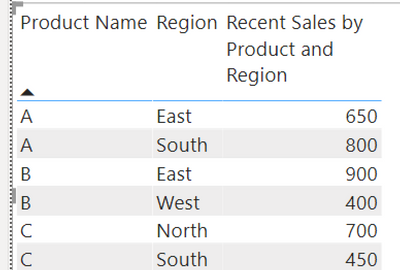
Would appreciate Kudos 🙂 if my solution helped.
Subscribe to the @PowerBIHowTo YT channel for an upcoming video on List and Record functions in Power Query!!
Learn Power BI and Fabric - subscribe to our YT channel - Click here: @PowerBIHowTo
If my solution proved useful, I'd be delighted to receive Kudos. When you put effort into asking a question, it's equally thoughtful to acknowledge and give Kudos to the individual who helped you solve the problem. It's a small gesture that shows appreciation and encouragement! ❤
Did I answer your question? Mark my post as a solution. Proud to be a Super User! Appreciate your Kudos 🙂
Feel free to email me with any of your BI needs.

@jakeudy here you go
Recent Sales by Product and Region =
VAR __currentDate =
CALCULATE (
MAX ( ProductRegion[CREATEDDATETIME] ),
ALLEXCEPT( 'Product','Product'[Product Name] ) ,
ALLEXCEPT( Region, Region[Region] )
)
RETURN CALCULATE ( SUM ( ProductRegion[LINEAMOUNT] ), ProductRegion[CREATEDDATETIME] = __currentDate )
and here is the output
Would appreciate Kudos 🙂 if my solution helped.
Subscribe to the @PowerBIHowTo YT channel for an upcoming video on List and Record functions in Power Query!!
Learn Power BI and Fabric - subscribe to our YT channel - Click here: @PowerBIHowTo
If my solution proved useful, I'd be delighted to receive Kudos. When you put effort into asking a question, it's equally thoughtful to acknowledge and give Kudos to the individual who helped you solve the problem. It's a small gesture that shows appreciation and encouragement! ❤
Did I answer your question? Mark my post as a solution. Proud to be a Super User! Appreciate your Kudos 🙂
Feel free to email me with any of your BI needs.
This worked great, thank you!
Hi @jakeudy,
assuming you are trying to create a measure you can use in a table visual, you can try this:
Last Sale =
VAR _product =
CALCULATE ( SELECTEDVALUE ( sales[Product Name] ) )
VAR _region =
CALCULATE ( SELECTEDVALUE ( sales[Region] ) )
VAR _maxDate =
CALCULATE (
MAX ( sales[CREATEDDATETIME] );
FILTER (
ALL ( sales );
sales[Product Name] = _product
&& sales[Region] = _region
)
)
RETURN
CALCULATE (
SUM ( sales[LINEAMOUNT] );
FILTER (
ALL ( sales );
sales[CREATEDDATETIME] = _maxDate
&& sales[Product Name] = _product
&& sales[Region] = _region
)
)
Cheers,
Sturla
https://community.powerbi.com/t5/Quick-Measures-Gallery/Lookup-Min-Max/td-p/985814
Don't miss out on Data Days, June 15 through August 7. Learn Fabric, Power BI, SQL, AI and more.
Check out the May 2026 Power BI update to learn about new features.
| User | Count |
|---|---|
| 23 | |
| 23 | |
| 21 | |
| 20 | |
| 15 |
| User | Count |
|---|---|
| 58 | |
| 54 | |
| 42 | |
| 30 | |
| 24 |